
 How much paper does your office use in a day? For the average person in the United States, it stacks up to about 700 pounds a year or 10,000 copies per worker a year. Multiply that by the employees in your office and check out the overflowing recycling bin.
Imagine going paperless. Not ready for that? Then try “Papercut," a print management tool.
Technology is making it easier for organizations to give their users tools to make smarter printing decisions.
A Government Mandate
More government agencies and courts are moving to e-filing in an effort to use as little paper as possible. In Minnesota, “going paperless” has become a statewide effort and marks the largest transition in the history of the state’s court system. Laptops and other devices are expected to replace papers and files in all 87 district courts.
While many organizations make the move to reduce costs and waste, the courts are focused on improving accuracy of documents and the protection of private information.
The paperless movement surfaced over a decade ago. The data I’ve seen among our clients at Marco and across the industry shows that printing and copying remains relatively flat per device, but the number of devices is on the rise in America.
For most organizations, paperless is not feasible. It’s rare that all paper gets eliminated in an organization. But organizations can print smarter and even significantly reduce their printing with the help of tools and technology.
What does it take to go paperless, or at least make a papercut?
1. Print Management Tool: PaperCut
It starts with print management software such as PaperCut, which helps organizations track printing, reduce waste and save money by printing “smarter.”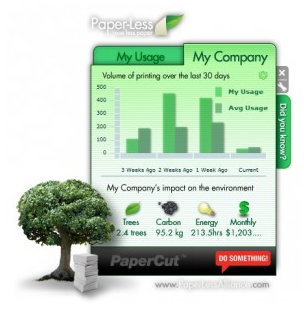
Among the features of this type of software are tools to help users print more responsibly. Organizations can automatically set printers to default to black and white or two-sided or give users the information to make better decisions themselves. In some cases, printing prompts can show users the cost of printing the document in color vs. black and white or two-sided vs. single-sided.
In other cases, the software goes even further to communicate the environmental impact of the print job. PaperCut shows the impact the print job has on trees, carbon output and energy use. There’s even a desktop widget that shows users their usage, the company’s usage, how that compares to the average and the environmental impacts of it. Widgets also are available for smartphones and other devices.
These tools are designed to build in a sense of accountability – and a responsibility to think before you print. Administrators also can see who printed what from what device – instantly.
2. Document Management Tool: M-Files
It’s not enough to cut down on printing or move to doing business electronically. Organizations need to have a system in place to effectively store the files so they are properly archived, protected and easily found.
Document management software such as M-Files is quickly replacing file cabinets and desktop file managers. M-Files organizes information in a centralized place based on what it is with the goal of not having users remember where it is saved or which version is the right one. With M-Files, there is only one version of each document. Old versions remain available and various users can edit simultaneously.
Paperless may be more of a myth than reality at this time. We’ll likely always want to print some items. But with increased mobility and collaboration, the concept begins to make more and more sense.