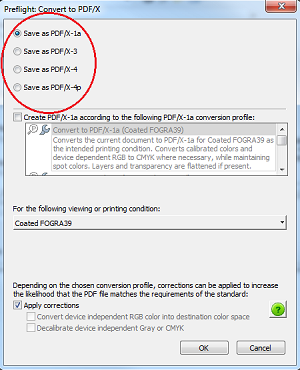
Printing quality can make or break your document. If what is on your screen isn’t what you are seeing on your printed document, there may be an issue with the way your file was saved. (Believe it or not, the printer isn’t always to blame!) In order to properly produce print ready files, there are a few things you should know. The first is what PDF standard you need and the second is your preset.
Properly Saving and Printing PDFs
If you are printing general documents for personal or in-office use, a classic PDF will be sufficient. If you know you need to print your PDF with superior color and precision, exact fonts and formatting and more, you will want to save your PDF as a PDF/X Standard. This will preserve the necessary elements from your native file to produce a high quality final product. So, for example, if you are printing high quality graphics and marketing materials, or if you are sharing design documents online for client review, you will want to save your file as a PDF/X.
After you choose to save as a PDF/X standard, there will be default presets you can select. The following nine defaults are used in different circumstances, require specific settings in their native application and are compatible with different versions of Acrobat®.
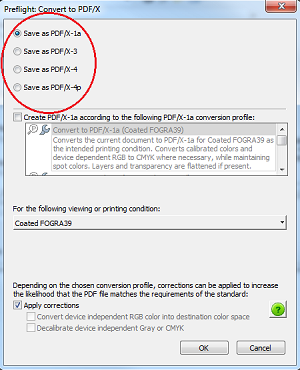 PDF/X-1a
Files ready for print production.
- Presets & Compatibility - If you have Acrobat 4/PDF 1.3 your preset will be PDF/X-1a: 2001. If you have Acrobat 5/PDF 1.4 your preset will be PDF/X-1a: 2003.
- Settings – In your native application you should convert RGB color to CMYK; spot colors are okay.
PDF/X-3
Print ready but also allows color managed workflows
- Presets & Compatibility – If you have Acrobat 4/PDF 1.3 your preset will be PDF/X-3: 2002. If you have Acrobat 5/PDF 1.4 your preset will be PDF/X-3: 2003
- Settings – In your native application you can leave RGB and CIELab colors, but transparency should be flattened.
PDF/X-4: 2008
Print ready but also allows for transparency and layers
- Compatibility – Acrobat 7/PDF 1.6
- Settings – Color profiles, transparency and layers are allowed so you do not need to manipulate this in your native application before saving.
PDF/X-4p: 2008
Use when required ICC profile is unambiguously identified and supplied separately
- Compatibility – Acrobat 7/PDF 1.6
- Settings – Color profiles, transparency and layers are allowed so you do not need to manipulate this in your native application before saving.
Press Quality
Use when PDF/X presets aren’t available
- Compatibility – Acrobat 5/PDF 1.4
- Settings – In your native application you should convert RGB color to CMYK, but spot colors are okay, and it doesn’t need to be flattened.
High Quality Print
For quality printing on desktop printers and proofers
- Compatibility – Acrobat 5/PDF 1.4
- Settings - In your native application you can leave RGB and CIELab colors and transparency as is.
Smallest File Size
For on-screen display, email and online
- Compatibility – Acrobat 5/PDF 1.4
- Settings – In your native application you should convert CMYK color to sRGB, but can keep the transparency.
With these options you will be able to produce a print ready file that will produce your desired results. Finally, we want to mention that printing equipment can also be programmed to handle certain presets better than others. Generally, your print provider will manage these settings on your printing device based on your printing needs, and then also set your printing defaults to these presets so you get the best print results.
Set up a free print technology assessment to determine which printing equipment and defaulted presets may simplify your printing processes and produce higher quality results (in addition to providing general cost-saving and improved workflow opportunities).










