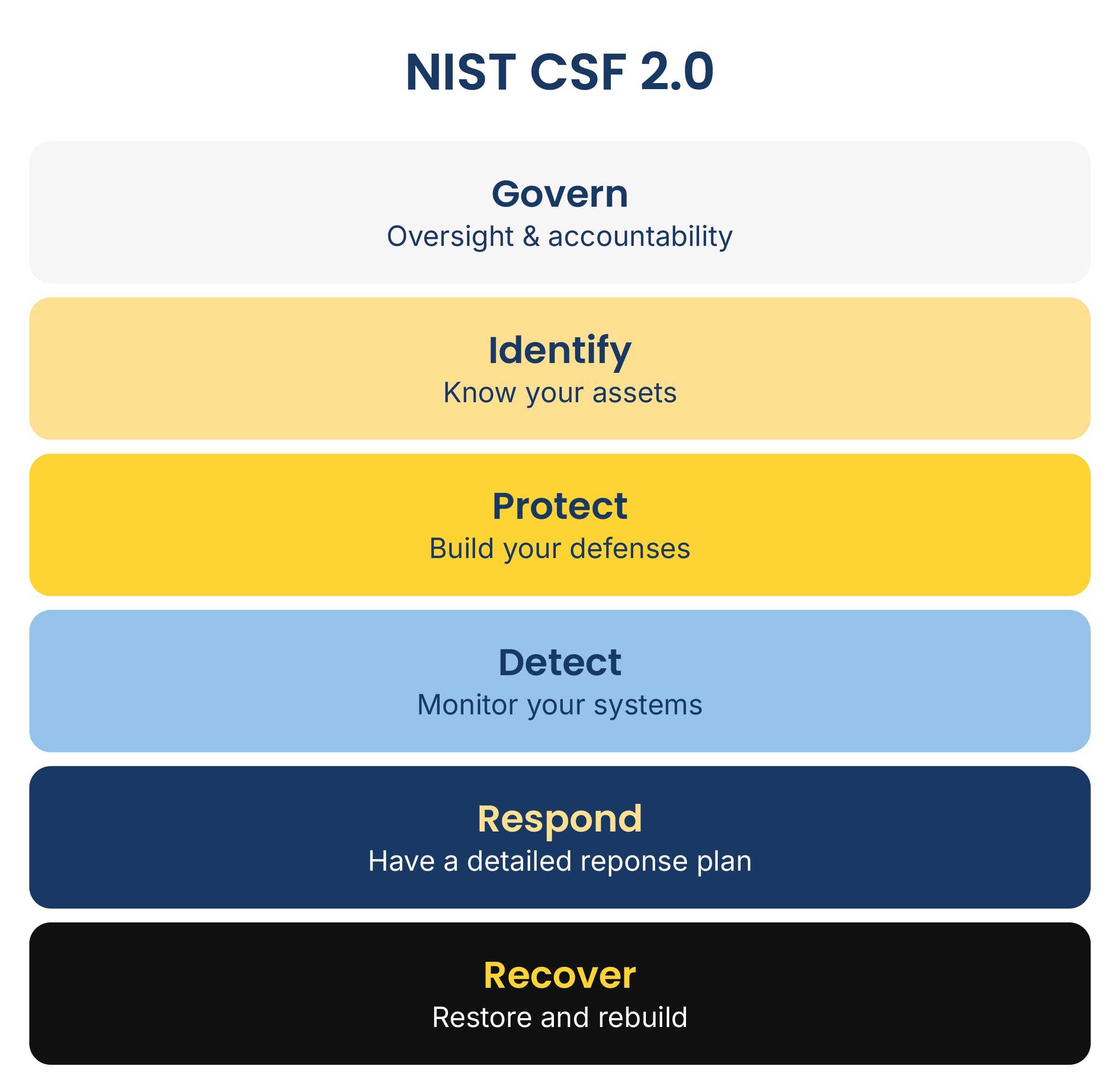
I've helped businesses through ransomware attacks, and the first hour matters more than almost anything else. What you do in that hour decides how fast you recover, how much you lose, and whether you make the problem worse. This ransomware response plan walks through the exact steps I give clients, in order, so your team has a ransomware response checklist ready before an attack ever happens.
Why ransomware needs to be taken seriously
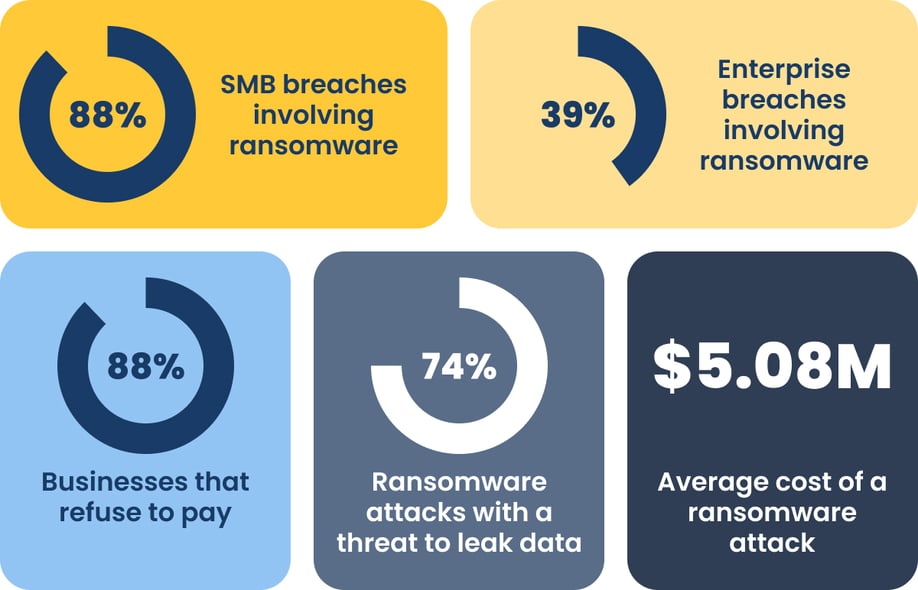
The numbers don’t lie.
As companies are starting to get smarter about not paying the ransom and evolving their backup strategies, attackers are also finding ways to heighten their threats.
That’s why it’s important to make sure that your team knows what to do if and when your business is attacked.
A recommended ransomware recovery plan
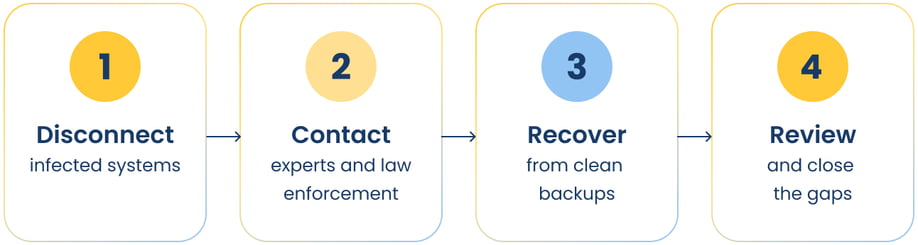
This ransomware recovery plan is in line with recommendations from CISA — the Cybersecurity and Infrastructure Security Agency.
Follow these steps in order.
Disconnect infected systems immediately
The moment you see ransomware, pull the plug. Disconnect the infected device from the network, unplug the Ethernet cable, or turn off Wi-Fi. Do this before you do anything else.
Ransomware spreads fast across a network. Every minute a device stays connected gives it more time to reach other systems, shared drives, and backups. Attackers also monitor your network after the initial breach, so coordinate quietly and avoid announcing your response over channels they might be watching, like company email or chat tools tied to the infected systems.
- Disconnect the infected device first, not the whole network, if you can isolate it quickly
- If multiple systems show signs of infection, take the affected segment offline at the switch level
- Leave the device powered on — powering it down can destroy evidence you need later
- If possible, capture a system image and the contents of volatile memory from affected devices before anyone starts cleanup
Contact experts, law enforcement, and stakeholders
Bring in help immediately, not after you've tried everything else. Your incident response team can assess the scope of the attack, contain it properly, and start recovery the right way.
Contact law enforcement too. The FBI, CISA, and groups like the Multi-State Information Sharing and Analysis Center (MS-ISAC) track ransomware variants and can sometimes tell you whether security researchers have already broken that variant's encryption — which can mean you don't need to rebuild or pay at all.
Then call your cyber insurance carrier. Many policies set a strict notification window, and waiting too long can void your coverage entirely.
Have your internal and external messaging drafted before you need it, not while you're improvising mid-attack. Tell employees what's happening and what they should (and shouldn't) do, and issue updates as the situation develops.
If the attack affects customers or partners, you’ll also need to inform them, too, even though it's uncomfortable. Ransomware groups increasingly threaten to leak stolen data specifically to pressure victims into paying, so staying quiet doesn't protect you the way it might feel like it does.
Eradicate the threat before you rebuild
Once your incident response team has contained the attack and gathered what evidence they need, the malware itself still has to come out. Skipping this step is how "recovered" systems get reinfected within days.
- Identify and close the specific vulnerability or entry point the attacker used
- Wipe and rebuild infected systems from clean images rather than trying to disinfect them in place
- Reset every password and credential tied to affected systems, not just the ones you know were compromised
- Get sign-off from your incident response team confirming the environment is clean before you reconnect anything
Recover from clean, verified backups
Once your systems are rebuilt and confirmed clean, you can start recovery. This only works if your backups are actually clean.
- Confirm your backups predate the infection
- Test restored systems in an isolated environment before reconnecting them to your network
- Bring systems back online in stages, starting with the ones your business needs most urgently
Skipping any of these steps is how businesses get reinfected right after they think they've recovered.
Review what happened and close the gaps in your defenses
After you're back up and running, sit down with your incident response team and figure out exactly how the attack got in. Most ransomware still starts with a phishing email or an unpatched system, so pinpointing that specific opening matters more than any general security upgrade.
Backups, patching, and other cybersecurity best practices stop most attacks before they start, and security awareness training closes the gap that generic annual training usually leaves open.
Two mistakes that make a ransomware attack worse
Beyond the steps above, avoid these two reactions. Both feel instinctive in the moment, and both usually make recovery harder.
Trying to fix it yourself
I understand the instinct. Something's broken, and you want to jump in and repair it. With ransomware, that instinct causes real damage.
Attackers often leave traces in your system logs, memory, and network activity that investigators need to trace exactly what happened and how. If you start deleting files, reinstalling software, or running your own cleanup tools, you destroy that evidence before anyone gets a chance to look at it.
Leave the infected systems as they are and call your incident response team instead. They know how to investigate a ransomware incident without wiping out the evidence your insurance carrier, legal counsel, or law enforcement may need.
Paying the ransom
Paying feels like the fastest way out. It usually isn't.
Paying also doesn't guarantee the attacker won't come back. Once they know you'll pay, you become a repeat target. Worse, some ransomware operators have suspected ties to sanctioned or state-linked groups, and paying can carry sanctions risk under U.S. Treasury (OFAC) guidance — even if you never learn who was actually behind the attack.
Organizations with clean, tested, immutable backups recover without paying at all, and building that resilience starts with having a documented incident response plan in place.
Frequently asked questions
Here are the questions I hear most often from business owners dealing with ransomware.
What should a ransomware response checklist include?
A strong ransomware response checklist covers isolating infected systems, preserving evidence, contacting your incident response team and law enforcement, avoiding ransom payment, and recovering from verified backups. Document each step and assign ownership before an attack happens, not during one.
What's the first thing I should do if I discover ransomware?
Disconnect the infected device from your network immediately, but leave it powered on. Then call your incident response team.
Should I pay the ransom?
No. Paying doesn't guarantee that you’ll get your data back, and it incentivizes additional attacks.
Can I try to remove the ransomware myself before calling for help?
No. Attempting to fix it yourself destroys evidence your incident response team and law enforcement need to investigate the attack properly.
How do I know if my backups are safe to restore from?
Confirm they predate the infection, and test them in an isolated environment before reconnecting any restored system to your network.
Adding incident response capabilities without adding staff
In my experience, incident response is usually the missing piece of a company's cybersecurity, not because businesses don't take it seriously, but because the capabilities it requires (forensic investigation, 24/7 monitoring, coordinated containment) are genuinely hard to build and staff in-house.
Most internal IT teams are stretched thin enough handling day-to-day operations, let alone standing up a dedicated response function for an event they hope never happens.
If you don’t need fully managed IT but are hoping to fill those gaps, we can help. One of our newer services is designed to provide those incident response capabilities so businesses can contain and respond to active threats quickly.