Too many small business owners still think they’re “too small” to be targeted by a cybercriminal. Unfortunately, 43% of cyberattacks each year are aimed at small businesses.
When you think like a criminal, it makes sense. Attackers have learned that smaller organizations often run lean security programs, making them faster and easier to compromise than larger enterprises with dedicated security teams. That’s the bad news. The good news is that most successful attacks exploit common, but preventable gaps. If you know where to focus, a reasonable investment is enough to keep your business safe.
Why Small Business Security Deserves Serious Attention
There's a persistent myth that cybercriminals are primarily chasing large enterprises. The reality is more unsettling. Smaller organizations tend to have fewer controls, fewer dedicated IT staff, and tighter budgets — which makes them attractive targets precisely because the effort-to-reward ratio is favorable for attackers.
Ransomware is a clear example. Rather than mounting a complex attack on a single large organization, attackers now routinely run high-volume campaigns against hundreds of smaller businesses simultaneously, collecting modest ransoms from each. The math works in their favor.
AI is accelerating this further. Phishing emails and malware have become more convincing and harder to detect as attackers use AI tools to personalize attacks at scale, adapt tactics in near real time, and bypass security systems that were designed for older threat patterns.
Cybersecurity Tips for Small Businesses

These recommendations don't require an enterprise-level budget. They do require consistency.
1. Build a Multi-Layered Defense
A single line of defense — a firewall, an antivirus tool, a strong password — isn't enough anymore. Attackers expect and plan around basic controls. A layered security approach stacks multiple protections so that if one layer is bypassed, others remain in place.
In practice, this means combining tools like endpoint detection and response (EDR) software, multi-factor authentication (MFA), network segmentation, automated monitoring and alerting, and data backup and recovery capabilities. No single layer is bulletproof. The combination is what creates meaningful friction for attackers.
2. Enforce Strong Password Policies and MFA
Weak or reused passwords remain one of the most common entry points into small business networks. Password policies should require length and complexity, prohibit reuse across accounts, and prompt regular updates. A password manager makes this realistic for employees who manage multiple logins.
Multi-factor authentication (MFA) is a non-negotiable layer on top of that. Even if a password is stolen, MFA blocks access without the second verification step. Enable it on every system that supports it — email, VPN, cloud applications, and any admin accounts, especially.
3. Keep Systems Patched and Up to Date
Unpatched software is one of the most exploited vulnerabilities in small business environments. Attackers actively scan for systems running known outdated versions — because once a vulnerability is public, it becomes a roadmap. Not surprisingly, unpatched vulnerabilities account for up to 60% of data breaches.
Fortunately, automated patch management tools can apply updates across devices on a schedule, reducing the window between a vulnerability being discovered and being closed.
4. Secure Every Endpoint
Remote and hybrid work has expanded the attack surface dramatically. Every device that connects to your network — laptops, smartphones, tablets, home computers — is a potential entry point. Endpoint protection needs to account for all of them, not just the machines sitting in the office.
This includes managing BYOD (bring your own device) policies, ensuring remote devices run approved security software, and having visibility into what's connecting to your network at any given time. Devices you can't see are devices you can't protect.
5. Train Employees — Regularly and Realistically
Technology can only go so far when a human is on the other end of a convincing phishing email or vishing call. Ongoing security awareness training is consistently one of the highest-ROI investments in a small business security program — not because it's glamorous, but because it directly addresses how most attacks actually succeed.
Training should go beyond annual compliance checkboxes. It should include scenario-based exercises, simulated phishing campaigns, and coverage of newer tactics like social engineering and voice-based scams. Employees who've practiced recognizing an attack respond very differently from employees who've only read a policy document.
6. Test Your Defenses, Not Just Your Plans
A security policy that looks good on paper is not the same as a security posture that holds up under pressure. Vulnerability assessments and penetration testing put your defenses to work in a controlled environment — surfacing gaps before an attacker does.
Active testing frequently turns up issues that weren't visible during planning: misconfigured systems, overlooked access privileges, gaps in monitoring coverage. The findings aren't a report card — they're a roadmap for where to focus next.
7. Protect Your Data — Back It Up and Limit Who Can Access It
Two disciplines that often get treated separately are actually closely related: data backup and data access control. Together, they define how much damage an attacker can actually do if they get in.
Reliable backup and disaster recovery capabilities mean a ransomware attack doesn't have to be a business-ending event. Regular, tested backups stored separately from your primary systems give you a recovery path. Access controls — limiting which employees can reach sensitive data — reduce how much is exposed if any single account is compromised. Only collect and retain the data your business genuinely needs, and keep it only as long as there's a clear reason to.
8. Have a Plan for When Something Goes Wrong
Most small businesses have some version of a cybersecurity prevention strategy. Far fewer have a clear incident response plan — a documented, practiced set of steps for what happens when a breach occurs. The difference between a contained incident and a catastrophic one often comes down to how quickly and clearly an organization responds in the first hours.
An incident response plan doesn't need to be complex, but it does need to exist before you need it. At minimum, it should define who gets notified, who makes decisions, how systems get isolated, and how communication is handled — internally and externally.
For a deeper look at what to include, this breakdown of incident response planning is a useful starting point.
How Do You Know Where To Start?

Getting a thorough cybersecurity assessment can be a good starting point — mapping your current environment against established frameworks, identifying your highest-priority gaps, and producing an actionable plan — not just a list of things that could theoretically go wrong.
But not every small business has the internal staff to implement every recommendation and manage risks long-term. That's where a managed security partner that offers flexible plans can be helpful. Our cybersecurity support plans are designed to give you the protection you need, without paying for what you don’t.
Frequently Asked Questions
Cybersecurity is constantly evolving. Find updated answers to common questions that small business owners have below.
What are the most important cybersecurity tips for small businesses?
The highest-impact steps are multi-factor authentication, regular patching, employee security training, endpoint protection, and data backup. These address the most common attack vectors — compromised credentials, unpatched vulnerabilities, human error, device-based entry points, and ransomware — and don't require enterprise-level investment to implement.
Why are small businesses targeted by cybercriminals?
Small businesses are frequently targeted because they tend to have fewer security controls, fewer dedicated IT staff, and smaller budgets than large enterprises. This makes them faster and easier to compromise. Attackers often run high-volume campaigns against many small businesses simultaneously rather than investing heavily in attacking a single large organization.
Do we really need to use multi-factor authentication?
Yes! Here’s why: Multi-factor authentication (MFA) requires a second form of verification — a code sent to a phone, a biometric scan, or an authentication app — in addition to a password. That’s important because even if an attacker obtains a password through phishing or a data breach, MFA blocks access without that second step. It's one of the simplest and most effective security controls available.
How often should small businesses conduct security training?
Security awareness training should be ongoing rather than annual. Regular sessions, simulated phishing exercises, and updates when new threat types emerge keep employees sharp.
One training session per year is not enough to change behavior when threat tactics are evolving continuously.
What should a small business do immediately after a cyberattack?
Isolate affected systems from the rest of the network to prevent further spread. Notify your IT team or managed security provider immediately. Document what happened and when. Avoid wiping systems before forensic information can be captured. Then follow your incident response plan — which is why having one in place before an incident matters.
Get Our Cybersecurity Checklist for Small Businesses
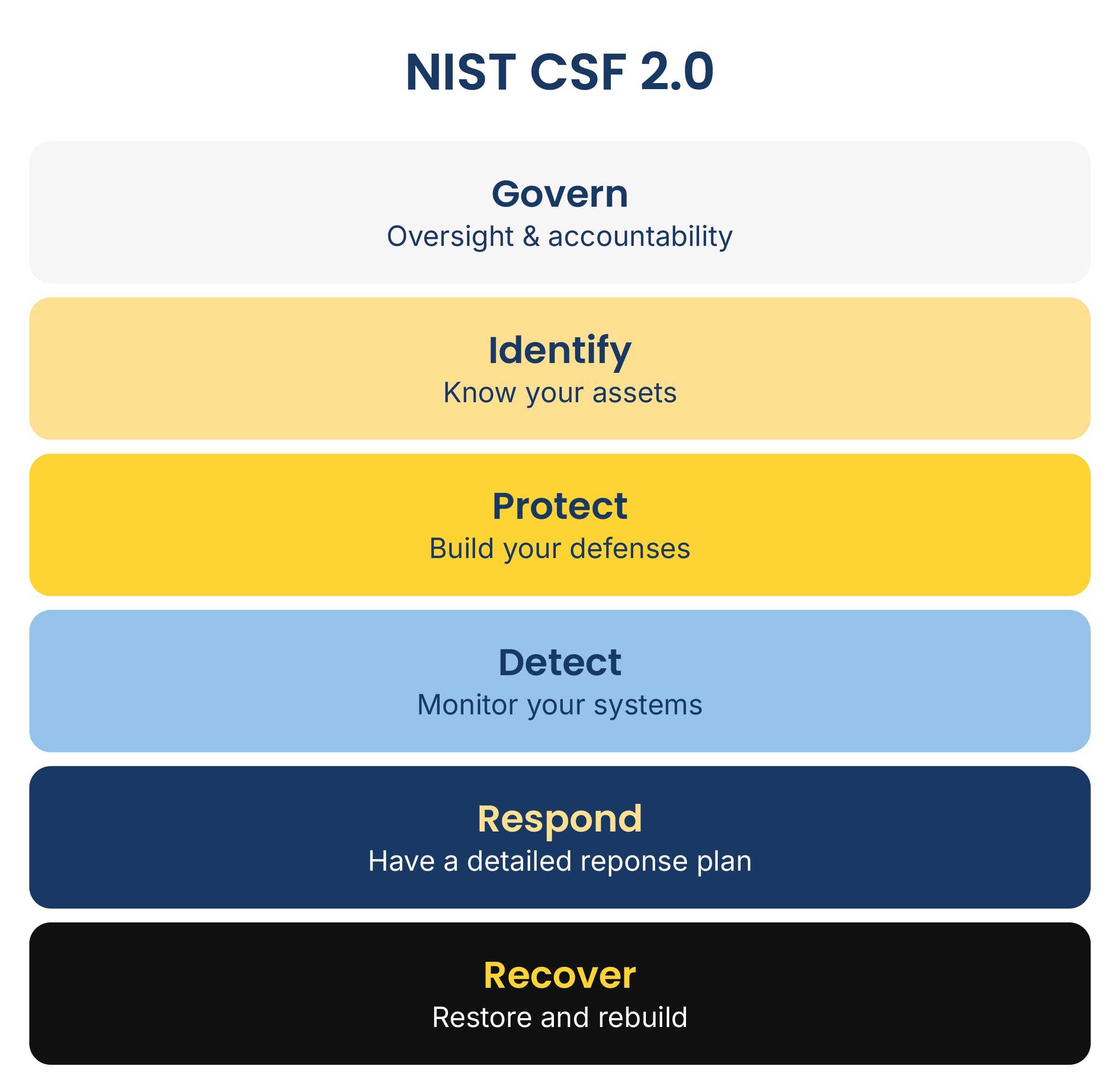
You don’t have to reinvent the wheel when it comes to small business cybersecurity! Our cybersecurity experts recently updated our online checklist, which was developed around the NIST Cybersecurity Framework. Get a clear picture of where your defenses are already strong and where you might have gaps.