For 20 years, the security industry has known that the office printer is dangerous. Researchers have proven it on stage, vendors have patched it in silence, and academics have published the exploits in exhausting detail. And yet, walk into almost any hospital, school district, or mid-market office today and the multifunction printer humming in the corner is running firmware that has not been touched since the day it was installed.
The vulnerability is documented. The patch exists. Nobody applied it. That gap, the space between a known fix and an unpatched device, is the subject of this article, and it is about to become far more expensive than it has ever been.
What endpoint protection often looks like today
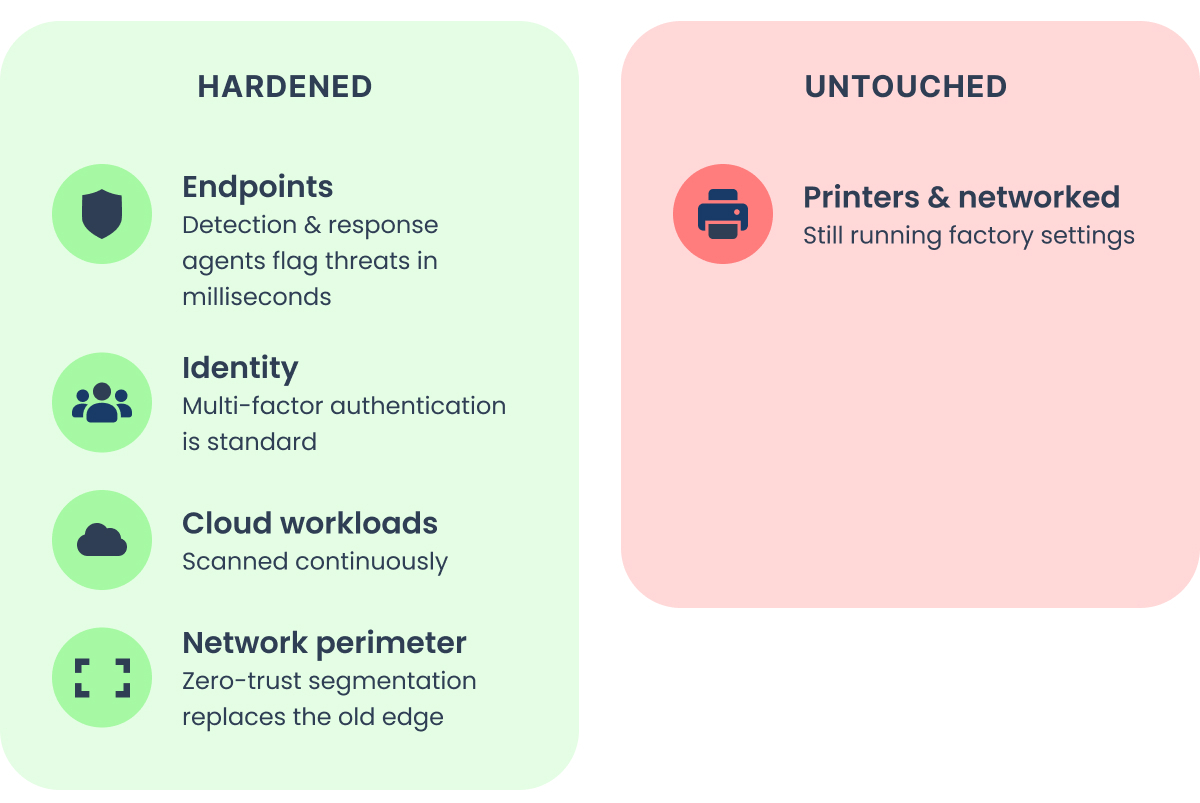
Today, endpoints run detection and response agents that flag suspicious behavior in milliseconds. Identity is wrapped in multi-factor authentication. Cloud workloads are scanned continuously, and the perimeter that once defined a network has dissolved into conditional access policies and zero-trust segmentation. The security posture of the average organization in 2026 is dramatically stronger than it was in 2006.
But that progress has not been uniform. It climbed the obvious branches and left one conspicuous outlier untouched.
Why printers got the short end of the stick
For years, the printer was not the low-hanging fruit hackers were looking for. It was simply one option among many, and rarely the easiest one.
As defenders picked the reachable fruit clean, hardening workstations, servers, and email, the attacker had to climb higher each year to find anything ripe. The printer, meanwhile, never moved. It sits on a branch nobody pruned, at a height that used to be inconvenient to reach, fully exposed and perfectly preserved. But now, printers, along with an ever-expanding list of networked IoT devices, are some of the last ripe things left on the tree.
Worse, with the advent of AI cyberattacks and frontier models like Claude Fable 5 (and the ungated Mythos-class models) or OpenAI's GPT-5.6 Sol, the tools for reaching it just got radically cheaper.
Why nobody bothered
To understand why printers survived two decades of security maturation untouched, you have to understand the economics of an attack:
- Every intrusion has a cost, measured in time, skill, and risk
- Attackers are attracted to the target that yields the most access for the least work
- For most of the last 20 years, the printer lost that calculation badly
Print security risks aren’t new. But they weren’t being attacked because easier entry points existed.
Why write a bespoke exploit for an embedded print controller when a well-crafted phishing email lands credentials in an afternoon? Why reverse-engineer proprietary firmware when a forgotten remote desktop port sits exposed to the internet, or when a single reused password unlocks a VPN? Printer exploitation demanded specialized knowledge of obscure protocols and device internals, and it delivered a foothold on a strange, headless computer that most attackers did not know how to use. The opportunity cost was brutal. The path of least resistance ran straight past the printer.
The evidence for this is telling in its absence:
Ask any security professional to name the landmark printer breach, the printer's equivalent of the 2013 Target compromise that famously began through an HVAC vendor's network credentials. You will get silence. There is no marquee case. There is no "we got hacked through the printer" headline sitting in the industry's collective memory the way the HVAC story does. What exists instead is a mountain of proof that such a breach is entirely possible, assembled by researchers who kept demonstrating the danger to an audience that kept declining to act on it.
One common form of printer hacking
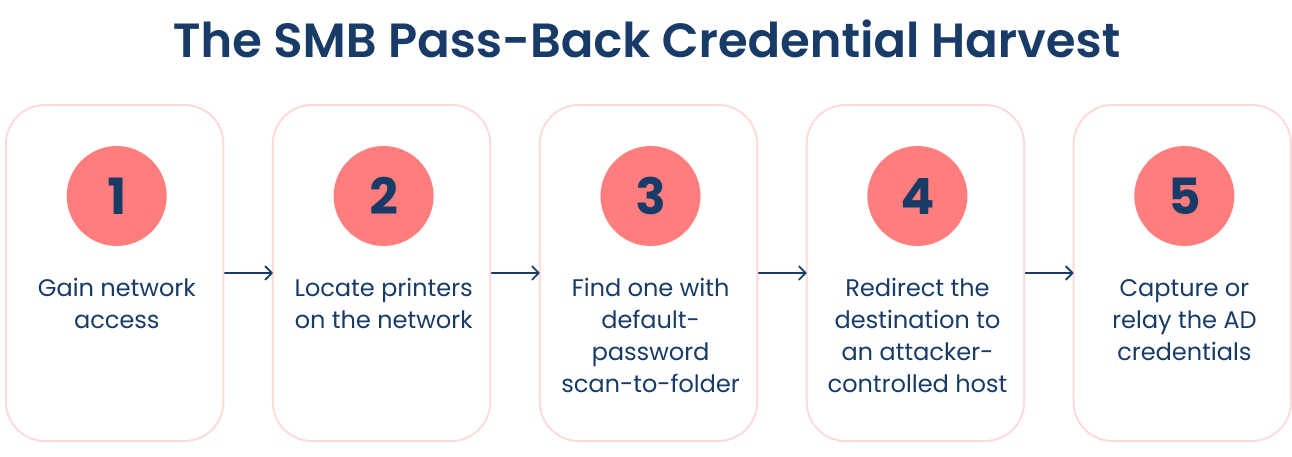
There is one place printers do show up, and it is not in breach headlines. It is in penetration test reports. For years, harvesting credentials off print devices as part of an overall attack has ranked as a reliable pivot point, and the play is well documented:
- Gain network access
- Locate printers
- Identify one with authenticated scan-to-folder (SMB) configured (especially a device running a default admin password)
- Reconfigure printer settings to point that destination at a host you control
- Relay or capture the authentication the printer sends, preferably AD creds
This pathway can elevate an attacker from no credentials at all to a valid domain user or service account.
None of this is secret tradecraft. It is common enough that it is written down in one of the field's most widely read manuals. The Hacker Playbook 2 by Peter Kim (2015) covers the printer credential-harvesting play in its Exploitation chapter, and its toolkit bundles Praeda, a tool built specifically to scrape stored credentials off networked printers. The related network-poisoning approach, using Responder to catch authentication without touching the device at all, gets its own treatment in the lateral-movement chapter. This is entry-level material for a working pentester, not a novel discovery.
The difference here is that the traditional SMB attacks (and also LDAP directory attacks) leverage existing protocols operating as intended. It is not the exploitation of a specific device vulnerability or CVE, the type of thing that takes significant specialized knowledge and effort.
Patching alone will not close this. There is no flawed code to fix.
Modifying the destination or server address in the device config, especially on a device still running its default administrator password, is trivial, something you can do on every pen test.
So with that said, let’s talk about what has changed with the advent of AI.
Growing threats
The academic and research record on print security is not thin. It is overwhelming, and it has been growing for years.
In 2011, Columbia University researchers showed that HP LaserJet firmware could be silently rewritten over the network, turning the printer into a persistent spy and, in one famous demonstration, driving the fuser hot enough to scorch and smoke the paper inside. That episode is what pushed HP into the security overhaul that produced its "World's Most Secure Printers" marketing to this day (shoutout to Red Balloon Security, the OG print security firm).
At Pwn2Own Austin in 2021, the industry's premier exploitation contest, printers became a standing target category, and the results have not been pretty. Researchers demonstrated full remote code execution against enterprise devices year after year, and in 2022 HP confirmed that a single vulnerability exploited at the contest affected more than 200 of its printer models. Canon, Lexmark, and others have met the same fate.
Pass-back vulnerabilities
The catalog keeps growing, and recent entries read like a blueprint: In February 2025, Rapid7 disclosed a pair of pass-back vulnerabilities in Xerox VersaLink multifunction printers, CVE-2024-12510 and CVE-2024-12511. The mechanism is elegant and quietly devastating. A multifunction device has to talk to the rest of the network to do its job, so it holds configured connections to the corporate directory over LDAP and to file shares over SMB, along with the service credentials those connections use. The pass-back attack redirects the device's own outbound authentication to a machine the attacker controls. The printer, doing exactly what it was configured to do, hands over its stored directory credentials in clear text, or surrenders a Windows authentication handshake that can be relayed straight against Active Directory. A device meant to scan documents to a folder becomes a credential dispenser.
Serial-to-admin chains
In mid-2025, Rapid7 published a cluster of eight vulnerabilities affecting 689 Brother printer models, along with devices from 4 other manufacturers, for 748 affected models in total. The set should be read as a chain rather than a list:
- CVE-2024-51977 lets an unauthenticated attacker leak sensitive device information, including the serial number.
- CVE-2024-51978 (rated critical at CVSS 9.8!) allows that same attacker to generate the device's default administrator password directly from the serial number, because the password was never random to begin with.
- CVE-2024-51979 is a stack-based buffer overflow that yields remote code execution once authenticated.
- CVE-2024-51984 discloses the password of a configured external service such as LDAP or FTP.
Read together, they describe a complete progression from anonymous network access to code running on the device to > credentials for the systems around it.
The most alarming detail is that some affected models cannot be fully fixed in firmware at all, because the password weakness is baked into the manufacturing process. And that is before we even talk about End of Support equipment that runs the effective codebase.
For years, this arsenal sat mostly unused in the wild. The proofs were real, the exploits worked, but the return on investment for a human attacker still did not justify the effort when softer targets were everywhere.
Enter AI.
How AI is changing the equation
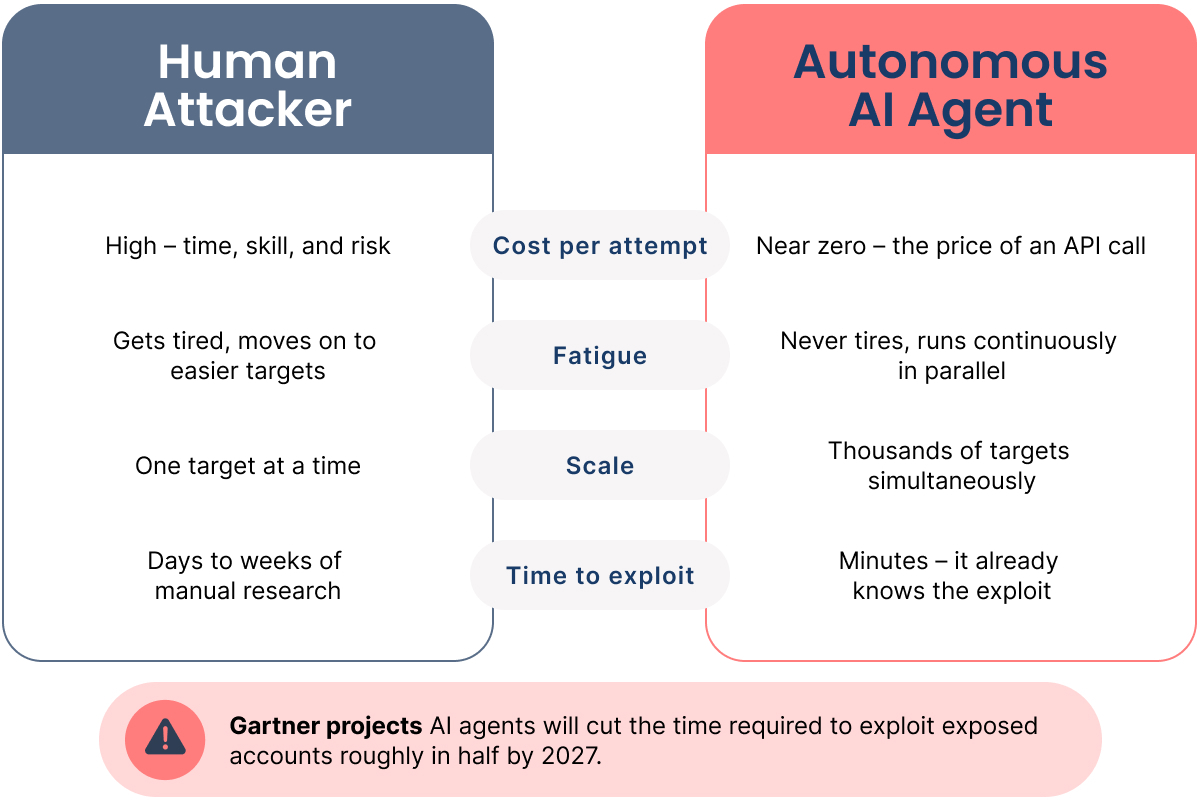
The variable that made printers safe was never their defenses. It was the cost of the attacker's time. Remove that cost and every dormant calculation flips at once.
Autonomous AI agents are removing it; the offensive tooling that matured across 2025 and into 2026 does not get tired, does not command a salary, and does not weigh the opportunity cost of a difficult target the way a human operator must. It scans, enumerates, and probes continuously, and when it finds a device it has seen before, it already knows the exploit. The economics have inverted along a single axis: The marginal cost of attempting an attack has fallen toward zero. When trying costs nothing, the question stops being "Is this the easiest way in?" and becomes "Why not try everything, everywhere, all the time?" (Great movie, by the way).
Why it’s all crashing down
The figures coming out of the offensive-research community make the shift concrete. Autonomous systems built on large language models now discover novel vulnerabilities at a scale and speed no human team can match, in one vendor's accounting, operating dozens of times faster than manual testers and surfacing well over a thousand previously unknown flaws.
Gartner has projected that AI agents will cut the time required to exploit exposed accounts roughly in half within a few years. The barrier that historically gated sophisticated attacks, the scarcity of elite human talent, is being replaced by a barrier that is merely the price of compute, and compute gets cheaper on a schedule.
Printers were never properly protected. They were just obscure and didn’t present an easy opportunity.
Obscurity is no longer a barrier because an agent that has ingested every public CVE and exploit knows more about the print controller's internals than the IT team that owns it.
Opportunity cost is no longer a barrier because there is no longer a human deciding the printer is not worth the trouble.
The relentless, tireless, affordable attacker will happily spend an hour, or a thousand parallel hours, exploiting a device a human would have walked past. The whole class of devices we deprioritized for 20 years, printers, and the other quiet embedded/IoT systems beside them, was deprioritized on an assumption that no longer holds.
Anatomy of a pivot: From no access to domain admin
Envisioning a start-to-finish cyber-intrusion can be difficult.
Let's demystify that today by enumerating a complete attack at a high level.
And let’s skip the infamous public-facing IP-addressed printer (shodan.io, anyone?), as (1) don’t do that, and (2) the threat profile of misconfigured and public devices is multifaceted and can include so many other issues like crypto-mining, becoming part of a botnet, hosting … illicit files, and so much more.
Let’s start.
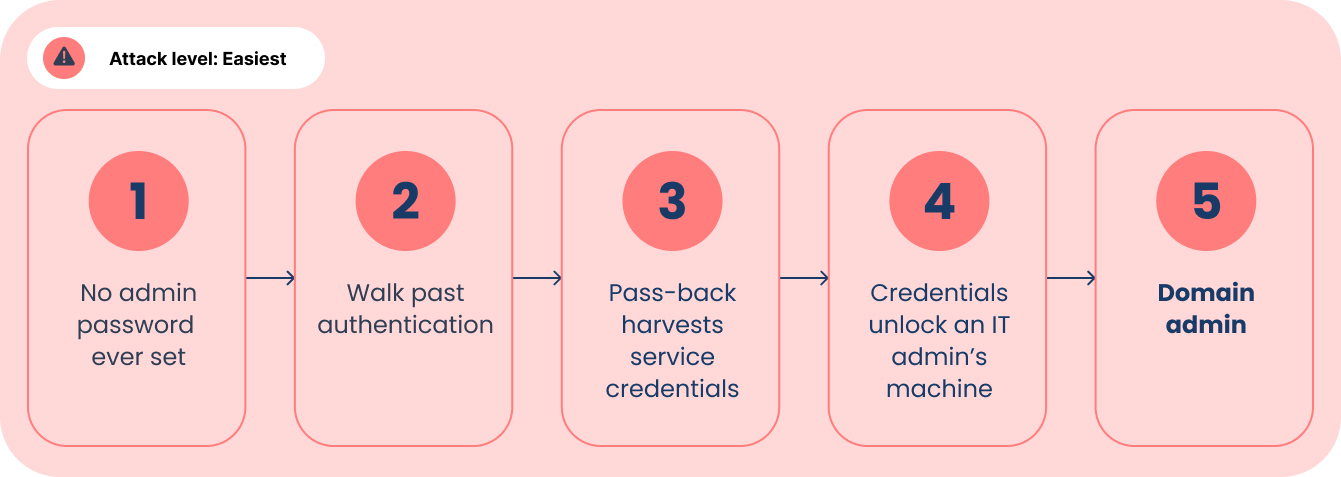
Attack 1: Easiest
1. Choose your strategy
You are a cybercriminal hoping to find your next ransomware or data exfiltration target. You found an organization, but here at the beginning you have nothing: no credentials, no foothold, no insider … no access. To gain network access (i.e., past the perimeter firewall), you deploy any one of a long list of strategies:
- A dropped USB with a tempting label ("Payroll 2026" or "Layoffs_Confidential" anyone?)
- A rogue device left behind on the network (e.g., a cheap LAN Turtle behind a desk or a printer, or even a version with a cellular data backlink)
- Compromised BYOD phone or laptop already trusted on the corporate WiFi
- A spear-phishing email to a board member (“July board packets.pdf”)
- A broad phishing campaign casting wide ("Your package could not be delivered")
- Credential stuffing against an exposed login (VPN portal, webmail, etc., using passwords from an old breach)
- A malicious or poisoned software update (or a trojanized "free tool" an employee installs)
- Compromising a third-party vendor with network access (see the Target HVAC example above)
And these are just a few top of mind.
Now to get a lay of the land.
2. Start your attack
Using an autonomous agent, start poking around the local network space to find other endpoints. Sift through the results of devices that respond to a ping, looking for those with a web interface port open, and review devices. Skip the cameras (often uncredentialed, giving you a live view of the environment; neat!), and the VoIP phones (maybe we’ll return to these later if we don’t find anything better), until you find a multifunction printer (oh look, something better). Using the SNMPv1/v2c read community string (naughty, naughty, using default strings and not switching to the encrypted-in-transit-capable SNMPv3 protocol), gather information about the target device, including make, model, and firmware version.
3. Get what you came for
Wouldn't you know it, the printer never had an admin password set. You don't defeat authentication; you walk past it. Using the "traditional" SMB pass-back described earlier, you point the device's scan-to-folder destination at a server you control and collect the service account it was storing. Even better, that account was over-provisioned: to spare someone the work of scoping it properly, it was dropped into an AD group that grants local admin on workstations across the fleet. Using the service account, log straight into an IT administrator's machine. From there, you dump cached credentials and drop a keylogger, and the next time that admin types their password, domain admin is yours. Network access, over-privileged account off the printer, domain admin. Minutes, not hours.
Too easy?
Let’s try that again, but make it a little harder, where the printer is locked down, but the network isn’t.
Attack 2: Harder
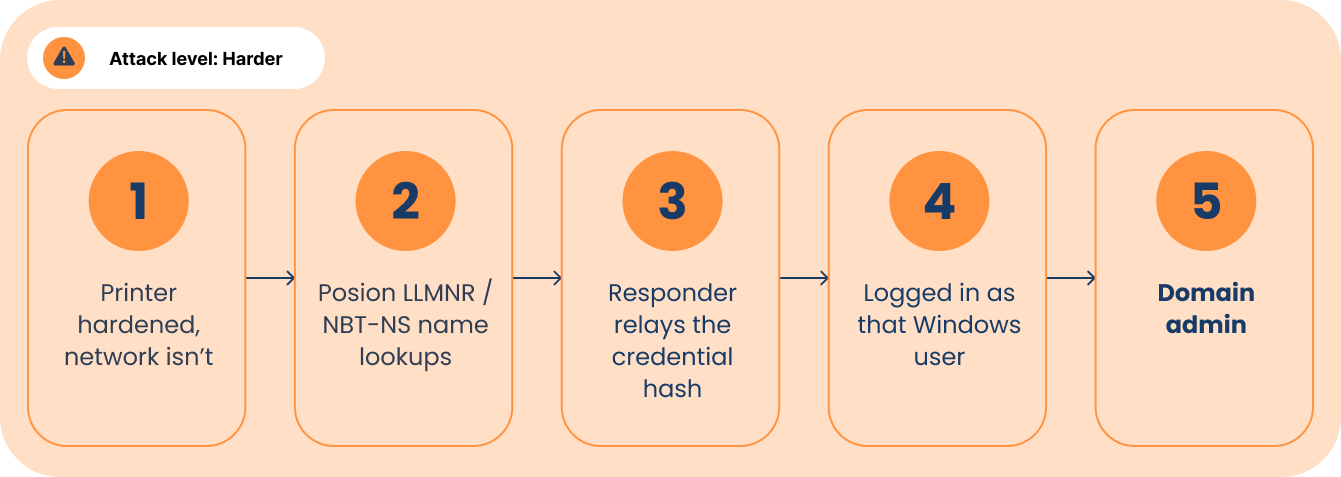
You have network access, but you don't touch the printer's config this time. Instead, you poison name resolution on the local segment (aka you lie about who's who on the network, and let the machines come to you).
Every time a Windows computer fumbles a lookup for another machine, it falls back to shouting into the room, "does anyone know where the file server is?" over two chatty legacy protocols called LLMNR and NBT-NS.
The MFP is the loudest voice in that room, forever asking after servers for scan-to-folder, directory lookups, and address-book syncs.
No problem. You just fire up Responder (a name-poisoning tool that ships with Kali Linux, the standard hacking distribution) and simply answer those shouts: "Yes, that's me." The machines believe you and try to log in to you, handing over their credentials in scrambled form (a NetNTLMv2 hash). Normally you'd have to crack that scramble offline, but this network never enforced SMB signing (a setting that makes computers verify they're really talking to the right server, and one that's off far more often than on), so you skip cracking entirely and simply pass the login straight to another machine, walking in as that user.
You're in. Again. So let’s try this again, only this time, they segment.
Attack 3: Even Harder
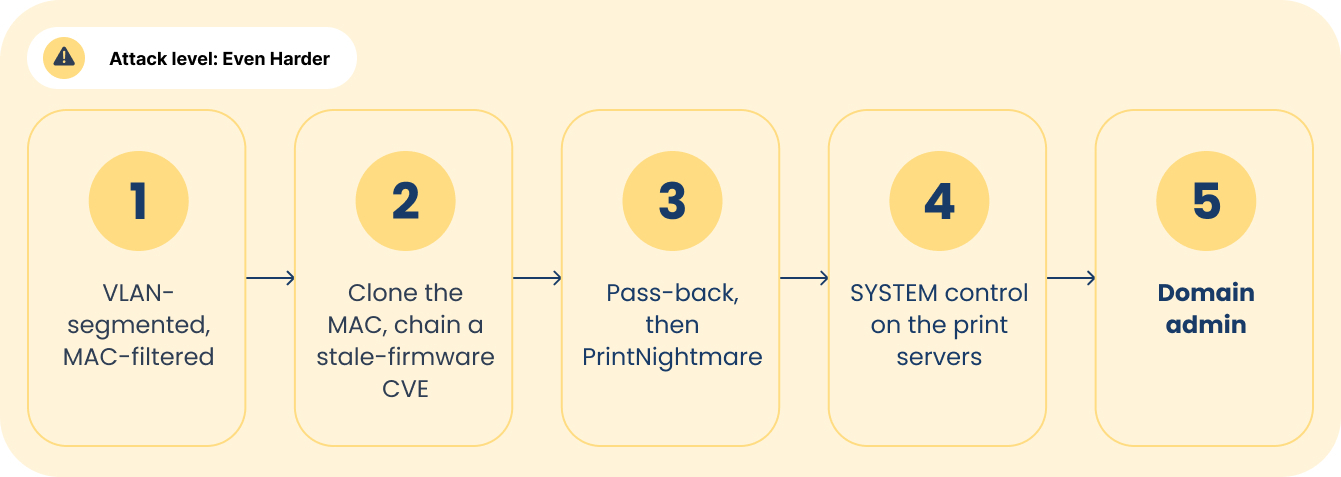
This shop did some homework about improving their print security. The network is carved into VLANs, the printers isolated on their own, and that printer segment is permitted to reach exactly one thing: the print server it depends on. The wall ports even have access control now. Except … the access control is MAC filtering, a lock that hands you its own key.
The printer's MAC (a static, unique device identifier on the networking card) is on a sticker on the back of the device. You clone it, the port opens, and that's the end of that. MAC filtering stops a curious intern and no one else.
Now you're on the printer VLAN, and this time the admin password was changed, so the factory-password shortcut is dead. You try the front panel remotely to reach Service Mode, which on some models resets the admin password. Changed too. Darn. Heck, even the legacy services are all disabled: Bonjour, AppleTalk, Novell/IPX (all the good stuff HP turned off by default in its v1.4 2019 "Secure by Default" initiative), along with the ones that bite: Telnet, FTP, SMBv1, and raw port 9100. Maybe this homework has a passing grade?
Unfortunately, a hardened front door isn't the same as no door. Remember the make, model, and firmware you pulled over SNMP? The firmware is two years behind, which the odds favor: Only about a third of organizations patch printer firmware promptly. You look up the model, find it in a documented vulnerability cluster, and chain the public research. One known CVE leaks the serial number (CVE-2024-51977 from above). A second (CVE-2024-51978) regenerates the factory admin password from that serial. The unique password the admin so carefully set still sits on top of a default that was never truly removed.
The write-ups exist, but a ready-to-run exploit doesn't, so your AI agent turns the research into working code itself in the time it takes to read this sentence.
Printer admin in hand, you run the same pass-back harvest (wherein the printer coughs up the AD account it was configured to use for scan-to-folder). This time the account is a domain account, but a restricted one, with no free local admin across the fleet. That's fine, because it's a valid domain identity.
To get out of the VLAN, you discover the organization still runs an unpatched Windows Print Spooler, the infamous PrintNightmare vulnerability (CVE-2021-34527) on the print server. This remains a reliable escalation to SYSTEM-level control on a server, and on the right server, that is a short step from the directory itself. (Note: Even though you could communicate with the print server, you couldn't shortcut straight here as PrintNightmare requires an authenticated domain account, which is exactly what the printer just handed you.) Credential harvesting and privilege escalation compound from there until the attacker holds domain administrator rights, the keys to the entire environment.
You still get what you came for, but it cost you a lot of time. Now let’s see what happens when print security is done mostly right.
Attack 4: hardest
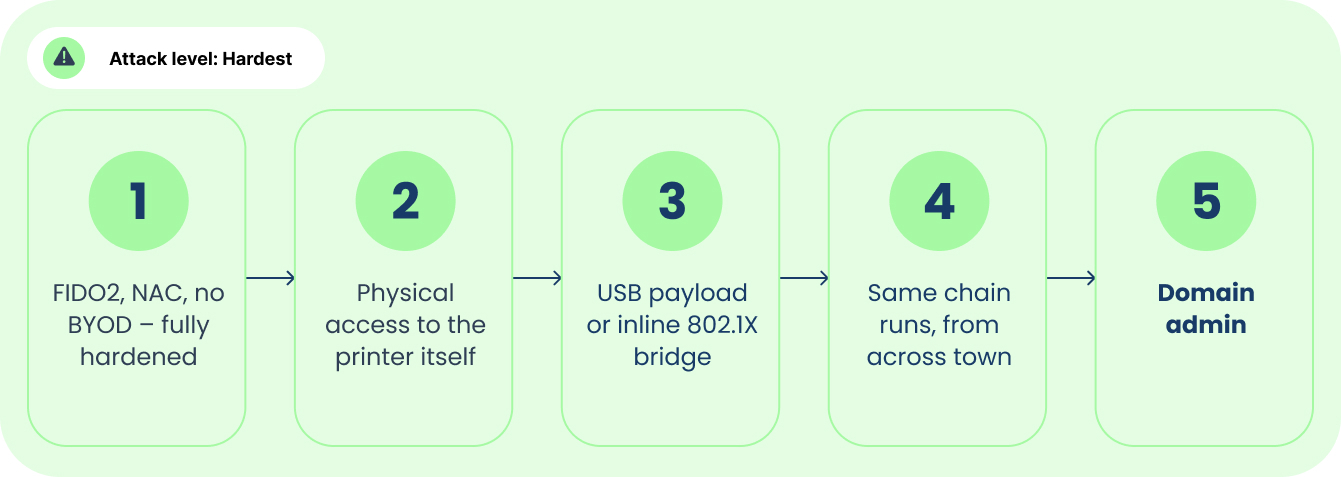
Take the paranoid shop. Phishing-resistant FIDO2 security keys mean your end-user credential-phishing goes nowhere; there's no code to intercept and no push notification to fatigue. USB ports are disabled across every workstation, so your "Payroll 2026" USB drop is inert. No BYOD to compromise. And 802.1X network access control (NAC) guards every wall jack, so a port authorizes nothing without a valid device certificate. You checked, and they didn't cut a MAC address exception for their printers the way most shops do.
This is a real wall. Most attackers would stop here!
There’s just one problem. Every control above governs logical access: the credential, the code, the certificate. None of them govern who gets to physically stand next to the printer, and the printer is the one device on this network that lives its whole life in reach of strangers.
It sits in a hallway or an open copy room, not a locked rack. It gets serviced on a schedule by people no one escorts: the break-fix tech, the toner delivery, the leased-fleet swap, the managed-print provider rotating hardware in and out. The room where your third-party cleaning service empties the trash. The device your auditors use when doing onsite work. This is the one "computer" an organization will happily let an unvetted outsider power down, open up, and repair, because it's just the printer.
The same org that spent a fortune making its logins phishing-resistant will let a service badge kneel behind that device, unwatched, for ten minutes. Their cybersecurity is on point. Their physical security is not. And the two intersect.
So, this compromised employee, vendor, or social engineer has two main options for leveraging physical access to your printer:
Option 1: On some models, a crafted USB payload at the device's service port could compromise the firmware directly. Model-dependent, but when it lands, it's the whole game in one step. This is where advanced knowledge, such as knowing the device make, model, and firmware version, can identify unpatched CVEs to exploit.
Option 2: A small inline bridge, placed between the printer and the wall jack, with a cellular backlink. The printer authenticates to 802.1X exactly as it should, certificate and all, and your box quietly rides that trusted session onto the VLAN behind it. The network logs one legitimate printer. You're operating from across the street, or across the country.
Now, you're on the printer segment. From here, the attack chain from the last round (above) runs move for move: exploit the stale firmware for printer admin > pass-back for a domain account > PrintNightmare the print server for SYSTEM (or another hole you discover once on the network). Every defense this network added, it added correctly. Phishing-resistant MFA, port lockdown, no BYOD, certificate-based NAC, segmentation, hardened credentials. But a single unpatched system, a misconfigured account, or an abusable service means game over if your time is infinite.
You're in.
Of the four examples, not one was novel (i.e., zero day). A pass-back technique older than most staff, a documented CVE chain, MAC cloning, an inline 802.1X bridge, PrintNightmare. Every move has a name, a write-up, and a tool.
What the attack always cost wasn't knowledge. It was time and patience: the reconnaissance, the model-specific research, the discipline to chain a dozen steps without tripping a single alert. That labor is the toll that kept the printer pivot rare, run mostly by professionals on sanctioned engagements. And it's exactly the toll an autonomous agent pays without complaint, in parallel, for the price of an API call. The printer didn't become more dangerous. It became a cheap attack surface. And in the best-built network, the one that did everything right, the printer was still a way in.
What IT leadership should do
The good news? The fix is not a mystery. Unlike a zero-day no one has seen, the "AI attacks printers" problem breaks down into ordinary operations work:
- Keep devices on currently supported models
- Apply firmware updates to patch known vulnerabilities
- Harden devices from their default state
- When required, scope service accounts so a stolen one isn't a skeleton key (or skip entirely and move to a managed print overlay solution like PaperCut)
- Harden the network and identity layer itself: disable legacy name resolution (LLMNR, NBT-NS), enforce SMB signing, and lock down the protocols the attacker never needed a CVE to abuse
- Layer in compensating controls (network segmentation, NAC, getting these devices into your logging and monitoring like any other endpoint)
Solvable operations problems, not intractable research ones. The work is unglamorous, which is exactly why it has been deferred, and deferral is the one thing the AI era no longer permits.
A note about firmware and managed print agreements
We need to set things straight. This is not a part of a standard Managed Print Services Agreement. Firmware is the hard one, and anyone who tells you otherwise has not run a fleet.
Take the obvious: Across a large managed fleet, most devices have no remote-update path at all for the Managed Services Provider, which means firmware updates require a technician standing in front of each one. Do the napkin math on that to see how it is not feasible to push firmware via in-person technicians. Well, how about service calls? Vendors often include firmware updates as part of regular service, but most devices should go years between service calls, so that certainly won’t address the greater security risk.
What about cloud-connected models that now allow a remote push? Thing is, firmware is not a thing you fire blindly across thousands of models and firmware permutations and print workflows. Push an untested update, and you can break scanning, break a line-of-business print integration, break the fleet, and then the question is who pays to put it right and whether the irate customer stays with you. Testing firmware in your actual environment before it ships is not caution. It is the job.
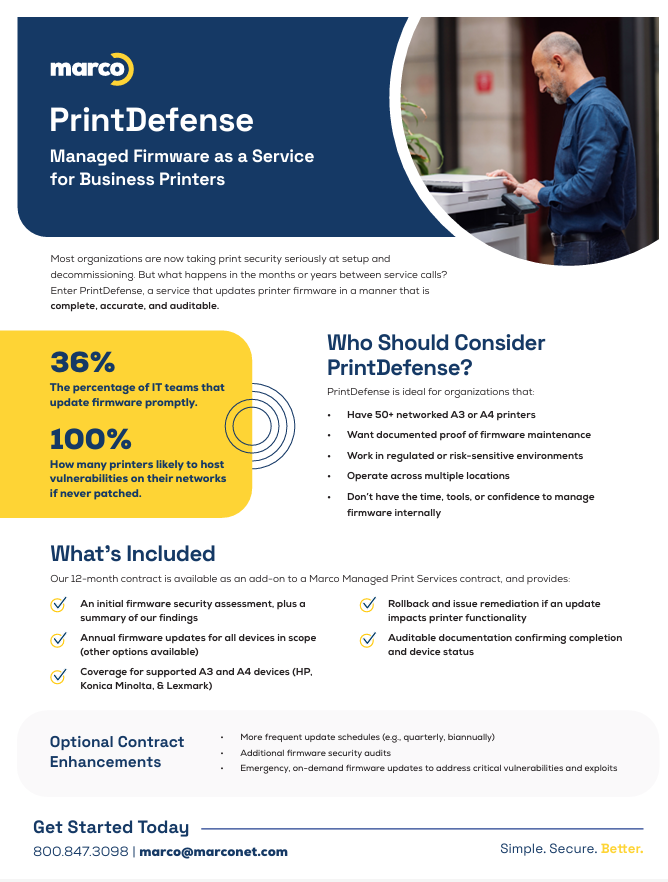
So, the honest guidance is a fork. Where the manufacturer publishes firmware openly, as HP and Lexmark do, you can often follow their documentation and update the devices yourself. In fact, here is a fantastic guide written by our talented Jared Thienes explaining how to do just that using HP Web JetAdmin. Where you want it managed and validated, that is a service, whether time-and-material or something like our PrintDefense firmware-as-a-service. Patching is not glamorous, but either option beats discovering the gap after a breach.
Down the other path, you find that many manufacturers lock their firmware behind a service paywall, so the files you need to secure a device you own are not available to you at any price short of a service call. That is a security anti-pattern dressed up as a business model. To be fair, some devices have multiple firmware running simultaneously and are easy to break, a real concern. But in this security practitioner’s opinion, firmware that closes a known, published vulnerability should be freely available to the people running the hardware. Until it is, this particular door stays propped open by the vendors themselves, and I would like to see the industry called to account for it.
So, IT leaders, the advice is to push these same expectations onto vendors and the procurement process.
Security is too often left out of the buying conversation entirely. Ask for the security documentation, route the answers to the people qualified to judge them, and treat firmware support and update commitments as purchasing criteria and part of your budget, not afterthoughts. The device that cannot be patched is a liability that should be identified early, not after it is breached.
An easier way: managed print security
Our new firmware-as-a-service offer is designed to bring turnkey vulnerability management to your print fleet by performing update at a set interval, ensuring the updates are complete, accurate, and auditable.
Not sure if you need it? We offer a complimentary Print Security Assessment to help you gauge your current cyber risk on your existing print fleet. Designed to identify end-of-support and vulnerable devices, this quick and easy assessment gives you a roadmap towards a secured print environment.
Reach out to request your free assessment.