Over the last five years, 60% of companies have experienced some form of physical security breach. And in most of those cases, the exposure wasn't a sophisticated attack — it was an unlocked door, an unmonitored entry point, or an employee who didn't know what to do when something looked off.
Physical security and cybersecurity aren't separate disciplines anymore. A stolen laptop or a forgotten print job containing client data — these are physical events with very real digital consequences. So in this blog, we’ll explore what a comprehensive business physical security strategy actually looks like — and where most businesses have gaps.
What Is Physical Security for Business?
Physical security is the protection of your people, facilities, technology, and data from unauthorized access, theft, vandalism, and other tangible threats.
A complete physical security plan typically includes:
- Site layout and vulnerability mapping
- Access control and perimeter protection
- Video surveillance
- Intrusion detection and sensors
- Staff training and incident response
- Infrastructure protection for servers and data storage
Businesses that experience physical security breaches face an average remediation cost of around $100,000 per incident — and that figure doesn't account for reputational damage, operational disruption, or the compliance implications that follow. Theft, unauthorized access, and data breaches carry far higher costs — both financially and reputationally.
Common Physical Security Risks Businesses Face
Before investing in any system or technology, it's worth understanding where businesses are most often exposed.
Unauthorized Entry
Tailgating — when someone follows an authorized employee through a secured entry without their own credentials — is one of the most common ways unauthorized individuals gain access to restricted areas.
Piggybacking, where an intruder impersonates a contractor or vendor to gain entry, is another. These breaches often go undetected for days or longer.
Theft and Burglary
Businesses own valuable physical assets — equipment, documents, employee credentials — and valuable data. Both are targets. After-hours periods and low-traffic areas are at the highest risk, since activity goes unnoticed.
Insider Threats
83% of organizations reported at least one insider incident in the past year. Insiders have legitimate access to systems and spaces, which makes their actions harder to detect and trace.
Unattended Workstations and Devices
An unlocked screen, a document sitting on a printer, or a laptop left in a conference room creates immediate exposure. And absolutely no technical sophistication required.
Vandalism and Physical Damage
Deliberate or opportunistic property damage can disrupt operations, damage equipment, and compromise security infrastructure itself — particularly when surveillance equipment is targeted.
How Layered Physical Security Works
One of the most common mistakes businesses make with physical security is treating it as a single investment — one camera system, one access control setup, done. The problem is that no single measure covers every scenario. A camera doesn't stop someone from walking in. A locked door doesn't help if no one knows it was bypassed.
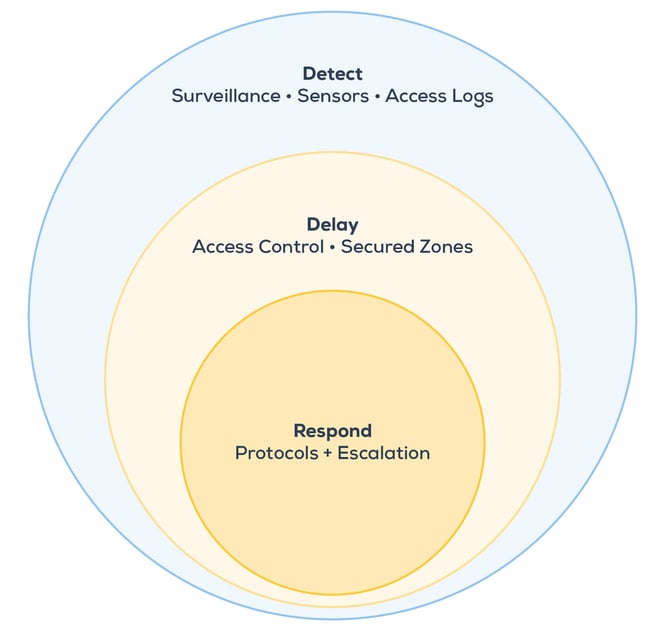
What works is a layered approach, where each component backs up the one before it. Think about it in terms of what you want your security to accomplish at each stage of a potential incident.
The Outermost Layer
The outermost layer is about making your facility a poor target in the first place. Visible cameras, clearly marked entry controls, adequate exterior lighting, and perimeter measures all communicate that your site is monitored and that unauthorized access will be difficult and conspicuous. Most opportunistic threats stop here.
If someone attempts entry anyway, the next layer is knowing about it quickly. Surveillance systems, motion sensors, access logs, and intrusion alerts exist to surface that activity in real time — not after the fact. The speed of detection directly affects how much damage can be done before a response is possible.
The Middle Layers
Access control, secured doors, and segmented areas serve a purpose beyond just restricting entry. They buy time. An intruder who has to work through multiple credentialed checkpoints is an intruder who is slower, more visible, and more likely to be caught before reaching what they came for.
The Final Layer
What actually happens when an alert fires? This is where most businesses are underprepared. Technology can detect and delay, but without a clear protocol — who gets notified, in what order, and what they're authorized to do — detection becomes documentation rather than prevention. A physical security plan isn't complete until the response procedures are as well-defined as the hardware.
Types of Security Systems for Business
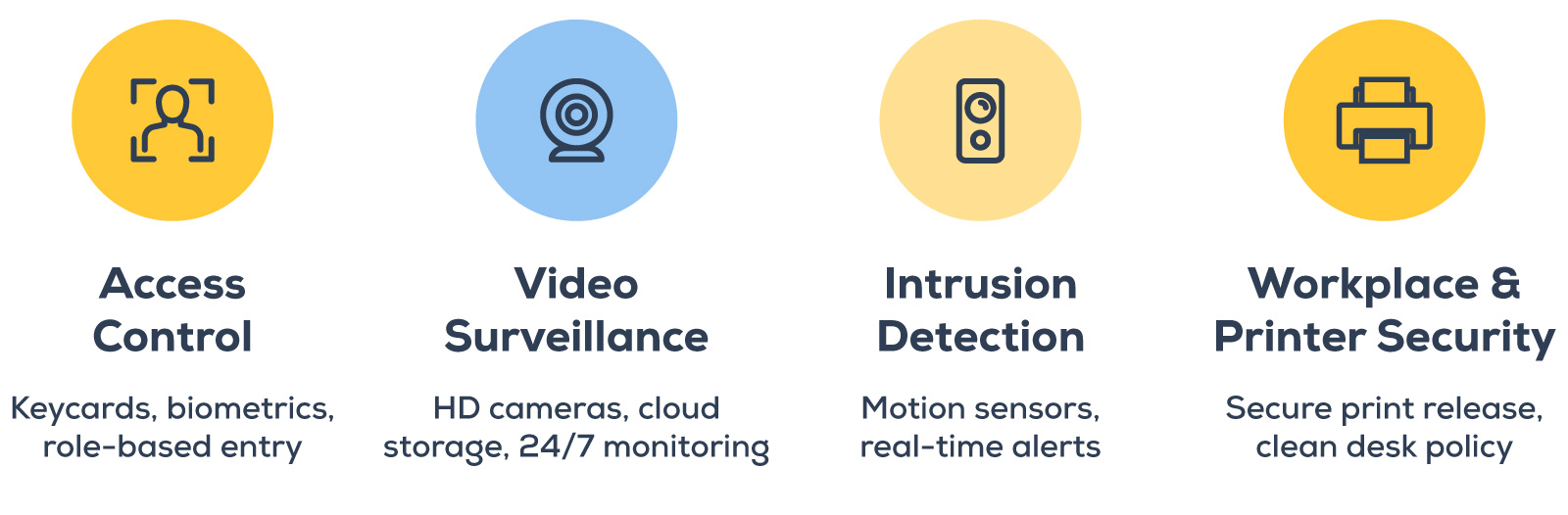
No single system addresses all physical security risks. The most resilient setups combine multiple layers.
Access Control Systems
Controlling who enters your building — and which areas they can reach once inside — is foundational. Modern access control systems go well beyond key cards. Today's systems support mobile credentials, biometric authentication, and role-based permissions that restrict access by employee, department, time of day, or location.
The business value is twofold: they make unauthorized entry genuinely difficult, and they create an audit trail. If something goes wrong, you can see exactly who accessed which area and when — essential for internal investigations, compliance documentation, and insurance purposes.
Access control also addresses tailgating more effectively than awareness training alone. Anti-passback configurations prevent someone from using another person's credentials to enter a secured area.
Business Security Camera Systems
Video surveillance serves two functions: deterrence and documentation. Visible cameras discourage bad actors. When an incident occurs, recorded footage is the most reliable evidence available.
Modern business security camera systems have advanced considerably — high-definition video, night vision, motion-triggered alerts, and AI-powered analytics are now standard at the commercial level. For most mid-sized businesses, the most practical advancement is cloud-based surveillance, which removes the need for on-premises recording infrastructure and enables 24/7 remote monitoring from any device.
Cloud-based surveillance systems can give businesses continuous visual access to their facilities from anywhere, with long-term storage and no hardware overhead. Camera placement matters as much as camera quality: entry points, parking areas, server rooms, and shipping and receiving areas are the highest priority for most businesses.
Intrusion Detection and Sensor Technology
Intrusion detection systems identify unauthorized access in real time and alert relevant personnel immediately. For businesses with after-hours risk — warehouses, distribution facilities, medical offices, multi-tenant buildings — they're particularly important.
Beyond traditional motion sensors, smart sensor technology now detects environmental changes, including sound, temperature, and air quality anomalies. When integrated with your surveillance and access control platforms, sensors allow your security team to correlate alerts across systems and respond with full context rather than reacting to isolated events.
Workstation and Printer Security
Every unattended workstation is a potential access point. A clean desk policy — requiring employees to lock screens, secure documents, and store credentials whenever they step away — addresses one of the most overlooked physical security risks in most offices.
Printers deserve specific attention. Up to 30% of print jobs are never retrieved from office printers. If that document contains employee data, client records, or financial information, it sits in an output tray accessible to anyone who walks by. Print security measures, including secure print release — which holds a job in the queue until the authorized user is physically at the device — close this gap without disrupting workflow.
Best Practices for Physical Security
Having the right systems matters. But best practices for physical security go beyond hardware — they include how your organization manages access, prepares employees, and plans before threats happen.
1. Start With a Physical Security Assessment
Before spending anything on systems or upgrades, you need to know where you're exposed. A physical security assessment maps your current environment — entry points, camera coverage gaps, access permissions, and policy weaknesses — and identifies what's most urgent to address.
Think of it as seeing your building the way a threat actor would. Once you have that picture, every investment goes toward a real vulnerability rather than a perceived one. If you don't have the bandwidth to conduct this internally, a technology partner with physical security expertise can do it for you.
2. Apply Role-Based Access Control
Not every employee needs access to every part of your building. Not every contractor needs the same permissions as full-time staff.
Role-based access control ensures people can go where their job requires — and nowhere else. This limits the exposure from an insider incident and makes audit logs far more meaningful when something does go wrong.
3. Train Employees Consistently — and Briefly
Effective physical security training doesn't require elaborate programs. Employees should understand what a tailgating attempt looks like, how to report something that seems off, and what the clean desk policy requires. Brief, regular refreshers — not just an annual session — are what actually change behavior.
4. Document Your Physical Security Plan
A written physical security plan serves two purposes: it keeps everyone aligned on protocols, and it provides accountability when something goes wrong.
At a minimum, your plan should document:
- All security components and their configurations
- Incident response contacts and escalation paths
- Protocols for testing and maintenance
- Any relevant compliance or regulatory requirements
This is also an invaluable resource for new hires and for demonstrating due diligence to auditors and insurers.
5. Audit and Update Systems Regularly
Physical security systems degrade over time. Cameras get repositioned or obstructed. Access permissions aren't revoked when employees leave. Firmware goes unpatched.
So build annual audits into your calendar, and tie access permission reviews into your employee offboarding process so nothing falls through the cracks.
6. Don’t Silo Physical Security and Cybersecurity
Surveillance cameras and access control systems run on your network — which means they're subject to the same vulnerabilities as any other connected device. Weak passwords on a security camera, outdated firmware on an access controller, or an unmonitored physical access log can all create openings that bridge directly into your broader IT environment.
This is why the most effective approach treats physical and cyber risk as a single discipline — not two separate budgets managed by two separate teams. The same assessment that maps your technology environment should account for who has physical access to your servers, your network closet, and your workstations.
Common Challenges — and How To Address Them
Even businesses with the right intentions run into obstacles when implementing physical security.
Culture and Compliance
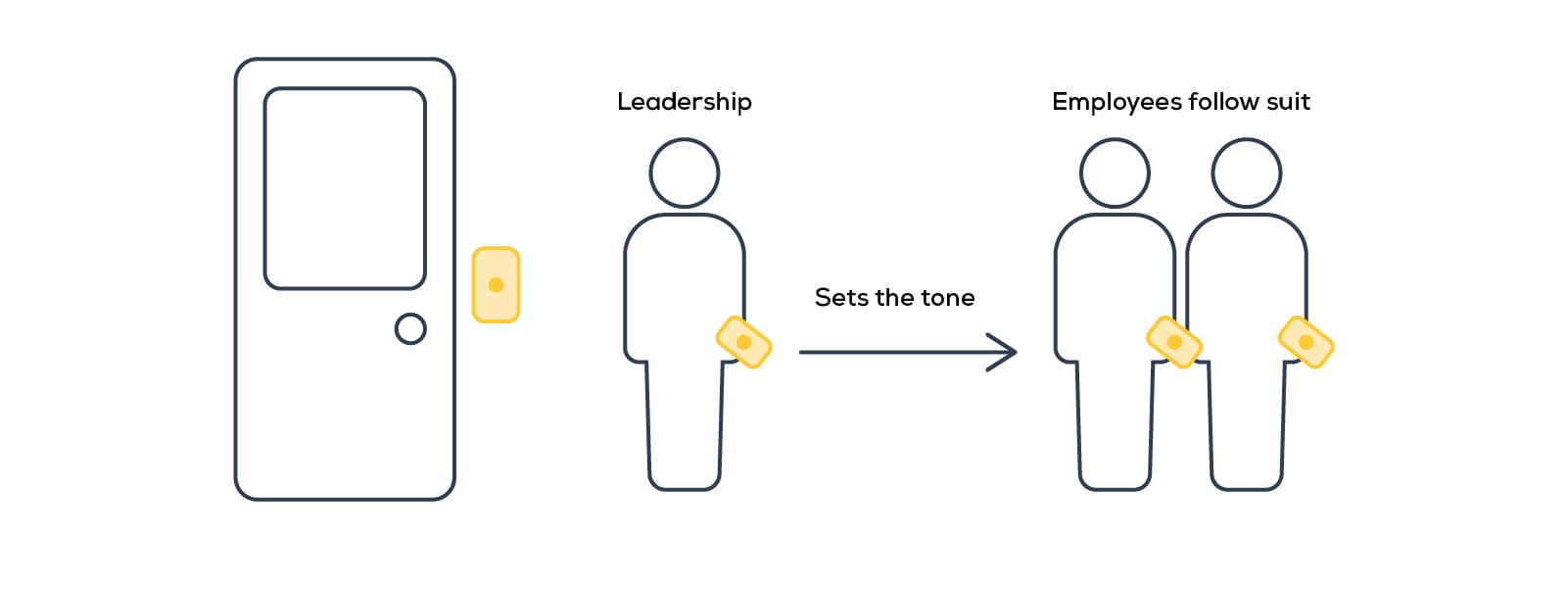
Physical security policies only work when everyone follows them — including leadership.
One of the most common points of failure isn't a technology gap; it's human nature. Employees hold doors open for colleagues out of courtesy. Someone follows a coworker through a secured entry rather than badge in separately because it feels awkward not to. These aren't malicious acts — they're social ones, and no access control system can fully compensate for them.
For better or worse, leadership behavior sets the tone. When executives bypass badge requirements or prop doors open because it's convenient, it signals to everyone else that the rules are negotiable.
What works? Building a culture where physical security is understood as a shared responsibility — not just an IT department concern.
Budget Constraints
A physical security investment doesn't have to be all-or-nothing. Prioritize based on your risk assessment — start with the highest-exposure entry points and work outward. Cloud-based systems, in particular, have made robust surveillance far more accessible by eliminating the upfront hardware investment of traditional on-premises setups.
Staff Capacity
Physical security technology is most effective when someone is actually monitoring it. If your team doesn't have the bandwidth, consider outsourcing monitoring to a managed security provider. Smart analytics and automated alerting also reduce the manual workload significantly — your team is notified when something actually warrants attention, rather than reviewing hours of footage after the fact.
Technology Integration
Cameras, access control systems, and sensors that don't communicate with each other create blind spots. When selecting technology, look for platforms that integrate cleanly — and work with a partner who can see the full picture, not just configure individual components.
Researching Next Steps
Just like cybersecurity, physical security isn't one of those projects that you ever get to complete. It's an ongoing practice that requires the right systems, the right policies, and, often, a partner who understands how all the pieces connect.
We approach security holistically, so our recommendations are always tailored to your business, your assets, your risks, your facilities, and how you work. Click the link below to see how we pull it all together.