Choosing business security camera systems isn't as simple as it used to be. That’s because modern systems can do so much more.
They help make your employees more productive, provide business insights, and can even increase revenue. The challenge is figuring out which features actually matter for your situation. Below, I've compiled six key factors to consider when choosing a security camera system.
Evaluating Security Camera Systems for Your Business by Feature
Not every business needs all the bells and whistles. But here are a few newer capabilities that might make a huge difference. It all depends on the problems you’re hoping to solve.
1. Do You Need AI-Powered Monitoring?
The biggest mistake a lot of businesses make is choosing a system that requires constant human monitoring. Do you want someone watching monitors all day, or do you want technology that only alerts you when something matters?
If you want the second option, I’d recommend eliminating any system that doesn’t come equipped with AI-powered monitoring.
Modern AI-powered systems monitor footage automatically and filter out the noise. Instead of getting alerts every time a leaf blows past the camera, you get notified about actual people, vehicles, or specific behaviors that need attention. Some systems can even detect unusual patterns, like someone loitering in a restricted area or a crowd forming near an exit.
Pro tip: Always test the search functionality. The best systems will let you find footage using plain language (i.e., white delivery truck) so you can get results in seconds. And if you have multiple locations, look for a system that will give you that level of control from a single interface.
2. Should Your System Collect Helpful Analytics?
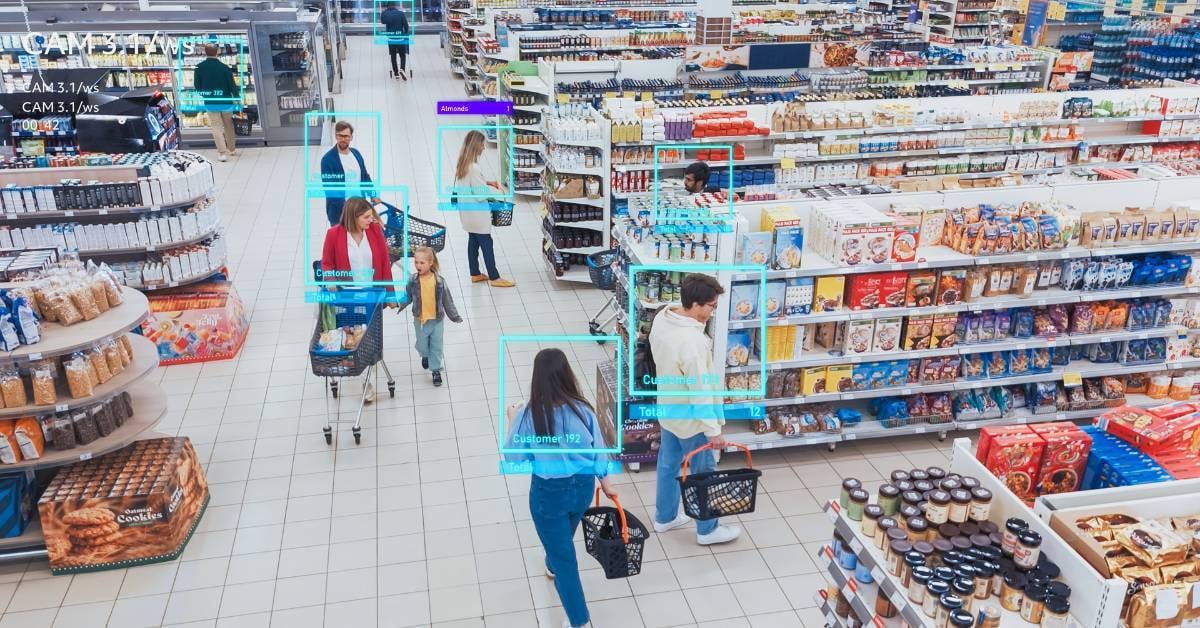
Is your camera system just there to record footage, or could it help you run your business better?
Here are just a few examples of what I’m talking about:
- Auto dealerships could use their system to measure how long buyers spend looking at specific vehicles, so sales teams can prioritize follow-ups
- Fast food restaurants could track drive-through wait times to adjust staffing
- Construction sites can verify subcontractor arrival times and monitor whether workers are following safety protocols in restricted zones
Pro tip: When you’re comparing systems, ask what analytics come standard and what costs extra. Some vendors charge monthly fees for features like people counting or heat mapping. Others include basic analytics in the base system. Before you sign anything, make sure you understand what insights you'll actually get and whether they align with your business needs.
I should also mention that the key to actually being able to use what you find is automatic data collection. You shouldn't need staff manually reviewing footage to gather this information. The system should do the work and present actionable reports to you.
3. Should Your System Be Wired or Wireless?
Wired systems using Power over Ethernet (PoE) deliver the most reliable performance. A single cable provides both power and data, which means consistent quality and no battery concerns. These work best for permanent installations where you can run cables — like retail stores, offices, and warehouses with structured layouts.
What Security Cameras Work Without WiFi?
Wireless systems offer flexibility, especially for temporary locations, construction sites, or areas where running cables isn't practical. But "wireless" is a bit misleading — most still need power, and performance depends on network strength.
The truly independent options are cellular-enabled cameras that work without wifi, recording to SD cards or transmitting over cellular networks. These are ideal for remote sites or locations with unreliable connectivity.
Pro tip: If you're in a permanent building with network infrastructure, wired systems typically perform better. If you need cameras in locations that change or lack network access, wireless makes sense despite the trade-offs.
4. How About Security Cameras That Can Record Audio?
If it would be helpful for you, many business cameras now include the ability to record audio. Some will also have two-way audio so that security personnel can communicate directly through the camera. This works well for deterring suspicious activity or assisting customers in remote areas.
Pro tip: Two-way audio can help deter intruders, but be sure to check your state laws before enabling audio recording in your business.
5. What Are Your Best Storage Options?
Don't overlook how your footage gets stored and accessed. You have three main options, and the best choice depends on your priorities:
- Local storage (using a network video recorder (NVR) gives you more control without storage fees, but if something happens to the recorder, your footage could be lost
- Cloud storage allows more flexibility, and you can grant access to law enforcement without being on-site. But you’ll need internet connectivity and a subscription
- Hybrid systems combine local recording with automatic cloud backup, so you get the best of both worlds
6. What Integrations Would Be Helpful?
Have access control systems, alarm systems, and other building management tools? Then, if your access control logs someone entering a restricted area, it would be great if your video system would automatically mark that moment for easy review.
Everything talking to everything else makes your whole security setup more useful.
Questions To Ask To Find the Best Security Camera System for a Small Business

Cameras have come a long way, and that means they can bring more value than they did in the past. Make sure you know the answers to these questions before you make a commitment:
- How many days of footage can the system store at my preferred resolution?
- If the internet goes down, does recording continue?
- What's involved in the installation, and how much downtime should I expect?
- How do I determine the right camera placement to avoid blind spots?
- Can the system scale if I add more locations or expand my facility?
- What happens during a power outage — is there battery backup?
- What's the total cost of ownership over 5 years?
- Is staff training included, or is that an additional cost?
- What cybersecurity features protect the system from being hacked?
- Does this meet my compliance requirements?
- Who has access to my footage if it's stored in the cloud?
- How are software updates handled, and do they interrupt recording?
These questions are harder to answer with a simple Google search, so once you start getting a sense of the type of system you need, it’s time to talk to a pro.
Good news — you found one! My team does a great job of getting to know your facilities well, so they can give you the answers to questions you didn’t even think to ask. We also have a few tricks up our sleeves to help you keep some hardware while making everything work seamlessly.