An email arrives from your CFO, asking you to approve a payment. Minutes later, your phone rings — the same voice, urgent and familiar, confirming the request. You join a quick video call, and there they are, nodding along with two other executives you recognize.
Just one small problem — none of it was real. Every email, voice, and video was generated by AI. Generative AI gives attackers the tools to write, speak, and appear as people your team already trusts, and to do it at a scale no human scammer could manage alone. But just like any other scam, it has its “tells.” So in this blog, I’ll explore what they look like, so you can recognize AI phishing scams for what they are.
What makes AI-powered phishing harder to detect?
AI phishing uses generative tools to build and deliver phishing attempts that look and sound like the real thing — without the grammatical errors and careless style choices that used to accompany a scam.
These scams can get personalized in seconds using details scraped from public profiles and posts. That also means traditional filters that look for known bad patterns, misspellings, or generic templates simply have less to catch.
Instead of a generic, typo-filled email, attackers now have tools that can create:
- Polished emails in the tone of a real boss, HR contact, or vendor
- A carefully cloned colleague’s voice used in a phone call
- Personalized content with all of the correct details
- Video of an executive appearing to give instructions
Because AI can do all of this quickly and at scale, one attacker no longer has to spend days crafting a single convincing scam. They can generate thousands of unique, personalized attempts in minutes.
But a scam is a scam. Once you know what you’re looking for, you can still spot them.
Inside an AI phishing attack
A modern AI phishing attempt usually moves through a few coordinated stages, each one building on the last.
Initial data collection
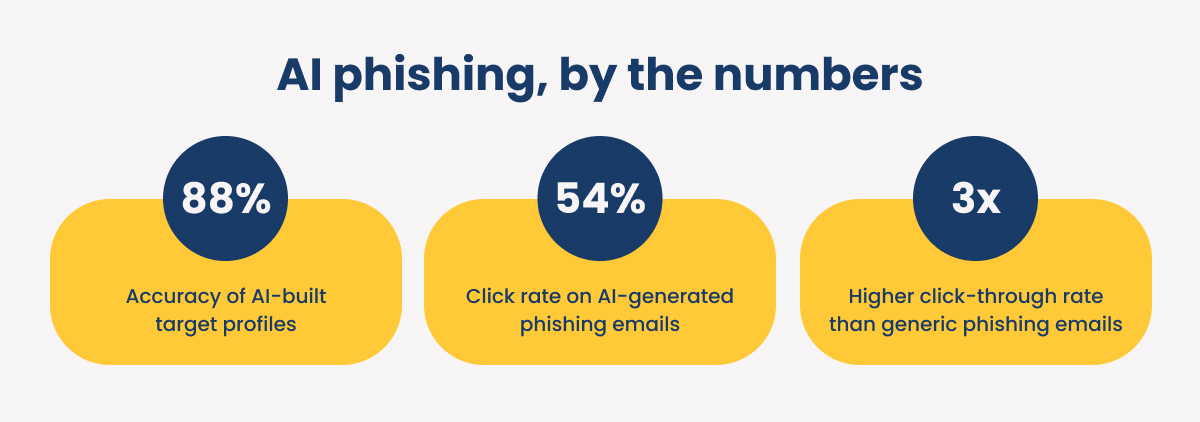
AI tools scrape LinkedIn profiles, company websites, press releases, and social media activity to learn names, titles, and current projects. One study found automated systems built vulnerability profiles of their targets with 88% accuracy, correctly gathering usable details about a target nearly nine times out of ten.
First touchpoint — the email
When a scammer has the information they need, AI can generate a convincing message: "Hi Sarah, per John's note on the Q3 vendor review, can you process the attached invoice today?" It reads like something from a real colleague because it references a real name and a real project, sidestepping the generic red flags employees are trained to spot.
Second touchpoint — the call
If the email doesn't land, a phone call follows, using a voice clone that sounds exactly like a real executive and presses for urgent action. Voice-cloning demonstrations have already shown just how convincing this can be, replicating a speaker's tone, accent, and inflection closely enough that listeners had trouble telling the difference.
The ultimate touchpoint — video
For high-value targets, attackers can stage a deepfake video meeting, with familiar faces appearing to confirm a request on screen.
Cloned voices and deepfake videos sound very 2026, but they’ve been a problem for a while.
Back in 2019, the CEO of a UK energy firm transferred 220,000 euros after a cloned-voice call. And in 2024, a Hong Kong employee authorized a $20 million transfer after joining a video call full of AI-generated "colleagues.”
Why old defenses can't keep up with AI scams
One study found AI-generated phishing emails tricked 54% of participants into clicking — the same success rate as expert-crafted scams, and more than three times higher than generic phishing attempts.
Most security training has 3 specific weak spots:
- Annual or quarterly security awareness training refreshers can't keep pace with tactics that shift monthly, so by the time an employee's next session comes around, a new AI tactic may already be circulating.
- Training also tends to lean on static, easy-to-spot templates, which gives employees false confidence that they can easily recognize a scam when the real thing looks nothing like the practice version.
- Most programs still focus on email alone, when real attacks now move across email, phone, and video in the same attempt.
The large majority of phishing attacks observed over a six-month period involved some level of AI assistance, and phishing has surged back to become the top vector attackers use to get into business systems, ahead of exploiting software vulnerabilities. Billions of phishing emails go out globally every single day.
At the same time, filters built to catch suspicious domains are running into a related problem …
Attackers now build convincing fake login pages using free, legitimate website-building platforms, so the page inherits that platform's trusted reputation. Email gateways pass it through. URL scanners come back clean. The infrastructure is real; only the intent behind it isn't.
What AI-generated phishing leaves behind
Ready for some good news? AI-generated phishing attempts aren't flawless, even when they look that way to the average reader.
Security researchers at KnowBe4 have identified technical fingerprints AI leaves behind in phishing campaigns: leftover generated text, hidden formatting meant to slip past scanners, and fabricated filler content designed to make a message look more human than it is.
Signs of an AI-generated phishing attempt
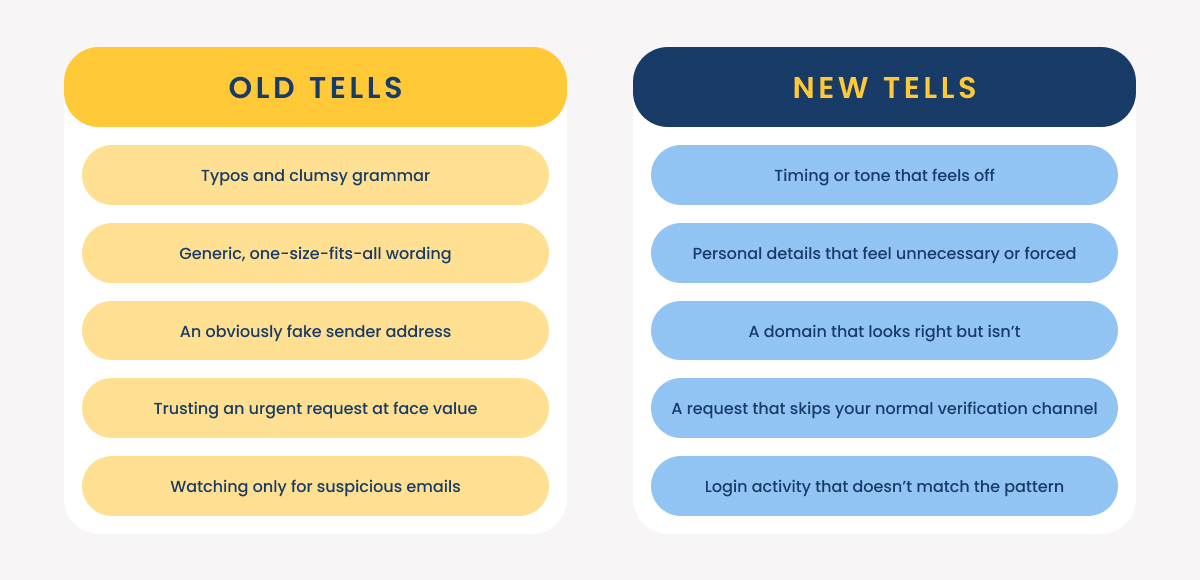
Most of the old advice — watch for typos, look for bad grammar — doesn't hold up against AI-generated content. Here's what to watch for instead.
Timing or tone that feels off
Two patterns show up again and again:
- Odd timing: a "request from finance" arriving at 3 a.m. your time, even though your CFO never emails at that hour, because attackers running mass AI-driven sends often forget to account for time zones.
- Tone mismatch: a message that's grammatically perfect but too formal, too brief, or otherwise off from how that person usually writes.
Personal details that feel unnecessary or forced
AI-generated messages often include specific, accurate details pulled from public profiles and posts: a recent conference talk, a real client name, your exact job title.
Here’s an example:
"I saw your panel last month on cloud security, great talk. Can you forward the updated vendor contract?"
It looks credible on the surface, but a genuine colleague rarely recaps information you both already know. Security teams at several large companies have reported a rising number of AI-generated emails loaded with exactly this kind of unnecessary detail.
Also, watch for validation phrases — lines like "just to confirm" or "as you might remember" that feel engineered to build trust rather than convey information.
A domain that looks right but isn't
Treat any link sent by text or email as unverified by default, no matter who it appears to be from.
Attackers now swap in look-alike characters, including Cyrillic letters that are visually identical to standard ones, so a domain can appear completely correct while actually pointing somewhere else.
It’s always best to type the address you already know into your browser or use a saved bookmark, rather than clicking through from a message.
If you do need to check a link first, confirm the page uses HTTPS and avoid shortened links that hide the true destination. A domain that looks fine at a glance isn't enough on its own, especially now that attackers can build convincing fake pages on legitimate platforms.
A request that skips your normal verification channel
Any high-risk request — a wire transfer, a credential reset, a contract approval — should be confirmed through a second, already-established channel before anyone acts on it, no matter how urgent the message sounds.
In fact, whenever a message sounds urgent, I’d recommend treating it with additional suspicion. Creating a sense of urgency is just one way hackers try to use your brain against you.
This matters most for voice and video requests, since a familiar voice or face is exactly what's designed to override your instinct to double-check.
Account or login activity that doesn't match the pattern
A login from an unexpected country in the middle of the night, followed by an urgent request from that same account, is exactly the kind of anomaly that behavioral monitoring tools like Microsoft Defender are built to catch.
But relying on tools alone isn’t enough. The tool can flag the anomaly, but a trained employee needs to know what to do when the alert comes in.
What to do if you suspect AI phishing
Acting quickly (and in the right order) limits the damage from an AI phishing attempt.
If something feels off, work through these steps before doing anything else.
- Pause: Don't act on urgency alone, even if the request seems to come from someone senior.
- Verify: Contact the person directly using contact information you already have on file, never anything included in the suspicious message itself.
- Escalate: Report the attempt to your IT team right away, even if you're not fully certain it's a scam.
- Document: Note odd timing, an unusual tone, an unfamiliar link — whatever tipped you off helps your team spot the next attempt faster.
Frequently asked questions about AI phishing
Here's what businesses ask us most as they work to get ahead of AI-generated scams.
How can you stop AI-generated phishing attacks?
No single tool stops them outright. The strongest defense combines ongoing, realistic training that reflects current AI tactics, tools, and processes — like a thorough verification process for high-risk requests.
How realistic are AI phishing simulations?
Modern simulations can replicate cloned voices, deepfake video, and highly personalized email, which is what makes them useful. Practicing against a realistic version of the threat, rather than a generic template, is what prepares employees to recognize the real thing and respond correctly instead of freezing when it actually happens.
How is AI used in phishing attacks?
AI is used to research targets, write personalized messages, clone voices for phone calls, and generate video for deepfake meetings. Each of these removes a barrier that used to slow attackers down or give victims a chance to notice something was wrong.
Are you vulnerable to AI scams or other cyberattacks?
Most businesses I talk to have come a long way in a short time when it comes to their cybersecurity. They’ve got most of the basics in place, but need additional help with security awareness, staying on top of evolving cybersecurity threats, or incident response.
Many technology providers will offer targeted cybersecurity services or consulting to fill in gaps. But that only works when you know where your gaps are.
What was considered secure years ago isn’t enough today, so if it’s been a while since you’ve tested your cybersecurity, I’d recommend using our free tool to get a checkup. I’ve attached it below.