This morning, a faulty update from CrowdStrike caused systems to encounter a Blue Screen of Death (BSOD) error on Windows machines globally. The issue has affected several Windows operating system versions, including Windows 10, Windows 11, and various Windows Server versions. Please note that macOS and Linux systems are not impacted by this issue.
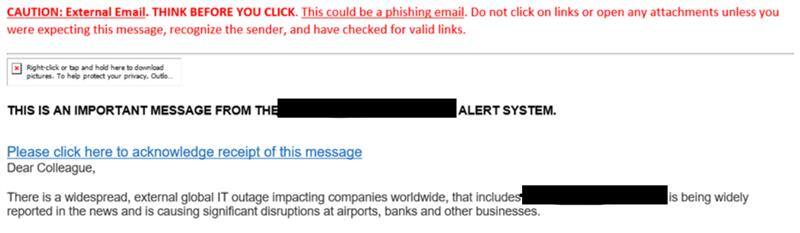
We are receiving reports of end users receiving phishing emails and SMS text messages from threat actors who are attempting to take advantage of the situation. The messages describe the outage and request the user click a link to acknowledge receipt of the message. Please advise your end users: do not click on these links, and immediately delete these messages.
Publish and Update History
Published at 9:26 AM CT on 7/20. Updated with Help Video at 10:35 AM CT. Updated 11:23 AM CT to notify of potential SMS and email phishing attempts. Updated 1:03 PM CT to add Bitlocker Key Recovery information. Updated 3:55 PM CT with On-Premise and Hosted Servers.
Updated 7/23 at 9:29 AM CT to add Bitlocker Recovery without Recovery Keys information. Updated at 3:07 PM CT with an update from CrowdStrike related to EDR agent.
Updated 7/24 at 10:27 AM CT with a new recovery tool published by Microsoft.
Update 7/26 at 12:30 PM CT with an updated message for clients and formatting changes.
For Marco's Clients - July 26th
Please contact Marco Support via the following ways if there are any outstanding issues with the CrowdStrike update and BSOD:
- Create a ticket in the Client Center at https://portal.marconet.com/
- Email us at mit@marconet.com
- Call us at 800-847-3097
Crowdstrike Update - July 23rd
Earlier today, Crowdstrike released an update to the EDR agent to aid in the resolution of the ongoing issues impacting Windows OS-based systems. The impacted configuration file, acting as the catalyst for this event, was added to the known-bad list in the CrowdStrike Cloud. When a system contacts the CrowdStrike Cloud, a request to remove the bad file and place it in quarantine is issued to the agent. For customers with direct access to the Crowdstrike UI, this action will be displayed in the Quarantine Files panel. If the file does not exist, no quarantine will occur and systems will continue to operate normally.
For devices that are unable to boot, it is recommended to physically connect the system to the network and reboot 2 to 3 times to allow the update to be received during the brief period in which it connects to the network during the boot cycle.
Some systems may still require further manual intervention and support. If you need assistance, please contact Marco Support via the Client Portal, Phone, or Email.
Your Security
This event is the result of a faulty update to Crowdstrike software. The vendor has stated that your security and your data have not been compromised as a result of this issue.
CrowdStrike Statement on Windows Sensor Update
CrowdStrike is actively working with customers impacted by a defect found in a single content update for Windows hosts. Mac and Linux hosts are not impacted. CrowdStrike has reported that it is not a security incident or cyberattack.
Read statements from CrowdStrike:
Windows Sensor Update
Outage Impact
Next Steps - What to Do
Computer Boots Normally
If your computer boots normally, no action is required.
Computer With BSOD
For users requiring assistance, please contact your local IT Department or Marco’s Support Desk.
For users that have local administrator rights:
Booting into Safe Mode
Boot Windows into Safe Mode or the Windows Recovery Environment.- This is typically done by pressing ‘F8’ repeatedly while the computer is booting. This may vary depending on your computer’s make or model.
- For additional information on how to boot into Safe Mode, please refer to the following Microsoft article: Booting Into Safe Mode
CrowdStrike Recovery Instructions
Windows will be sitting at this Recovery screen below. Select “See advanced repair options”.

The “Choose an option” screen will appear. Select Troubleshoot.

The next screen will show “Advanced options”. Select Startup Settings and then select Restart.

The computer will restart and boot to “Advanced Options” start up menu.
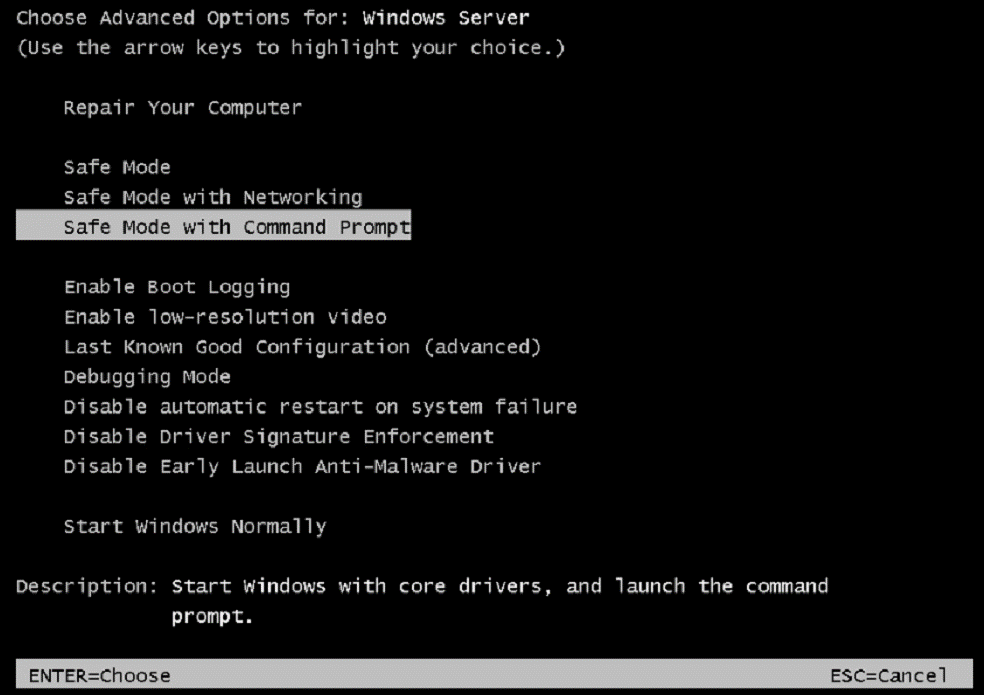
Use the Arrow and Enter keys on the keyboard to select Safe Mode with Command Prompt.
The computer will now boot to the Windows Login Screen.
Note: Computers with Bitlocker enabled will encounter a BitLocker screen and require that a recovery key be entered to boot properly.
Use CTRL-ALT-DEL and login to Windows using administrative-level user credentials.
A Command Prompt window will open.
Enter the commands shown below one by one, striking the enter key after each command:
cd c:\Windows\System32\drivers\CrowdStrike
del C-00000291*.sys
shutdown -r -f -t 3
NOTE: Bitlocker-encrypted hosts may require a recovery key.
Video for Next Steps
Please review the video to walk through the next steps for users that have local administrator rights:
Bitlocker Key Recovery
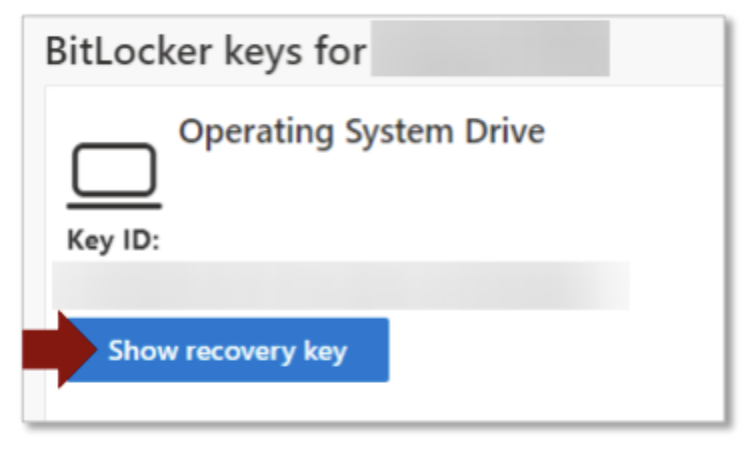
Bitlocker Key Recovery For devices requiring a BitLocker recovery key, the following procedure may be followed from a device that can access the internet via the web browser. If the key is not obtainable via this procedure, contact local IT support for any recovery keys documented offline.
1. Browse to https://myaccount.microsoft.com
NOTE: This can be done on a cell phone if you do not have access to a computer.
2. In the Devices tile, click Manage Devices.
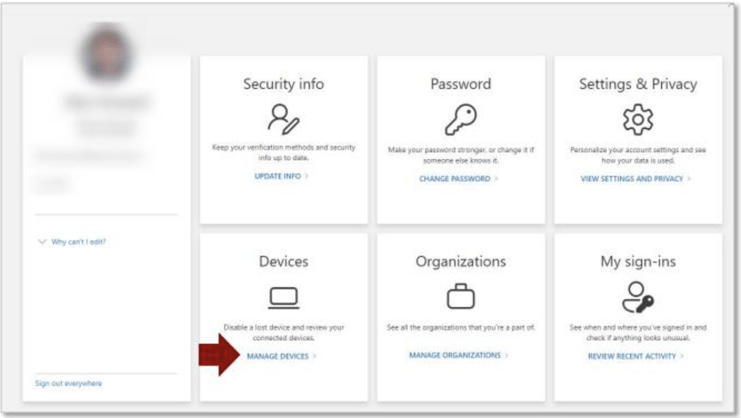
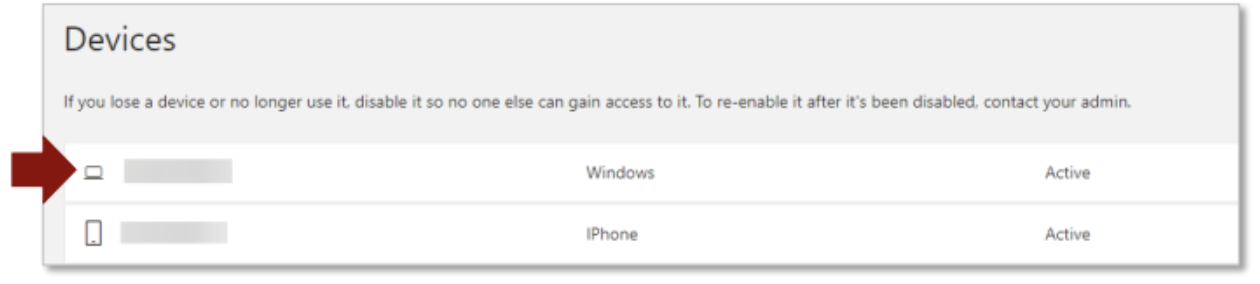
3. Locate the name of the computer you need to get the recover key and click on it.
4. Click on the View Bitlocker Keys button.
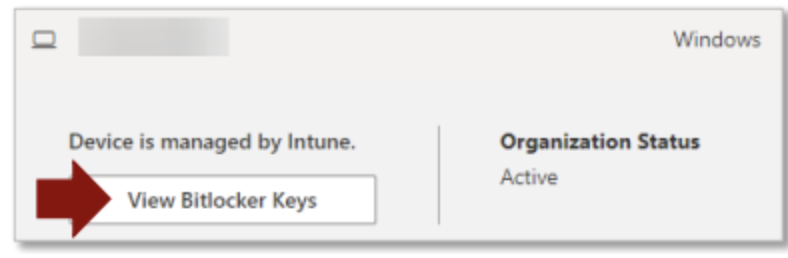
5. Click the Show recovery key button
Bitlocker Recovery without Recovery Keys
CrowdStrike published a document on Saturday, July 20th for Bitlocker Recovery without Recovery Keys. This is an experimental runbook to consider when you need to access the disk in Windows Recovery mode to delete the offending channel file when Bitlocker Recovery keys are not available.
Learn more: https://www.crowdstrike.com/wp-content/uploads/2024/07/BitLocker-recovery-without-recovery-keys-2.0.pdf
As a follow-up to the CrowdStrike Falcon agent issue impacting Windows clients and servers, Microsoft has released an updated recovery tool to help IT admins expedite the repair process. The article details how to recover a workstation using a PXE server and a USB flash drive configured with their published recovery tool.
On-premise and Hosted Servers in Public Cloud or Virtual Environments
Option 1:
- Detach the operating system disk volume from the impacted virtual server
- Create a snapshot or backup of the disk volume before proceeding further as a precaution against unintended changes
- Attach/mount the volume to a new virtual server
- Navigate to the %WINDIR%\System32\drivers\CrowdStrike directory
- Locate the file matching “C-00000291*.sys”, and delete it.
- Detach the volume from the new virtual server
- Reattach the fixed volume to the impacted virtual server
Option 2:
- Roll back to a snapshot before 0409 UTC.
Azure Environments
Please reference the following article from Microsoft.Sample SMS/Email Phishing Attempts
We are receiving reports of end users receiving phishing emails and SMS text messages from threat actors, describing the outage, and requesting the user click a link to acknowledge receipt of the message. Please advise your end users: do not click on these links, and immediately delete these messages.
Remain vigilant and on the lookout for similar suspicious emails. If you have questions regarding the validity of such messages, please contact support.
.jpeg?width=295&height=568&name=image%20(1).jpeg)
Microsoft Azure Impact
Unrelated to the above issue, there is also a Microsoft Azure impact for the Central US region. Starting at 21:56 UTC on July 18, 2024, a subset of customers may experience issues with multiple Azure services in the Central US region including failures with service management operations and connectivity or availability of services.
Current Status: Microsoft is aware of the issue and engaged multiple teams to investigate. As part of the investigation, we are reviewing previous deployments, and are running other workstreams to investigate for an underlying cause.
See the current status and updates here:
https://azure.status.microsoft/en-us/status