
A signed contract that's actually an old draft. A safety procedure on the shop floor that got updated last month, except nobody replaced the printed copy. It’s hard to think of a business in 2026 that isn’t trying to become more efficient, but these types of document control issues are still common, and they’re affecting bottom lines everywhere.
Two-thirds of workers said that poor digital organization interfered with their productivity, and 47% said the online filing systems they worked with were filled with outdated or irrelevant files, which made it harder to find accurate, up-to-date documents. So in this article, we wanted to explore document control in depth — what it is, why it’s important, and how to implement it.
What is document control?
Document control is the discipline of managing the documents that affect your business's operations, compliance, and quality:
- Creating documents
- Reviewing and approving documents
- Distributing documents to the right people
- Retiring documents when they’re no longer current
The goal is simple: Everyone in your organization works from the same accurate, current version, every time.
Document control vs. document management
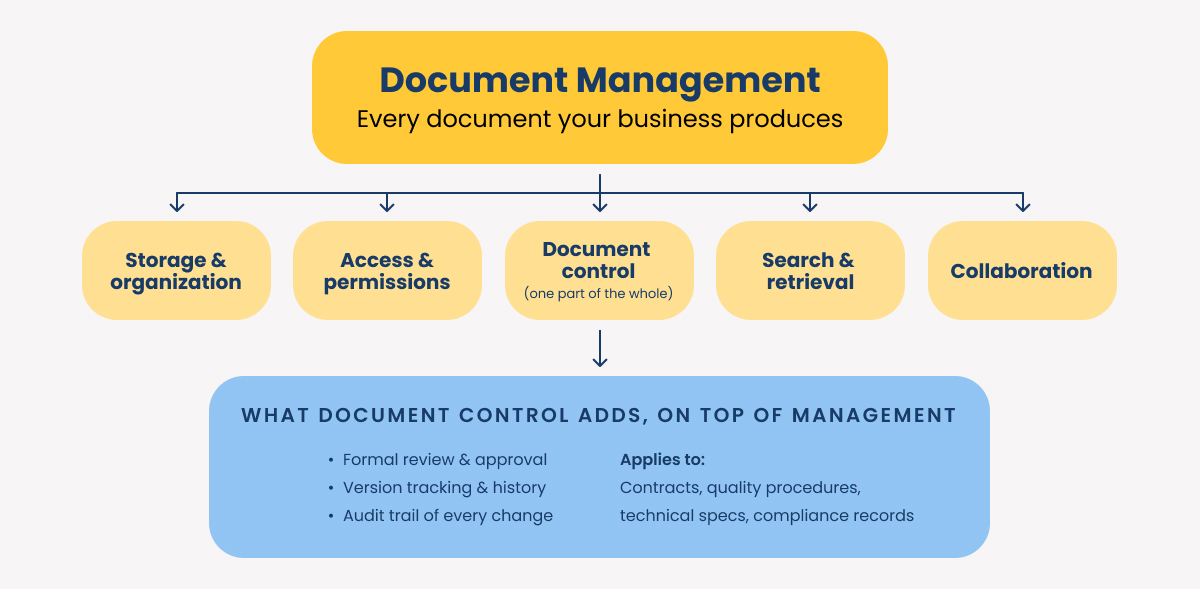
These two terms get used interchangeably, but they’re not exactly the same.
Document management is an umbrella term that covers how your business stores, organizes, and retrieves every document it produces (digital or physical), regardless of how much risk that document carries.
Document control is just one component of document management, and it only applies to documents where any mistakes carry significant risks:
- Contracts
- Compliance records
- Safety procedures
- Technical specs
Documents like these need more thorough review, approval, and tracking.
Why is document control important?
If you’re in a heavily regulated industry, document control isn’t just important. It’s non-negotiable. Healthcare, finance, manufacturing, and legal organizations all operate under standards that require documented proof of who approved a document and when.
But even in industries that aren’t regulated, document control issues can cause bigger problems:
- Employees losing significant amounts of time hunting for the current version of a form or contract
- Teams making decisions based on outdated information, leading to errors and rework
- Departments not collaborating effectively because they don’t trust shared information
7 Best practices for document control processes
A document control process has to cover the full life of a document, not just where it sits in storage.
Here’s what we recommend:
1. Get your people on board
Your employees are the ones who will need to make your document control system and process work day to day. So we’d recommend getting them involved as early as possible, providing thorough training, and sharing your goals for the new process.
2. Classify documents before you organize them
Not every document carries the same risk, so treat them differently from the start. Labeling files as public, internal, or confidential as they're created makes every downstream decision (like who can see it and how long it's kept) easier to set and enforce.
Skip this step and your access controls end up either too loose or too restrictive to work in practice.
3. Set access by role, not by request
Once documents are classified, access should follow job function: a manager gets edit and approval rights, a team member gets view and contribute rights scoped to their own work.
This cuts down on both accidental exposure and the slow drip of one-off access requests that nobody tracks.
4. Track every version, every time
This is where document control most often breaks down.
Without a real version control document process, teams end up working from different drafts of the same contract with no reliable way to know which one is current. A working system tags every version, logs who changed it and when, and makes the current version obvious to anyone who opens it.
5. Build in review and approval checkpoints
Documents that affect compliance or quality need a defined path before they go into use, not an ad hoc email chain. Multiple stakeholders should be able to weigh in and sign off before a document becomes official, especially for anything that will be audited later.
6. Know when to archive and when to shred
Retention isn't a one-time decision when it comes to data security. Map out how long each document type needs to be kept and what happens after that.
A clear schedule keeps your business audit-ready and limits legal exposure during discovery, instead of leaving years of files to sort through.
7. Solve for paper and scanned documents too
A scanned invoice or a signed paper form is only as useful as its indexing: If it isn't searchable, it doesn't matter how well-organized your document management workflow is otherwise.
Optical character recognition can turn a scanned image into searchable, usable text, so paper doesn't become the weak link in an otherwise solid process.
What to look for in a document control system
Policy alone won't enforce any of the above at scale. That's the job of a document control system, and a handful of features separate the ones that reduce work from the ones that just move the problem around.
Look for a document control system with:
- A user-friendly interface to help with onboarding
- A centralized repository where all documents can live in one place, with clear naming conventions built in
- Automatic version control, where version tagging and history are handled by the software
- Audit trails, so every access and change will be logged automatically
- Encryption for your data at rest and in transit
Frequently asked questions
Document control can be powerful, but it’s still underused. If you aren’t familiar with it, here are a few quick answers to common questions.
What's the difference between document control and document management?
Document management covers how your business stores and organizes every document it has.
Document control is the more focused discipline inside that system, applied specifically to documents that carry more risk if they're wrong, like policies, contracts, technical specifications, and compliance records.
What is document version control software?
It's software that automatically tracks every change made to a document, keeps a full version history, and makes clear which version is current. It removes the manual work of managing revisions by hand.
Why is document control important for regulated industries specifically?
Healthcare, manufacturing, finance, and legal organizations all operate under standards that require documented proof of who approved a document and when. Without formal document control, proving that during an audit becomes harder and more expensive.
What is document control and why is it important?
It's the process of managing the creation, review, approval, distribution, and retention of documents that affect your business's operations, compliance, or quality.
It keeps your team working from accurate, current information and lowers the legal and financial risk of relying on an outdated or unapproved document.
Choosing between document control systems
We typically recommend M-Files for document management because it makes things much easier for end-users.
Documents get organized by metadata instead of folder structure, a pre-built automation library shortens implementation, and audit trails and permissions come built in for compliance. We use M-Files internally to run our own operations, and we've also taken the additional step of building a library of tips and resources to help your team get that same return faster.
Click the link below to see what’s available.

