.jpg?width=1200&height=628&name=m365-pricing-changes%20(1).jpg)
Microsoft has announced broad pricing changes to Microsoft 365 that take effect July 1, 2026. That might sound far away, but most organizations will have to start making important licensing decisions well before then. So the time to start talking about it is — you guessed it — now.
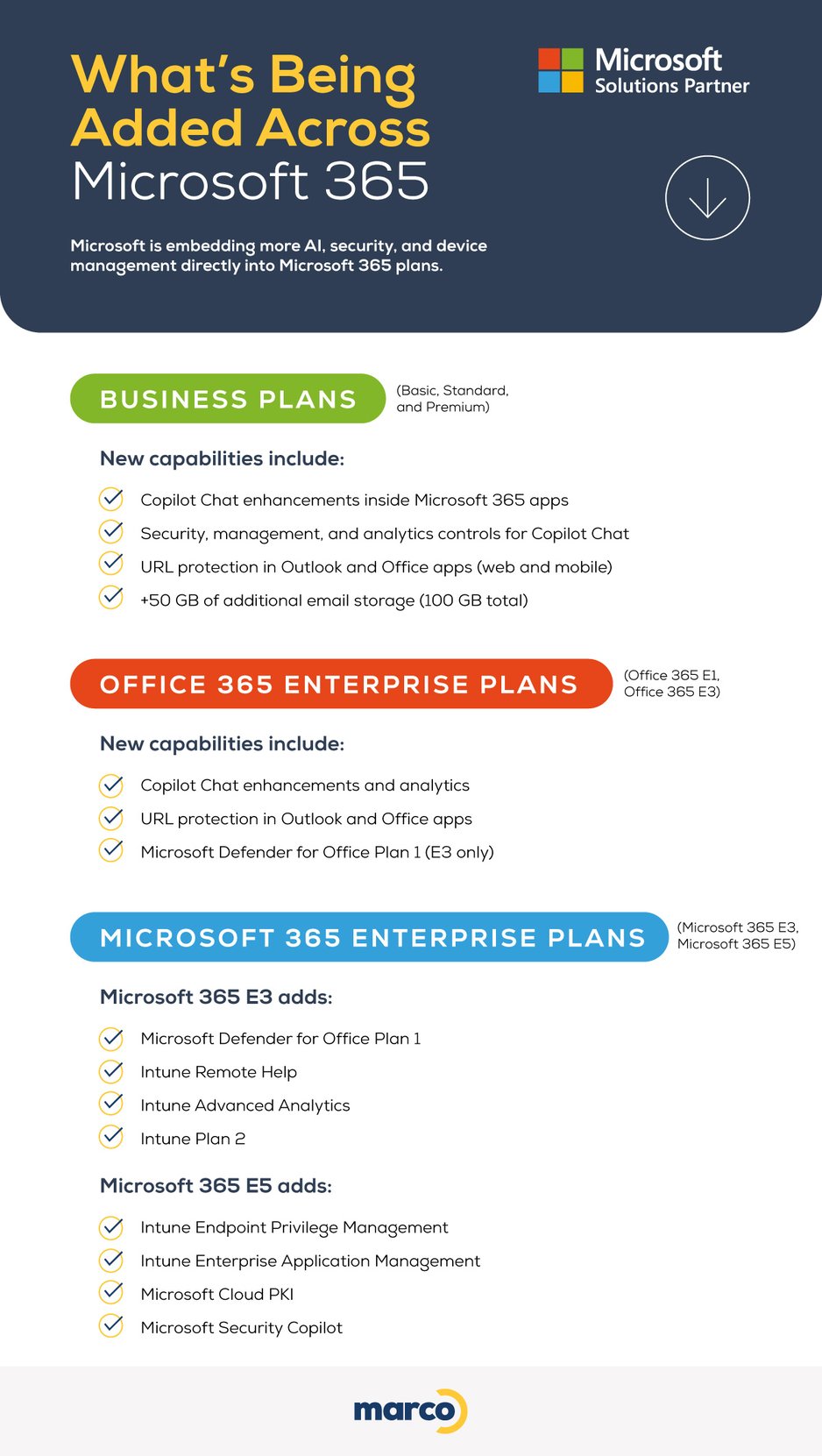
To make this easier to digest, we’ve summarized the pricing changes in the infographic below. We’ll also talk about what’s driving the increase and share some practical tips on how to avoid overspending.
.jpg?width=1200&height=2244&name=m365-pricing-changes%20(1).jpg)
Why Is Microsoft Raising Prices?
Okay, deep breath. This pricing update isn’t just about cost — it reflects how Microsoft continues to add value inside its core licenses.
Over the past year, Microsoft introduced more than 1,100 new features across productivity, security, AI, and IT management. Many capabilities that once required separate add-ons are now included directly in Microsoft 365 suites.
Key areas of expansion include:
AI Is Embedded In Daily Work
Copilot capabilities are now woven into Word, Excel, Outlook, Teams, PowerPoint, and OneNote — supporting drafting, analysis, summaries, and collaboration.
There’s Stronger Built-In Security
Email and collaboration protections, URL checks, and expanded Defender capabilities will be added to plans that previously required separate security licenses.
Enterprise Tiers Get Expanded IT Management
Endpoint analytics, remote help, and advanced device controls are being folded into E3 and E5 tiers, strengthening device visibility and response.
The Increases Are Actually Fair
As Microsoft Solutions Partners who have taken the rare step of getting all 6 partner designations, we have a fairly unique point of view about Microsoft licensing.
We get that it’s frustrating to see prices keep going up all over the place. It’s frustrating for businesses and for individuals. Most of the time, prices go up, but the value doesn’t.
In this case, Microsoft has added a significant amount of value that we believe is proportionate. But that’s only true if you’re getting your money’s worth. Too many organizations aren’t. But that’s a separate (and fixable) problem.
Where Microsoft Is Adding Value
Microsoft is adding new capabilities to its licenses in 2026. Here’s the full list.
Quick Ways To Offset Microsoft 365 Cost Increases
At most organizations, tons of licenses are going to waste. In fact, recent stats show that most companies waste over 30% of their Microsoft license spending. That’s a lot!
So if you’re frustrated with rising costs, here’s where to look first for some easy cuts:
- Advanced licenses assigned to users who don’t need them
- Frontline users with the same licenses as office-based staff
- Security and management features included but never enabled
- Copilot licenses purchased without training or governance
A Step-by-Step Approach to Maximizing Microsoft Value Moving Forward
Besides what we outlined earlier, here’s a more in-depth approach to make sure you’re only paying for what you’re using.
Start with clarity:
- Review ALL current Microsoft 365 licenses and actual usage
- Align license tiers to real job roles, not titles
- Evaluate where Copilot realistically delivers value
- Plan renewal timing early to avoid last-minute surprises
- Stop buying “just in case” licensing moving forward
This isn’t about cutting important tools — it’s about making sure what you’re paying for is actually working for your business.
Your Cheat Tool for Microsoft License Management
There are a few reasons most organizations have so much waste in their Microsoft licenses. For starters, you used to be able to buy software and use it to your heart’s content. Now that most software has switched to a subscription model (you can partly blame software pirates for this), wasted licenses cost you money every month. Unfortunately, licenses aren’t that easy to manage. Staff come and go, roles change, and different departments have different needs.
So we made a better way.
Use Our Microsoft Insights Assessment
Instead of taking hours to sit there and sift through all of your licenses, our Microsoft Insights Assessment takes about 15 minutes to:
- Scan your Microsoft environment
- Identify license waste and security gaps
- Show your Microsoft Secure Score
- Provide tips on how to secure your tools
Once our automated tool is done, our Microsoft Team takes over from there to look for even more opportunities to save money and reduce risk.
What you do with what we find is entirely up to you.
This is a POWERFUL tool that needs special permission to do its thing, so we’ve built it inside our secure portal. But even if you’re not a current client, you can access it for yourself.