A small business phone system is how your customers reach you. It's also how your team stays connected when people work from different locations. Yet many small businesses still rely on outdated landlines or makeshift setups that cost too much and deliver too little.
The good news: Features that used to require Fortune 500 budgets are now available to businesses of every size. Modern cloud-based business phone systems deliver enterprise-grade capabilities at small business prices. The challenge is knowing which ones actually matter to you.
7 essential business phone system features

When evaluating business phone systems, certain features stand out as essential for small business operations. Here are the features that deliver real value:
1. VoIP: the foundation of modern small business calling
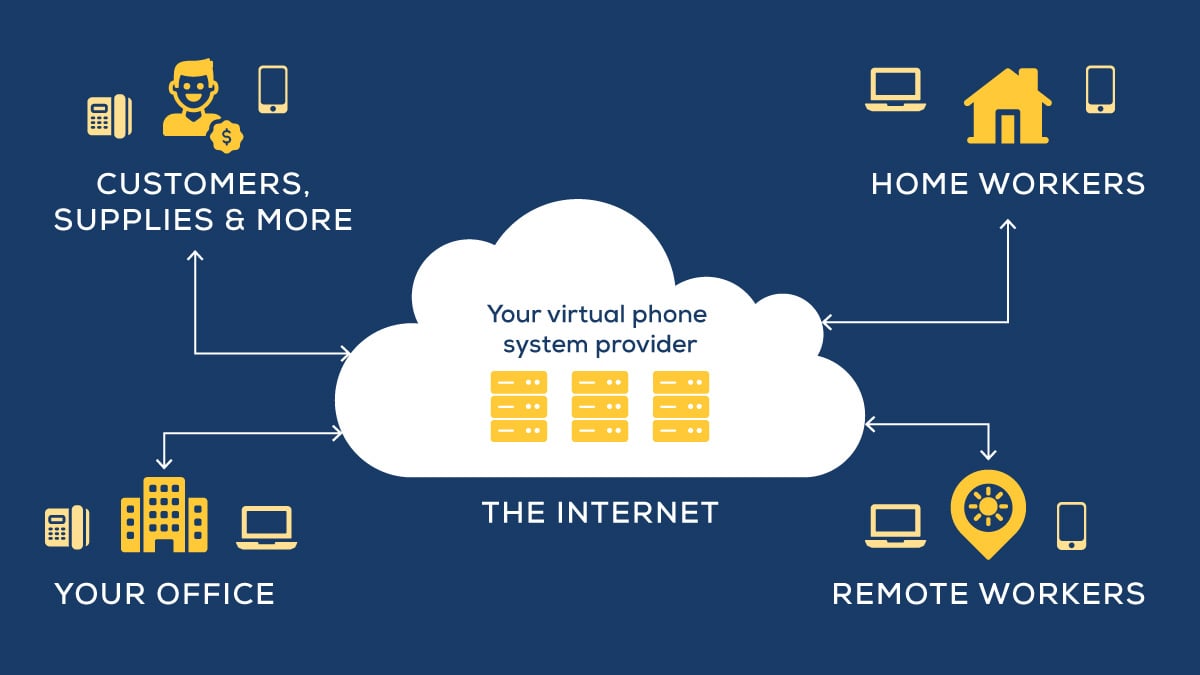
Voice over Internet Protocol (VoIP) replaces traditional landlines with internet-based calling. For small businesses, this is non-negotiable.
What VoIP can deliver:
- Cost savings: 40%–80% less than traditional landlines
- Scalability: Add users in minutes, not days
- Flexibility: Use your business number on any device (desk phone, mobile, computer)
- Reliability: 99.99% uptime guarantees are the industry standard
Why it matters: Small businesses can't afford expensive landline infrastructure or technician visits to add a line. VoIP eliminates that friction entirely. You pay per user per month. You add lines through an online portal. That's it.
The shift is already complete: Most businesses have already transitioned to VoIP, and adoption keeps growing because the case is obvious — the same or better quality, a fraction of the cost.
If you're wondering whether cloud-based business phones are worth it, the numbers speak for themselves: Most organizations save 90% on international calls, 75% on operational costs, and 40% on local calls.
2. Smart call routing and auto-attendant for small business
An auto-attendant acts as a virtual receptionist, greeting callers professionally and routing them to the right place without requiring a human to do call routing all day.
Smart call routing gives you:
- Sophisticated call trees: Multi-level menus that guide callers to departments or individuals without confusion
- Time-based routing: Different handling for business hours vs. after-hours vs. holidays
- Intelligent direction: Route calls based on caller ID, availability, or call history — not just "press 1"
- Custom greetings: Professional messages that reflect your brand voice
Why it matters: Small businesses don't have receptionists. So the system has to be your receptionist. Smart call routing means customers reach the right person without waiting on hold or getting transferred three times. According to recent research, 72% of customers expect to reach the right department without repeating their issue. A good auto-attendant delivers that while you focus on actual work.
3. Mobile integration: your phone system follows your team
Modern small business phone systems include mobile apps and mobile twinning — linking your business number to your cell phone so you're always reachable, whether you're at the desk or across town.
Key mobile features:
- Seamless call transfer: Move active calls from desk phones to mobile without dropping them
- Business caller ID: Present your business number when you call from your phone
- Full feature access: Use the same advanced calling tools on mobile as on desktop
- Unified messaging: Access all voicemail and texts across devices
Why it matters: Remote and hybrid work is standard now. A call to your office should ring your mobile. Period. If your team can't answer business calls from anywhere, you're losing customers. Mobile integration removes that friction entirely. For small businesses, it's the difference between capturing opportunities and missing them.
4. Advanced call management: recording, analytics, voicemail-to-email
Beyond basic calling, modern systems offer sophisticated tools that improve how you handle calls and understand communication patterns.
What advanced call management includes:
- Call recording: Automatically record calls for quality assurance, training, or compliance
- Call analytics: Track call volume, duration, peak times, and which team members handle what
- Voicemail-to-email: Get voice messages as audio files or transcriptions in your inbox
- Call monitoring: Managers can listen in for coaching without the caller knowing
Why it matters: Small business owners often guess about call patterns instead of knowing them. Analytics show you when calls arrive, how long they last, and where bottlenecks exist. This data tells you whether you need to hire, how to staff smarter, and where training would help.
5. Third-party integrations
Your phone system connects to your CRM, helpdesk software, calendar, and other tools you already use.
What integrations enable:
- Automatically log calls to your CRM with customer details
- Create support tickets directly from calls
- See customer history during a call
- Schedule follow-ups or meetings without leaving your phone system
Why it matters: You're already using five different tools for your business. Integrations mean your phone system doesn't become a sixth silo. Customer info is right there when the phone rings.
6. Analytics and reporting
Built-in dashboards show you call volume, peak times, and where calls go.
What analytics and reporting deliver:
- Track inbound and outbound call volumes by day, week, or month
- See which times are busiest so you can staff accordingly
- Identify the most common reasons customers call
- Measure how quickly your team answers calls
Why it matters: Data tells you where to improve. If you're slammed at 2 p.m. every Tuesday, you know to schedule staff then. If calls queue up when one person is busy, you know you need another set of hands.
7. Security and compliance
Phone calls contain customer data, payment info, and private details. Your system needs to protect that.
What security and compliance features include:
- Encrypt calls so conversations stay private
- Record calls securely for compliance purposes (HIPAA for healthcare, PCI for payments, etc.)
- Control who can access what features based on their role
- Keep audit trails so you know who accessed what and when
Why it matters: If you're in healthcare, finance, or legal, compliance isn't optional. Even if you're not, customer data deserves protection. A breach can cost you trust and money.
What is the best small business phone system for you?

Here’s how a business phone expert would approach making a recommendation:
Start with your actual needs
Before comparing providers, document what you need today and what you might need in 2–3 years. Are your people in one office or spread across locations? Do you get call volume spikes? Do you handle sensitive information that needs compliance recording?
A solo consultant prioritizes mobile access and voicemail-to-email. A small call center needs analytics and call recording. A retail business needs an auto-attendant and time-based routing. The wrong priorities waste money on features you'll never use.
If you're comparing cloud-based versus on-premises systems, most small businesses find that cloud-based solutions offer better flexibility and lower upfront costs. But understanding your options is key.
Consider your internet reliability
VoIP requires stable broadband. A typical business VoIP call needs about 100 Kbps per line. Video calls demand significantly more. If your internet is spotty, you have a VoIP problem — not a phone system problem. Check your internet speed first. If it's insufficient, upgrade before switching phone systems.
Understand total cost of ownership
Look past the monthly per-user fee. Consider:
- Setup and implementation costs
- Hardware (phones, headsets, if needed)
- Training time
- Potential IT support
-
Cost to scale as you grow
Most cloud VoIP systems have transparent per-user pricing, making budgeting predictable. Businesses switching from traditional landlines to cloud VoIP typically break even within 6–9 months.
FAQs: common questions about small business phone systems
Here are answers to common business phone system questions.
How much can a small business save by switching from a landline to VoIP?
Typically 40%–80%, depending on your current provider and call volume. A business paying $500/month for landlines might drop to $100–$200 with VoIP. Savings increase with team size.
Do I need to buy expensive equipment?
No. You can use your computer, phone, or existing desk phones. If you want traditional desk phones, VoIP providers usually offer them at an affordable cost. But you don't need them to get started.
Can I keep my existing phone number?
Yes. Most providers let you port your number to their system. By law, providers get up to 30 days to release a number once a proper letter of agency is submitted. Good news — you maintain continuity. Customers keep reaching you in the same way.
What happens if my internet goes down?
Most systems include failover options — calls can route to your cell phone or a backup line. It's not perfect, but it's more reliable than losing all service. Discuss backup options with your provider.
Can a phone system integrate with my CRM or other business software?
Most modern systems integrate with popular tools (Salesforce, HubSpot, Microsoft 365, etc.). Check the provider's integration marketplace before committing, but most of what you'd want is available.
Which features do remote teams actually need?
Mobile apps, call forwarding, voicemail-to-email, and do-not-disturb are essential. Mobile twinning (calls ring your cell phone) is also critical. These features ensure distributed teams stay connected without requiring everyone to be "in the office." Need more details? See our guide to phone systems for remote workers.
Getting started

The right phone system isn't just about features — it's about removing communication friction so you can focus on running your business.
If you're not sure which features matter most for your situation, consider these questions:
- How many locations do you operate? (Affects call routing and scaling needs)
- How mobile is your team? (Affects priority on mobile features)
- Do you have call volume peaks? (Affects need for analytics and scaling)
- Do you handle sensitive information? (Affects compliance recording needs)
Our phone specialists have created a short quiz to help you narrow it down even faster. Click the link below to access it.