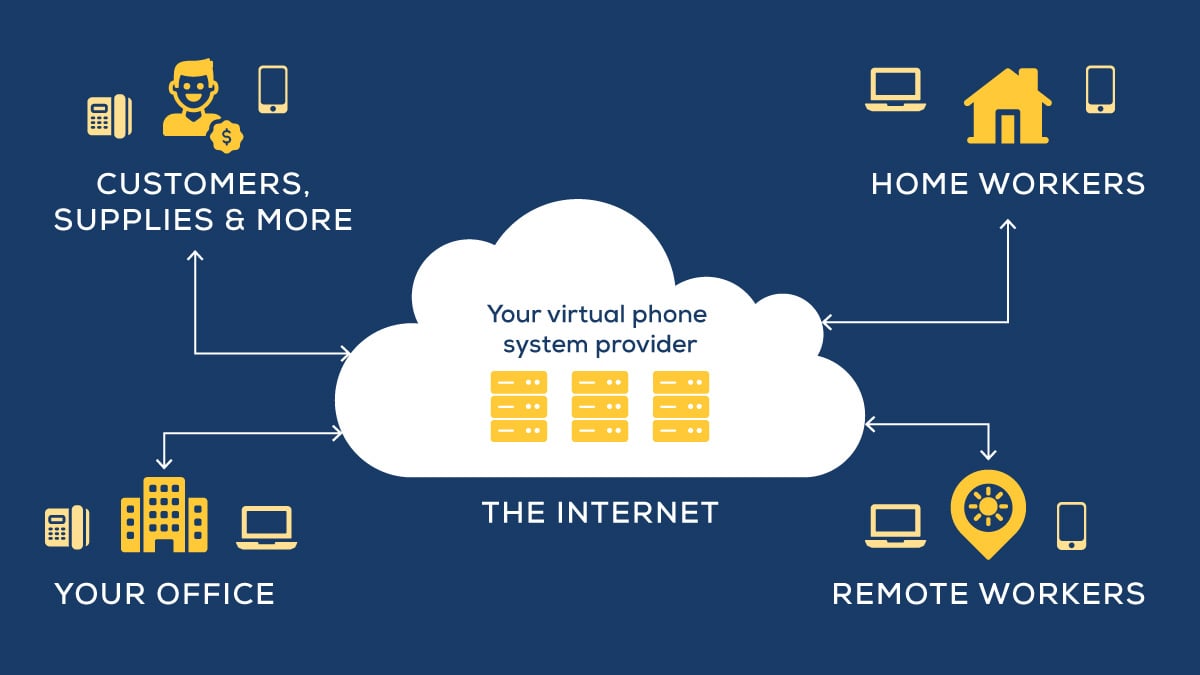
Most businesses didn't choose their current communication setup. They inherited it — a phone system from one era, a video conferencing tool from the pandemic, a chat platform someone added because the old one wasn't cutting it. The result is a stack of overlapping tools that your team has learned to work around, not with.
Unified communications solutions address exactly this problem — not because they're a shiny new platform, but because the productivity gains and cost savings are measurable in ways most technology decisions aren't.
What Is the Difference Between UC and UCaaS?
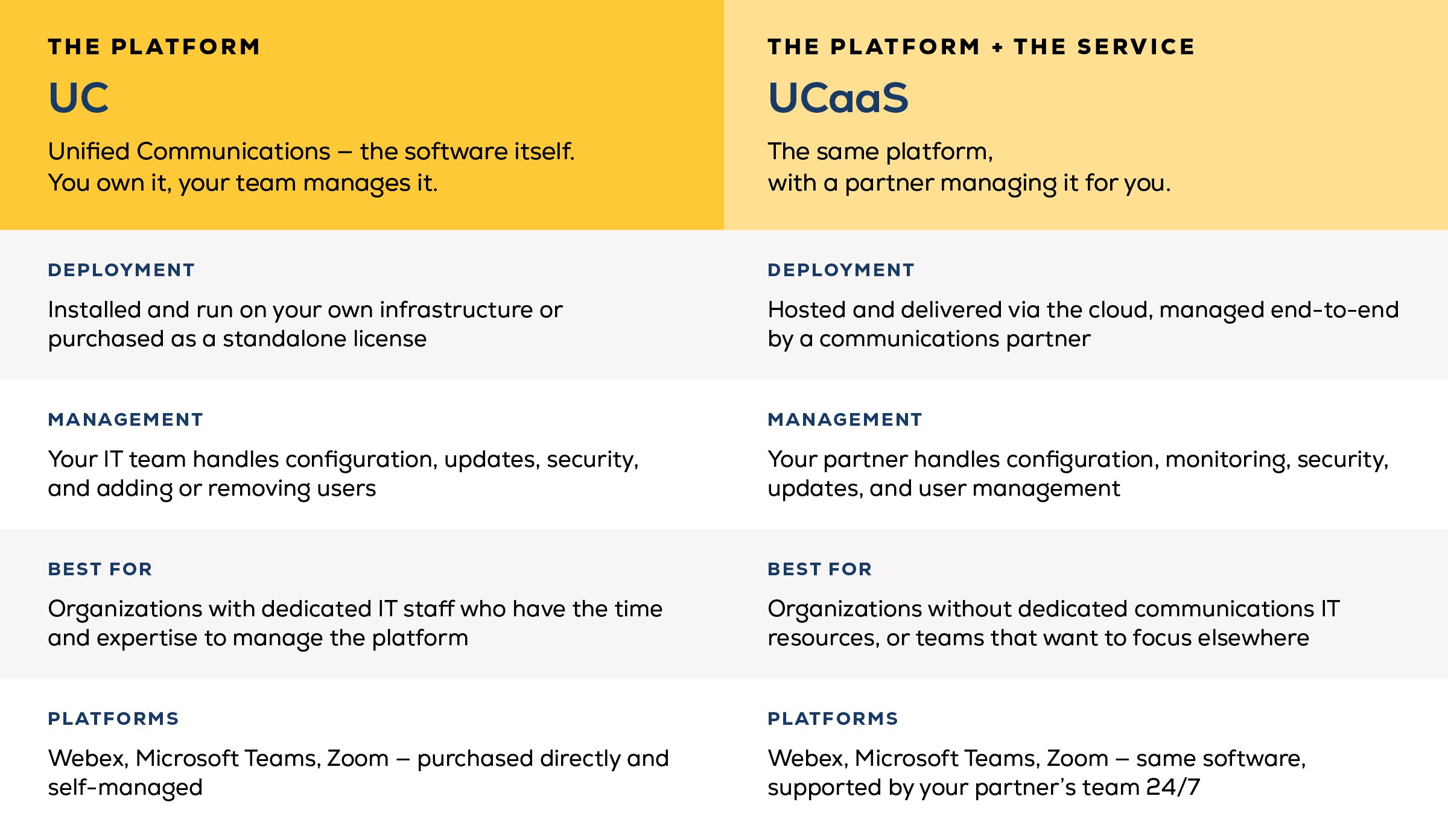
Unified communications (UC) platforms — Webex by Cisco, Microsoft Teams, Zoom — integrate voice, video, messaging, and collaboration into a single system. Your employees can join a video call from home, receive voicemails in their inbox while traveling, and see whether a colleague is available for a call, all without leaving the platform.
Using these platforms is incredibly simple. Setting them up and securing them is a different story.
Unified communications as a service (UCaaS) is what happens when you pair that platform with ongoing service. Configuration, security, user management, and support require real expertise. If your internal IT team has bandwidth for that, great. If not — and for most mid-sized businesses, they don't — a UCaaS partner handles it for you.
Why Traditional Phone Systems Fall Short
Plain Old Telephone Systems (POTS) were built for a different era of work. They struggle to keep up with how businesses actually operate today:
- Adding or moving staff requires new equipment and installation costs every time.
- A single component failure can take the whole system down.
- Features like call routing and conferencing are limited, leading to long wait times, dropped calls, and frustrated customers.
The workforce has changed. The tools need to match.
How Unified Communications Solutions Improve Employee Productivity
Fragmented communication doesn't just create friction — it has a measurable cost.
In fact, recent stats back that up:
- 86% of employees and executives point to poor collaboration and communication as the primary driver of workplace failures
- 97% of employees say communication tools affect their task performance every day.
- When businesses invest in better communication technology, productivity can increase by up to 30%
Here's where those gains actually come from:
Unified Messaging
Instead of checking multiple inboxes and apps, employees access voicemails, emails, and messages from a single platform. That consolidation alone saves more than 40 minutes per employee.
Find Me, Follow Me
This feature routes calls to whichever device an employee is currently using — desk phone, mobile, laptop — so calls reach the right person the first time. Instead of missed calls, callbacks, and time spent tracking people down, the call just gets there.
It’s often estimated that this simple feature will save employees about 30 minutes a day.
Dynamic Extensions and Teleworking
Employees can sync their desk, mobile, remote, and home phones under a single extension, so they're reachable wherever they are. Corporate voicemail, conferencing, and security features travel with them — no workarounds, no separate logins.
Hotdesking
Employees can temporarily move to a different workstation and keep their personal settings and phone configuration intact. For distributed teams and flexible offices, this removes a common source of daily friction.
Video Conferencing
Desk-to-desk video builds the kind of face-to-face connection that voice-only calls can't replicate. For remote and hybrid teams, this matters for both collaboration and culture.
Is Unified Communications Worth the Investment?
Just two data points — 30 minutes from find me, follow me, and 40 minutes from unified messaging — add up to roughly 70 minutes saved per employee, per day. That’s a conservative estimate of how much time this tool actually saves you, but let’s go with it.
For an organization of 100 employees at an average rate of $50/hour, here’s the math:
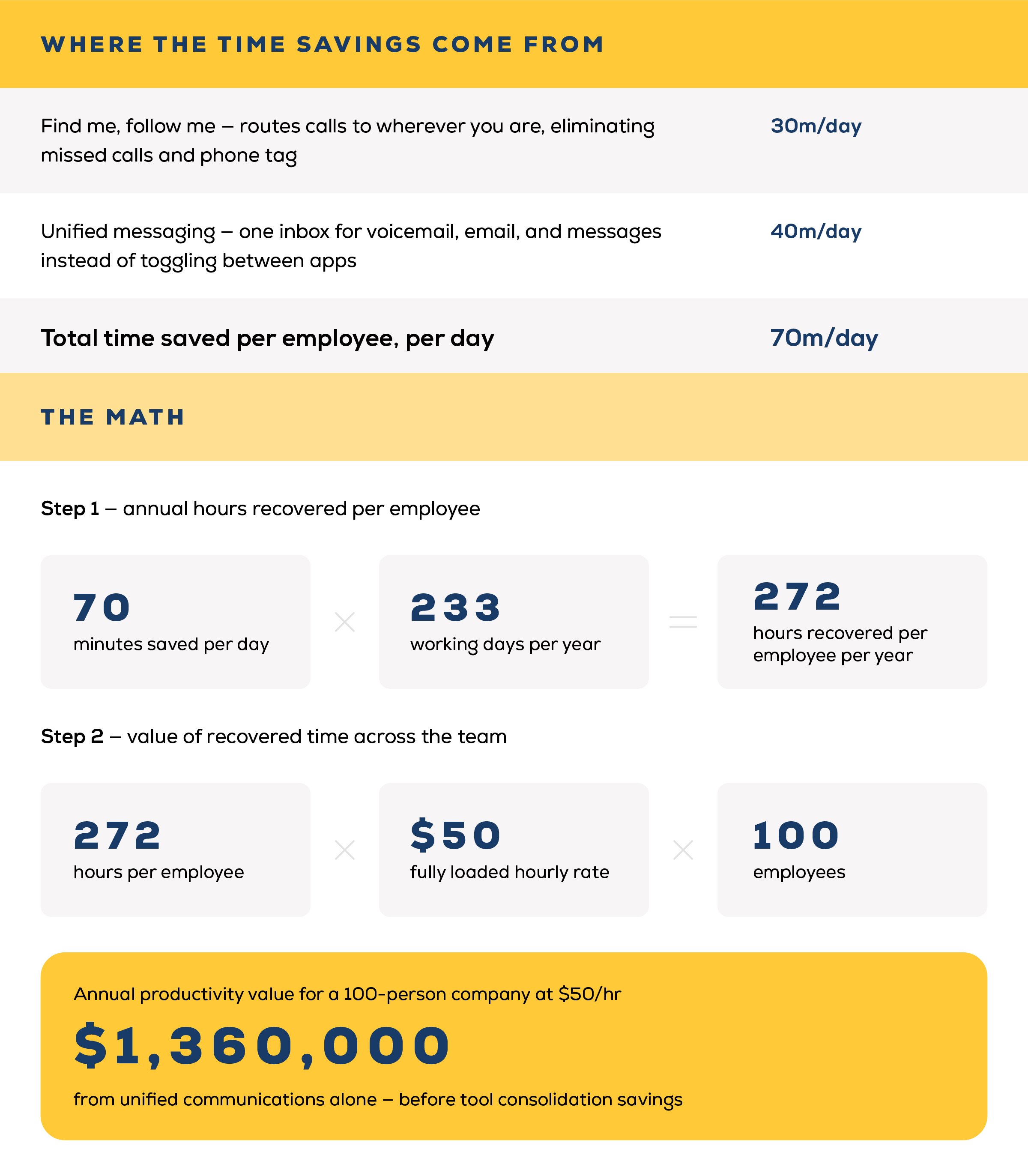
Of course, that math doesn't include the harder-to-quantify gains: fewer miscommunications, faster onboarding, and fewer dropped handoffs between remote and in-office staff.
But for most organizations, the productivity savings alone are compelling.
How Much Does Unified Communications Cost?
Add up what you're currently spending across separate voice calling, messaging, chat, webinar, and teleconferencing platforms. Many organizations find that consolidating onto a single unified communications solution actually reduces their overall communication tool spend, often while gaining more functionality than they had before.
There's one more number worth pulling: Ask your IT team how many hours per month they spend supporting your current communication tools. IT time is expensive time, and that's a cost that rarely shows up on a technology line item.
A UCaaS partner absorbs that support burden, which frees your team to focus on work that actually moves the business forward.
How Marco Approaches Unified Communications
Marco supports unified communications across the platforms businesses are already using — Webex by Cisco, Microsoft Teams, and Zoom. Whichever platform fits how your team works, Marco provides configuration, 24/7 monitoring, help desk support, management, and security, so your internal team doesn't have to carry that load.
Not sure which platform is the right fit? Our phone system quiz can help you dial it in quickly and point you toward the solution that would work best. If you're unsure what your current communication environment is actually costing you, that's the right place to start.