In order for most companies to operate efficiently on a daily basis, employees need reliable access to printers, copiers, fax machines and scanners. While some businesses may opt to provide each employee with a desktop printer, for larger companies this would be a functional and financial nightmare. Most large corporations and government agencies, for example, provide shared devices accessible over a local network.
When it comes to the printers, copiers or multifunction printers (MFPs) in your office, what consideration was given to printer location? How important do you think printer location is to the efficiency of your workforce and productivity? In this case study, you'll see just how important the location of MFPs and other devices can be.
The Situation: Government Agency in a Pre-MPS Environment
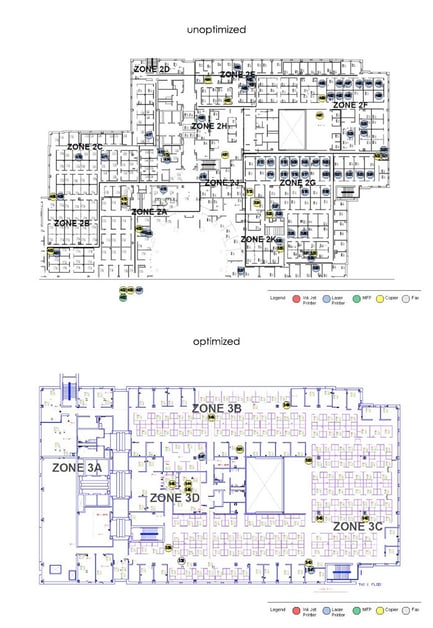
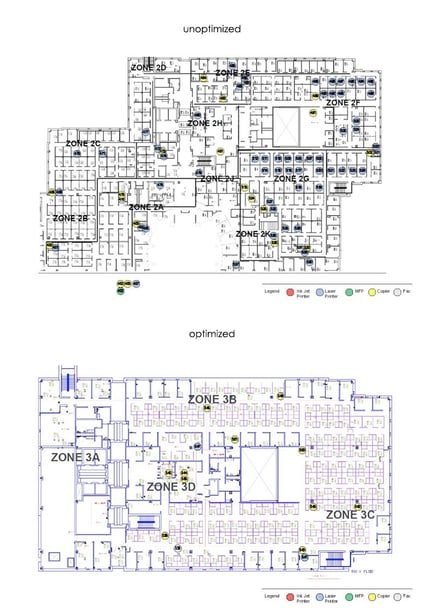
Before turning to managed print services (MPS), a local government agency’s two-floor office space was a complex assortment of laser jet, copier, fax and scan equipment that consisted of 438 devices in total, with 146 unique models from 10 different manufacturers. With such a large fleet of MFPs scattered throughout the office and no viable means of managing the devices, the print situation was a challenge.
Issues & Frustrations Pre-MPS
As a municipality, this organization deals with a variety of operations on a daily basis. Print needs range from the average print job (such as meeting notes, itineraries) to the large-volume scan jobs and confidential materials. Among the frustrations the employees in the office and the IT staff dealt with were:
- The need for secure printing in particular departments
- Desktop printers required for employees with client-facing roles
- Wait times for faxing (both transmission and reception)
- Confusion on where to send print jobs
- Frustration in sorting and tracking print jobs, as well as end-of-day shredding practices
There were other issues facing their office as well. For example, the IT staff had to deal with pockets of antiquated equipment throughout the office that required more maintenance than their modern MFPs. Additionally, there were certain sectors of the office (i.e. Community Services) that required special consideration in print management, with unique approaches needed to meet those demands.
Perhaps the most frustrating was the financial aspect. Before MPS was introduced into the workplace, ordering supplies and replacement parts, and requesting service ate up valuable IT hours and cost the office a lot of money. Let’s quickly look at an average request for toner:
The end user would have to request toner from an internal resource. That resource would then send the request on to the office's current supplier. The toner would arrive the next day, or in two days if a PO was required.
The Dakota County IT staff spent most of their time acting as first-line support for end-user requests. Countless hours were wasted trying to triage situations in the office, rather than focusing on long-term print management. Pre-MPS, the IT staff dealt with an average of 32 print-related tickets each month.
Marco Introduces Managed Print Services
Marco met with the office managers and IT support staff to implement a managed print services plan. This agency’s IT staffers not only needed a more efficient system to manage, but greater goals for the implementation of MPS included a move to paperless documentation, faster turnaround on service requests and increased productivity.
The MPS process started with an assessment and mapping of their current print environment. Immediately it was evident that the print fleet could be reduced by 30%, a move that would save money without impacting productivity and efficiency. A technology refresh was adopted, wherein modern equipment was installed (such as multifunction printers) to improve efficiency.
At the same time, the delivery of client experience in areas such as Community Services remained the same. Employees with desktop printers that required them to maintain client experiences, kept those devices. Targeted areas were established that offered scan and copy options with multiple devices, but avoided the redundancy of multiple devices that performed the same functions.
So what did the print environment inside the office look like after MPS was implemented?
- Device fleet dropped from 438 to 320 (a 30% reduction)
- Output remained the same: 1,024,160 b/w prints and 83,497 color prints
- Hours of internal IT support was replaced by managed outsourced support
- Partner for supplies and parts decreased to one
- One monthly invoice was received
- Accurate visibility of MFPs
- Strategic management rather than tactical triage
This government agency quickly found out how important printer location is in the workplace. With a reliable MPS program in place, the county increased efficiency and workflow in all operational areas, realized significant savings in print-related expenses, consolidated its vendor contacts and improved its on-site and support desk assistance and, all without sacrificing services in client-facing positions.
Learn more about how MPS programs take into account printer location:











