
SD-WAN (Software-Defined Wide Area Network) is a networking technology that uses software to manage and route traffic across a company's network. It gives IT teams greater control over bandwidth, prioritizes critical applications like video conferencing, and adapts routes in real time based on network conditions.
Essentially, SD-WAN technology is much better equipped to handle the back-and-forth, complex traffic that cloud computing demands.
What does SD-WAN do?
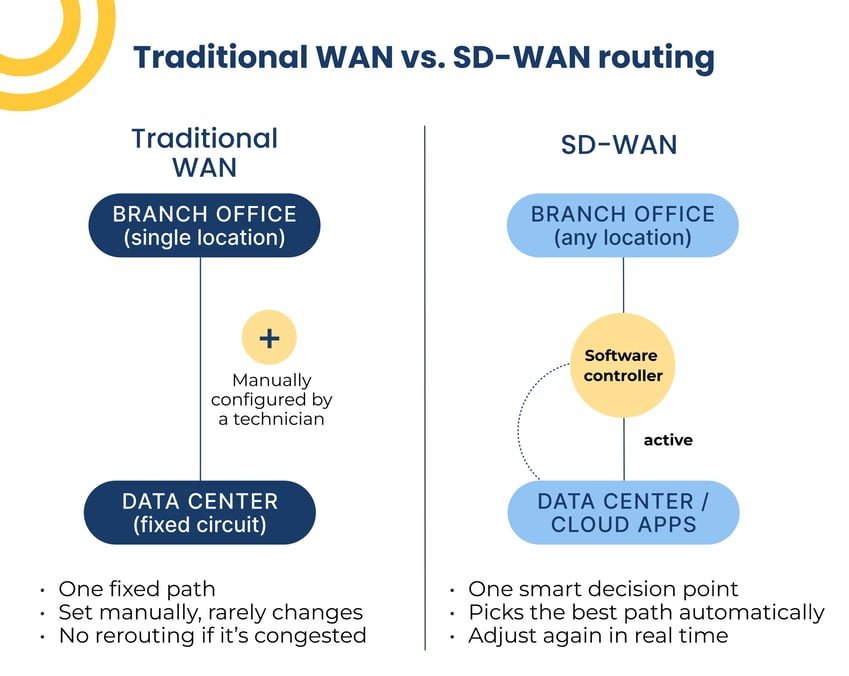
Think of a traditional WAN like a single-lane country road. It’s fine when traffic is light, but it backs up fast once you add more destinations and more demand.
SD-WAN does more than just adding lanes. It acts like a GPS, routing traffic along the fastest available path and giving priority to the applications that need it most.
SD-WAN, in a nutshell:
- Combines multiple connection types — MPLS (dedicated private circuits), broadband, and LTE — into one managed network
- Uses centralized software to set and update routing rules
- Continuously adjusts based on real-time network performance
- Prioritizes bandwidth for latency-sensitive tools like voice and video
SD-WAN technology explained
Every router on a WAN has two components: a data plane, which carries the traffic, and a control plane, which decides where that traffic goes.
On a traditional WAN, a technician manually configures the control plane for every router, a slow process that leaves plenty of room for error.
SD-WAN centralizes that control plane within software. That may sound like a small change, but it means that network admins can write new routing rules once and push them across the entire network almost instantly, instead of reconfiguring hardware one device at a time.
Why this matters for growing businesses
As companies add locations, cloud tools, and remote employees, a manually configured WAN becomes harder and harder to maintain. SD-WAN's centralized management scales with that growth without requiring a bigger in-house networking team.
Types of SD-WAN solutions
Not every business needs to manage SD-WAN the same way. SD-WAN solutions generally fall into three categories, and the right one often depends on how much business connectivity complexity you're managing across locations:
Self-Managed SD-WAN
Your internal IT team owns setup, configuration, and ongoing maintenance. This works if you already have dedicated networking expertise on staff.
Co-Managed SD-WAN
Your team and a managed service provider split responsibilities — often internal staff handles day-to-day changes while a provider manages performance monitoring and troubleshooting.
Fully Managed SD-WAN
A provider handles the entire lifecycle: design, deployment, monitoring, and updates. This is the most common path for businesses without a large internal networking team.
Of course, choosing a deployment model assumes you've already decided SD-WAN is the right move. For a lot of businesses, that's still an open question, and it usually comes down to SD-WAN versus the MPLS connection they already have.
Deciding between SD-WAN vs. MPLS
MPLS (Multiprotocol Label Switching) was the standard for connecting branch offices before SD-WAN existed, and it's still in use today. Here's how the two compare:
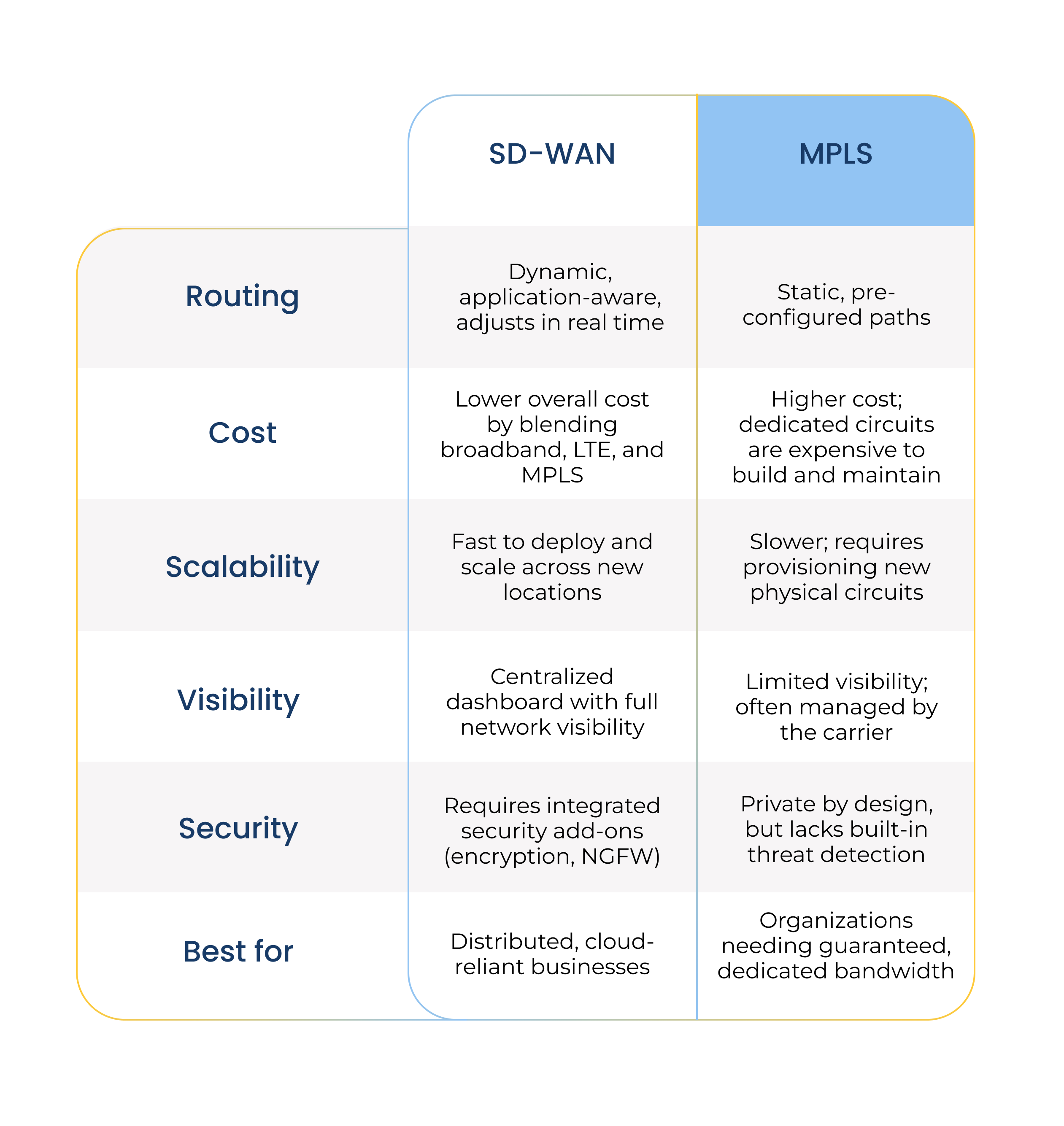
Pro tip: A hybrid approach that layers SD-WAN over an existing MPLS connection is common during a phased migration. If you're planning that kind of transition, make sure to understand the WAN implementation process ahead of time, so you can avoid a disruption.
SD-WAN security: what to look for
SD-WAN isn't secure by default — it depends on what's built into the solution. Because SD-WAN increases the number of direct-to-internet connections instead of backhauling everything through a central data center, integrated security has to be part of the architecture, not an add-on.
Look for:
- Integrated next-generation firewall (NGFW) capabilities
- Built-in encryption for all traffic, not just select paths
- Centralized threat visibility across every location
- Compatibility with a broader security framework like SASE (Secure Access Service Edge)
A poorly secured SD-WAN deployment can actually widen your attack surface. This is one of the main reasons businesses choose a managed provider over a DIY build.
What SD-WAN managed services should include
networking expertise most internal IT teams don't have time to build in-house. That's the gap managed SD-WAN services are designed to close.
A managed services provider typically handles:
- Initial network design and hardware selection
- Deployment across all business locations
- 24/7 monitoring and performance management
- Security patching and threat response
- Ongoing optimization as the business grows
For most mid-sized businesses, a managed solution ends up being more cost-effective than hiring and retaining specialized networking staff.
Frequently asked questions
Thinking of upgrading your network? Here’s what to know.
What does SD-WAN stand for?
SD-WAN stands for Software-Defined Wide Area Network. It's a networking approach that uses software to manage traffic routing across a business's network connections.
Is SD-WAN more secure than MPLS?
Not automatically. MPLS is private by design but lacks built-in threat detection. SD-WAN can be more secure than MPLS, but only when it includes integrated security features like NGFW and encryption.
Do I need managed SD-WAN services, or can I manage it myself?
It depends on your internal IT capacity. Businesses without dedicated networking staff typically benefit from a fully managed or co-managed SD-WAN solution to handle deployment, security, and monitoring.
Can I use SD-WAN and MPLS together?
Yes. Many businesses run a hybrid model, layering SD-WAN over an existing MPLS connection during a phased migration rather than switching all at once.
How much does SD-WAN cost?
Cost varies by provider, number of locations, and whether it's self-managed or fully managed. In general, SD-WAN reduces overall network costs compared to MPLS by blending in lower-cost connections like broadband and LTE.
Finding the best business network solution
If you’re on the fence about a network upgrade, we can help you get some real numbers around what kind of ROI you can expect, as well as the smartest path forward.
We can take a look at your current network, what you need it to do, and design a solution built to fit your needs. We can also help with the patching, proactive monitoring, immediate issue detection, and the day-to-day management most internal IT teams don't have time for.