As a small-business owner, you are undoubtedly accustomed to keeping a close eye on your budget. Whether you are purchasing new office supplies or making capital investments, your budget is the central factor as you make your decision. If you're frustrated with your current printer, copier and/or scanning devices, it might be time to upgrade to a multifunction printer.
Given the limiting factors of your small-business budget, you want to know that your investment is a wise one. Below you'll find the many benefits your small business will enjoy courtesy of a new multifunction printer.
The Benefits of a Multifunction Printer for Small Businesses
Cost Savings
Although your investment of a single multifunction printer (MFP) may be higher than a stand-alone printer, copier or scanner, you have the capacity to perform all of these operations, and more in one compact unit.
On top of that, long-term usage and maintenance costs are lower with an MFP. Rather than purchasing toner/ink, paper and maintenance services for multiple devices, you only need to pay for those supplies and services on a single monthly fee.
Simplified Inventory Management
With multiple devices in your office, you have to purchase supplies from various manufacturers for different makes and models. A multifunction printer means you'll purchase all of your supplies for one type of device — from one vendor.
Space Savings
An MFP cuts down on the amount of space you need to copy, print, scan and fax. With all of these functions performed by one device, you only need to devote one small area of your office for the MFP, rather than several different locations. With supplies only required for one device, you also save room on storage.
Greater Functionality
With the advent of email and cloud computing, fax machines are increasingly less common in offices today. However the need to fax hasn’t vanished completely. With many MFPs, your company can easily add the ability to send or receive the occasional fax without the added expense of purchasing and maintaining a separate, single-purpose machine.
On a similar note, a multifunction printer opens up a whole new world of workflow opportunities, file sharing and storage with its scanning function.
Convenience and savings are some of the benefits of a multifunction printer for small business. Your employees will benefit from the added conveniences a MFP provides for document creation, duplication, sharing and storage – plus you’ll save space, dollars and time!
Now, there are a wide variety of multifunction printers available on the market today. But every machine isn't great for every business. Some are ideal for large corporations, while others are geared towards small business. Some are designed for specific printing requirements while others appeal to a broader segment. Here are four steps to take when searching for the best multifunction printer for your small business.
4 Steps to Choosing the Right MFP for Your Small Business
Step #1: Assess Total Cost of Ownership
The cost of a machine is different from a machine's total cost of ownership. In the graphic below, we've outlined hot to determine the total cost of ownership of a print device.
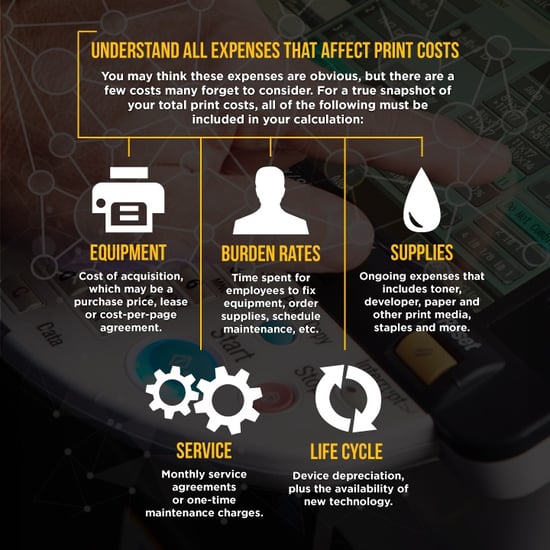
Beyond the cost of the hardware itself, supplies, services and the efficiency of the printer all have an impact on the total cost of ownership. For example, an inkjet may cost less upfront for your business, but in the long run, most businesses find that the cost of ink replacements drives total cost of ownership is higher than comparable laser machines.
In this case, you could end up spending more money on the inkjet printer in the long run, when you could have spent a little more upfront to save money over time on a more efficient machine.
STep #2: Evaluate Necessary Functions
Evaluate the printing requirements of your employees when selecting the best MFP for your office. Is your business a print-heavy operation that rarely uses scanning, copying and/or fax features? Or does your company rely upon all of these features to operate effectively on a daily basis?
Functions such as printing, scanning and faxing may be valuable features, but if copies are a necessity for operations, your search should start with a focus on multifunction printers that offer high copy quality before focusing on optional features.
Step #3: Consider Workflow Improvements
When selecting the best MFP for your small business, evaluate its ability to improve the workflow in your office. In many offices, multiple employees rely on a single device for printing, copying, scanning and more.
In these environments, offices require a machine that can perform multiple functions simultaneously. This enhances productivity and streamlines workflow. So, take time to assess your workflows and determine if your multifunction printer(s) can provide any improvement opportunities.
Step #4: Insights and Analysis
Consider all the extras that can take an MFP from a device to a business improvement tool. Your multifunction printer(s) could have the ability to monitor the flow of data regarding job status, print queues and device readiness between users and IT administrators. This information equips you and/or your service provider to identify improvement and cost-saving opportunities.
Finally, be sure to evaluate the provider’s commitment to device management tools, utilities and services available. A less expensive multifunction printer with little to no support from the provider is going to cost more money in the long run. Look for a device that comes with a complete suite of device management and support tools.
You could also look into managed print services. There are firms that provide maintenance and help desk support to ensure your device has maximum up time and a steady flow of supplies, while preventing disruption of your employee’s print workflow.
For assistance finding the best multifunction printer for your office, request a consultation with a Copier and Printer Specialist.