Zebra printers have a solid reputation for reliability even in harsh conditions. But even printers known for their reliability need a little TLC now and then. Printers have a difficult job and aren’t always given the same respect and care as other smart devices.
If your Zebra label printer isn’t performing like it used to, your first step is to see whether you can resolve the issue yourself or if it needs professional repair. Fortunately, Zebra has a simple test — a pause test — that can either help you avoid the cost of a professional repair or get a technician on the road sooner.
General Troubleshooting Tips for Poor Quality Printing
Is your printer producing faded-looking labels, not printing the full label, or producing labels with black or white lines through them? Depending on what’s wrong, you may be able to solve the problem yourself.
In fact, it may be as easy as running a pause test, which is why we suggest doing that first.
1. Try Running a Pause Test on Your Zebra Label Printer
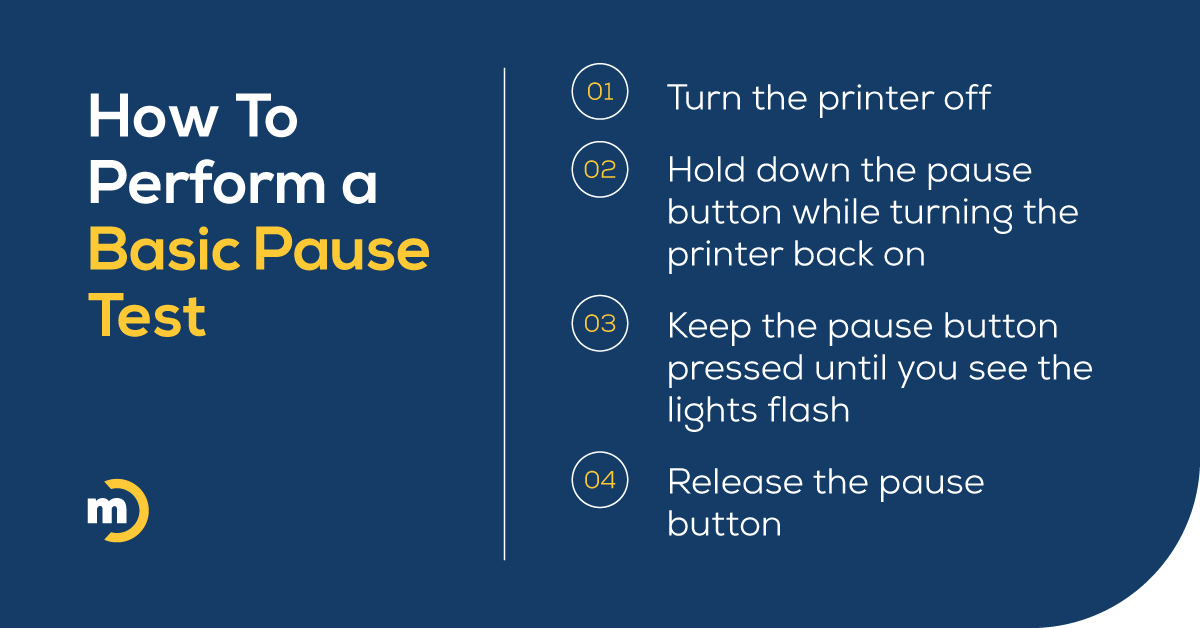
If your labels are now being printed perfectly, you’re good to go. If the labels are still faded or have white lines running through them, your next step is to try cleaning your printer.
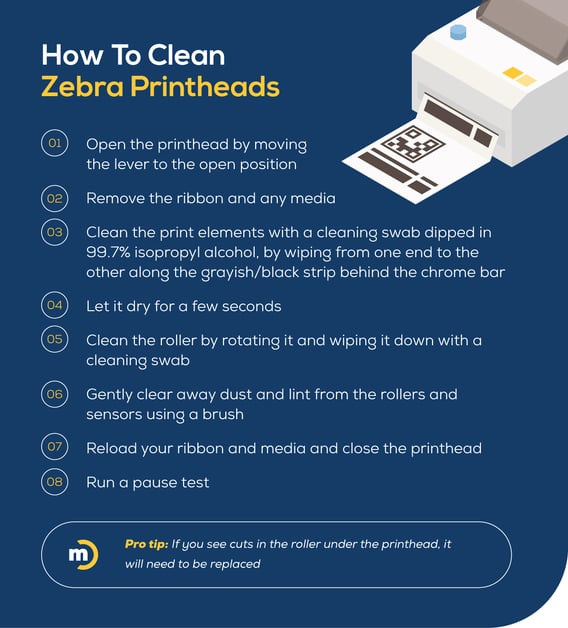
2. Clean Your Zebra Barcode Printer’s Printheads
Adhesive residue and dust are common causes of poor performance. So it’s a good idea to make sure your staff keep the cover down when they’re using the Zebra. The cover is designed to help the printheads stay clean longer!
However, periodically, Zebra printheads will still need to be cleaned.
3. Additional Fixes for Poor Print Quality
If your images are printing too light, try slowing down your print speed. If your labels still look faded, try boosting the heat or darkness setting. It’s also a good idea to make sure you’re using the right ribbon for your label materials and that your labels are loaded correctly.
If those fixes don’t work, make sure you’re using the latest firmware and drivers. Believe it or not, sometimes using outdated firmware and drivers can cause compatibility issues that affect print quality.
What To Try If Your Zebra Printer Labels Are Skipping
If you notice paper or ribbon out errors, or if your printer is routinely skipping labels, hit pause and select calibrate. If you don’t see this option, you can find calibration instructions for your model on Zebra’s website.
Your printer will then recalibrate its sensors and run through a few labels. If it stops printing precisely at the peel edge, the calibration was successful. If a label is sticking halfway out or you get an error message, check the sensors and rollers for dirt or signs of wear and tear. Then clean or replace them as necessary.
If that doesn’t work, and you’re sure that your printer drivers are up-to-date and the right software is being used, try using the printer on a different label roll to see if the problem is caused by the labels — not the printer.
If the problem isn’t the labels, and none of the above works, it may be time to call a pro.
What If Labels Are Misaligned or Skewed?
These issues can also be caused by a calibration issue. If recalibration doesn’t fix these issues, here are a few other potential solutions.
For misaligned labels, if recalibrating doesn’t work, check your label format settings and try adjusting the label guide position.
For skewed labels, double-check the label guide and label stop position. If those are correct, check your print head pressure.
What To Do If Your Settings Won’t Save
This issue can be caused by your labeling software or a print driver.
Check your label properties in your software to make sure they’re set correctly. You can also try navigating to your printer settings in your driver, and then selecting “advanced setup” and “use printer settings.” This setting should stop your software or driver from reverting to earlier settings.
What To Do If Your Ribbon Is Wrinkling or Breaking
This shouldn’t happen often if you’re using the correct ribbon type, the pressure and tension are set correctly, your ribbon is threaded correctly, and it isn’t worn out or defective!
However, these issues can cause some downtime, so if you have recurring problems with your ribbons, it may be time to get your printers professionally maintained. We’d also recommend professional maintenance for any organization where printing disruptions are more than simple annoyances.
How To Keep Your Zebra Printers Running Like New
Printers are often the cause of workplace frustration, but they really aren’t out to ruin your life. In many ways, they are expected to do more than a laptop, but are rarely given the maintenance and care they need. When they aren’t maintained on a proper schedule, you’re going to see more disruptions and issues with print quality.
If you have managed print services (MPS) for your other workplace printers, you already know how much a little maintenance can do to head off problems before they happen. MPS provides a large number of additional benefits for businesses, but if your current provider doesn’t include your industrial printers, it might be time to shop around.
The Easiest Way To Get Zebra Printer Support and Repair
One of many reasons we love Zebra printers is that their current lineup is designed to integrate with more systems and can be easily managed remotely by the right provider!
At Marco, we can provide MPS on every printer — including Zebras! We also include print security as part of our regular offering.
Our print software is top-of-the-line, so we know when something’s about to happen before it causes a disruption, and can send a technician out to address it quickly. Finally, as a Premier Zebra Business Partner, we know Zebra’s product line inside and out, so we can always provide best-in-class support.

