When it comes to computers, we have more choices than ever and that can easily lead us to carry more devices than ever. I have eight or nine. Yes, that is too many and mostly due to the fact that I crave new technology, and get paid to test it out and identify the best options.
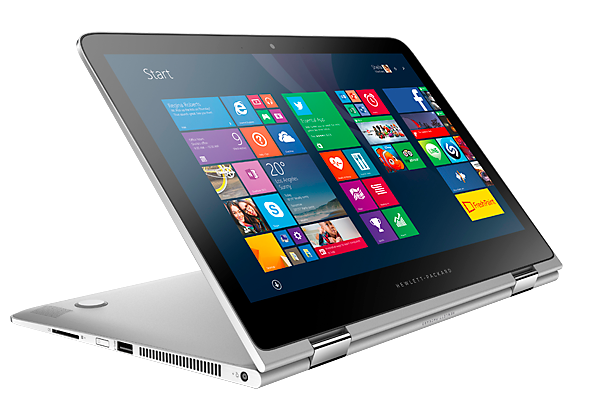
 My newest is HPs’ Spectre x360 (pictured right). It’s a laptop convertible. It goes from a laptop to a tablet by rotating the screen. So far, I personally like it the best.
I am often asked, how do you choose? The real question people want answered is “What device is best for me?” That question does not yield a one-word answer. It takes a series of questions to best answer. With graduation, Father’s Day and a potential workplace technology refresh around the corner, I thought I would share some insight here. Whether you’re looking for a device for yourself, your parent or your child, here are the key questions to consider:
- What are you used to?
Consider the operating system that the user is accustom and lean toward the devices that have that operating system. There are three main operating systems today: Windows (Microsoft), iOS (Apple) and Android (Google). They all support the device’s basic functions, such as scheduling tasks, executing applications and controlling peripherals. Each of them has a different appearance and feel.
If the goal is to replace your laptop for work, a Windows or Android operating system likely will be the best fit.
The most user-friendly – and intuitive – typically is the iOS, especially for digital immigrants who are still migrating to new technology such as smartphones and tablets. When professionals ask what to get their parents, I recommend an iPhone or iPad for this reason. - What devices do you already have?
Most people will have more than one device that they regularly use and will want them to sync. If you have a smartphone you like and want a tablet or laptop, it’s best to choose like-branded devices.
Apple devices have the best “sync-ability.” The files and applications on your iPhone can automatically sync to your iPad and MacBook Air through Apple’s iCloud. You can even see text messages sent or received from any of those devices. Apple’s iCloud is similar to Microsoft’s OneDrive or Google’s Drive. - What do you need it to do for you?
Think about the day-to-day tasks you will need to perform on the device. What are the applications you will need to use? Many applications work on any of the devices, but not all, especially lines of business software.
The iPad is the most popular and best for consumer use - checking email, surfing the Internet and using common apps. It is not intended for creation (ie: a Word file). Windows and Android are designed for that. The major hang-up in the business world on iPad adoption is that it lacks the ability to use a mouse and that inhibits creation.
That’s changing. I just received a mouse prototype from a manufacturer that can be used with an iPad when running a VDI session (see blog on VDI and creating a iPhone office). Until then, a laptop will have the mouse functionality, followed by the Surface tablet, which runs Windows.
If your senior parents want to text and prefer a larger screen, then an iPad (tablet) or MacBook Air (laptop) may be the best choice. Those devices allow people to text from a larger (more traditional) keyboard.
- How much do you want to spend?
This is the kicker and while functionality (the need to haves) is important, some features (the nice to haves) may need to go depending on your budget. Apple devices typically will be the most expensive, although most people will say they are worth the investment.
If you are buying on a budget, you can get a tablet for under $100, compared to the $600 for the Apple iPad. Just make sure it has the functionality you need – and you will use it. One of the biggest mistakes individuals make is not spending enough to get what they need and then ending up buying another device later.
The day is coming when we will have one device that will do it all and meet our desires for mobility and ease. It’s not here yet. But if you can choose the right device, you can limit your count to two.