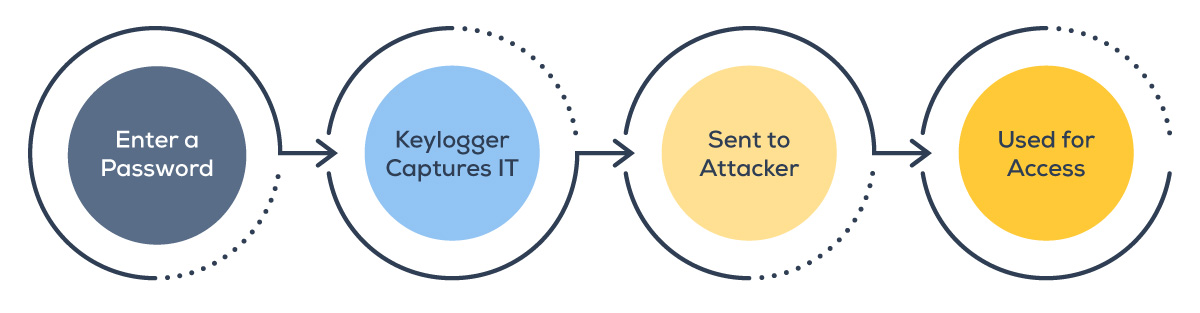
You probably don't think much about what happens between the moment your fingers hit the keys and the moment your password reaches a login server. That journey — keystrokes traveling through your operating system to an application — is exactly where one of cybersecurity's most persistent threats lives: the keylogger.
Keyloggers are deceptively simple, surprisingly effective, and far more common than most people realize.
What Does a Keylogger Do?
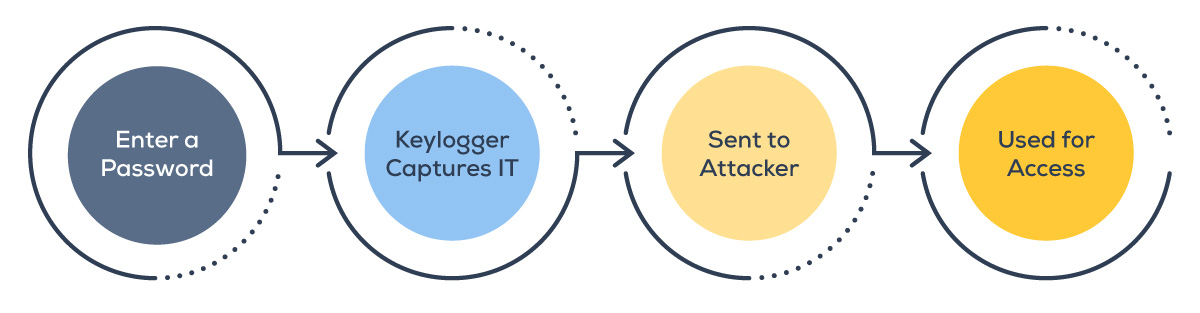
A keylogger (short for keystroke logger) is a tool that can record what you type and send that data to whoever installed the tool.
Cybercriminals will typically use keyloggers to record:
- Usernames
- Passwords
- Messages
- Search queries
-
Form fields
Keyloggers are one of the most direct forms of data theft because they bypass complex technical exploits entirely. Instead of breaking into a system, attackers let you hand over your credentials by simply recording what you type.
That said, not every keylogger is malicious. The technology itself is neutral — its ethics depend entirely on who deploys it, why, and whether those being monitored have given their informed consent.
How Are Keyloggers Used To Attack Businesses?
Keyloggers will frequently appear as just one part of a broader malware package — combined with trojans, ransomware droppers, or remote access tools.
What makes keyloggers particularly dangerous from a security standpoint is their position in the attack chain. Most cybersecurity defenses are designed to protect systems and data at rest. Keyloggers target the human operator instead, capturing sensitive information before it ever reaches encrypted storage or secure transmission.
A single compromised employee device running a keylogger can expose:
- VPN and network credentials
- Administrative account passwords
- Customer data entered through internal tools
- Confidential financial and legal communications
- Intellectual property discussed over email or internal messaging
Intellectual property discussed over email or internal messaging
Main Types of Keyloggers
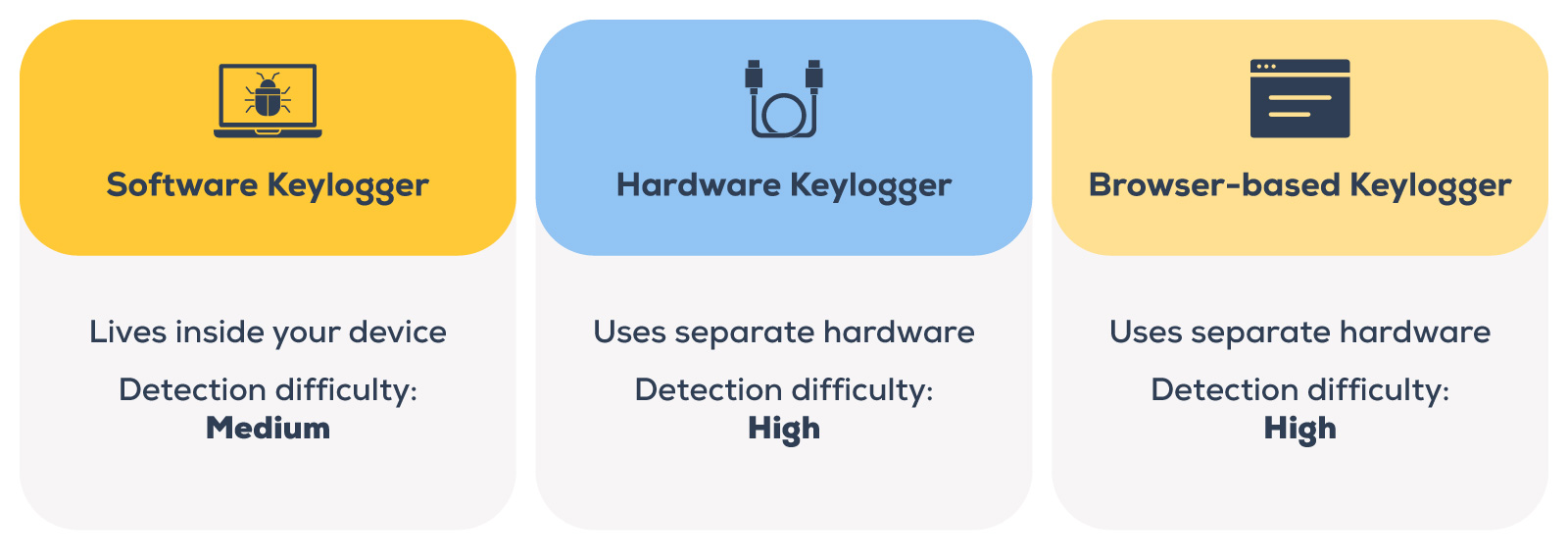
Keyloggers come in several forms, each with distinct characteristics and risk profiles.
Software Keyloggers
Software keyloggers are the most common. They’re programs installed on a device — sometimes disguised as legitimate applications, bundled with free software downloads, or delivered through phishing emails.
Once running, they operate as a background process, invisible to the casual user.
Hardware Keyloggers
These are physical devices inserted between a keyboard and a computer — or embedded directly into a keyboard — that record keystrokes at the hardware level.
Because they operate independently of the operating system, no software scan will detect them. They're more common in targeted insider-threat scenarios or attacks on shared computing environments like hotel business centers or shared workstations.
Browser-Based Keyloggers
This type of keylogger is increasingly common, and it targets web activity. These tools inject malicious scripts into compromised websites or browser extensions, capturing what users type into web forms — login pages, payment fields, and contact forms — without installing anything on the device itself.
As more business activity moves to web-based applications, this category poses a growing risk.
What Else Can a Keylogger Do Beyond Just Logging Keys?
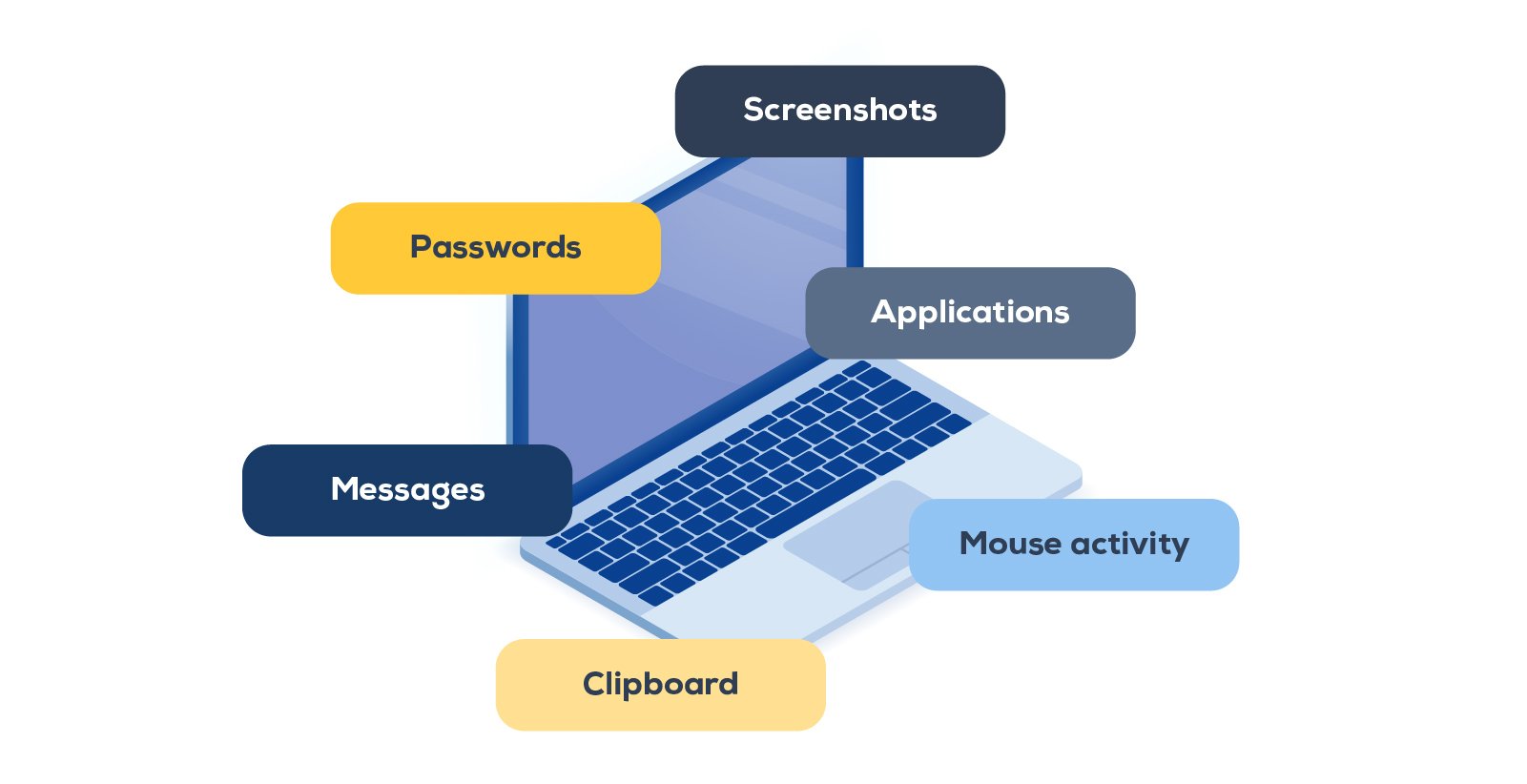
Sophisticated keyloggers can do a lot more than log keys and share the data.
Screenshot Capture
Keyloggers can take periodic snapshots of the screen to capture autofilled usernames, visible sensitive data — even activity that wasn’t typed at all.
Clipboard Monitoring
Anything copied to the clipboard, including passwords pasted from a manager, can be intercepted by a modern keylogger.
Application Tracking
Attackers can use these tools to see which programs and websites are active. That isn’t a big deal in itself, but it gives attackers the context they need to match credentials to their correct accounts.
Mouse and Other Activity Logging
The ability to track clicks and window focus patterns can help attackers understand which files and systems matter most to a target.
The result is a comprehensive intelligence-gathering tool that can reconstruct nearly everything you do on a compromised device.
Keystroke Monitoring: Legitimate vs. Malicious Use
After everything we’ve just covered, it might come as a surprise that keystroke monitoring technology isn't necessarily illegal — or unethical. Context, consent, and legal authority are what separate legitimate use from a criminal act.
Examples of legitimate applications include:
- Businesses monitoring their own devices for compliance, data loss prevention, or insider threat detection, provided employees are notified
- Parents monitoring a minor child's online activity on household devices
- Authorized penetration testing and security research
- Law enforcement operating with appropriate legal authority to investigate a crime
Examples of malicious applications include:
- Credential theft for account takeover and financial fraud
- Corporate espionage targeting trade secrets or strategic communications
- Identity theft through the harvest of personal information
- Ransomware staging, compromising credentials as a precursor to a larger attack
The key legal and ethical line is simple:
If the device owner didn't authorize it and the person being monitored wasn't informed, it's almost certainly illegal and always a violation of privacy.
Keylogger Detection: Signs Your Device May Be Compromised
Keyloggers are engineered to be invisible. But "invisible" doesn't mean they leave no trace. Here's what to watch for:
Performance Shifts
If you notice unexpected slowdowns, longer boot times, or unusual resource usage, that might mean you have a background process working overtime to log and transmit data.
Unusual Network Activity
Keyloggers that transmit captured data will generate outbound traffic, often on irregular schedules or to unfamiliar destinations.
Unfamiliar Processes
Checking Task Manager (Windows) or Activity Monitor (Mac) may reveal processes you don't recognize, particularly ones that restart automatically after being ended.
Unexpected Typing Behavior
Some keyloggers can interfere with input in subtle ways, like causing keystrokes to feel delayed or text to behave erratically.
Antivirus or EDR Alerts
Modern security platforms might flag suspicious API hooks, unauthorized driver installations, or anomalous input behavior.
New Startup Entries
If you notice any program that loads automatically on reboot, but wasn't intentionally installed, it deserves some scrutiny.
Pro tip: If multiple signs appear simultaneously, don't wait. A single warning sign could just be a software conflict; several at once point to something more serious.
What To Do if You Suspect a Keylogger on Your System
If you have reason to believe a keylogger is active on a device, here's what to do ASAP:
-
Notify your IT or security team first. Most users won't have the permissions or technical access to investigate on their own. Contact your company's service desk or open a ticket with IT/IS. If your organization has an incident response procedure, follow it.
-
Disconnect from the network. If a keylogger is actively transmitting data, cutting its connection limits the damage while you investigate.
-
Run a full scan with reputable anti-malware software. Updated security tools with behavioral detection capabilities are your best automated option. Signature-based detection catches known threats; behavioral analysis catches novel ones.
-
Review running processes and startup programs. Look for executables with random or generic names, especially those running with elevated privileges or restarting automatically after termination.
-
Check outbound network traffic. A firewall with logging enabled can reveal data being sent to unfamiliar IP addresses or external servers.
-
Physically inspect hardware connections on shared or public computers — hardware keyloggers appear as small devices between the keyboard cable and the port.
For hardware keyloggers on personal devices, check the keyboard's USB connection and any adapters in the chain.
Note that highly sophisticated keyloggers may evade standard scans. If you suspect a targeted attack, professional forensic analysis may be necessary.
How To Prevent Malicious Keylogger Infections
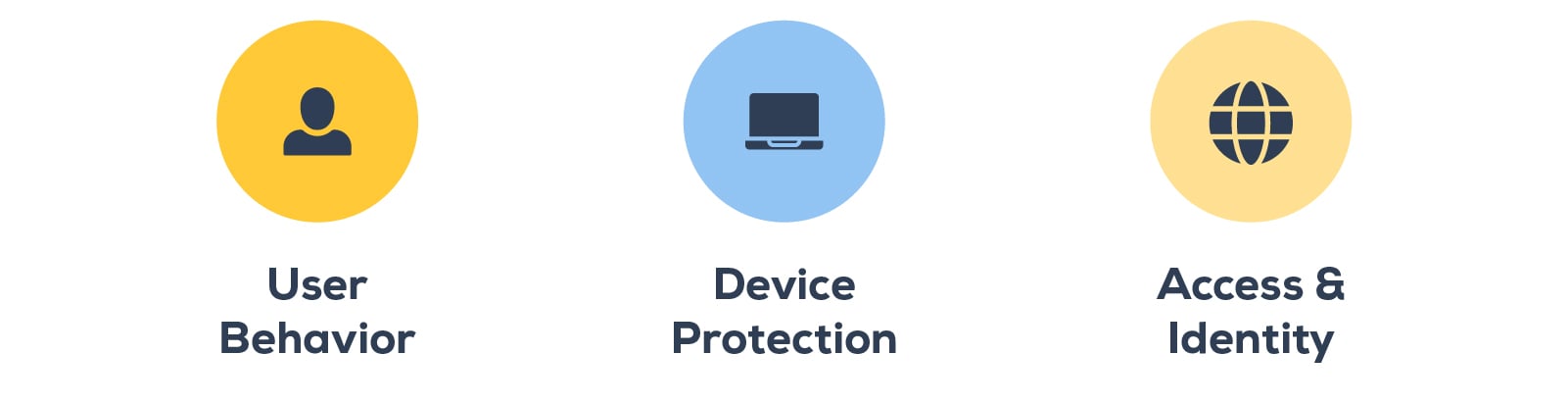
A layered security approach addresses keyloggers at multiple potential entry points:
Email Security and Phishing Awareness
Phishing remains the most common delivery mechanism for keylogger malware. Advanced filtering, attachment scanning, and user training reduce the likelihood of malicious payloads reaching inboxes or being executed.
Software Hygiene
Only download software from official, verified sources! Bundled software from third-party distribution sites is a common keylogger delivery vehicle. Also, keep your operating systems and applications updated to minimize any known vulnerabilities an attacker might use to install a keylogger.
Endpoint Detection and Response (EDR)
EDR platforms provide continuous monitoring for the behavioral signatures of keyloggers: suspicious hooking activity, unauthorized driver installations, and anomalous data transmission patterns.
Multi-Factor Authentication (MFA)
Even if credentials are captured by a keylogger, MFA adds a verification layer that most attackers can't bypass remotely. Yes, MFA takes a few extra seconds, but so does locking your front door.
Password Managers
Using a password manager reduces the amount of sensitive information that's ever typed manually, cutting keyloggers off from one of their most valuable targets.
Least-Privilege Access
Limiting what each user account can access means that even a compromised account has limited reach.
USB Port Controls
Blocking unauthorized peripheral connections prevents hardware keylogger installation and limits infection vectors.
Security Awareness Training
Human behavior is the most targeted attack surface. Regular training on recognizing phishing attempts, suspicious downloads, and social engineering tactics equips employees to be a line of defense rather than a vulnerability.
Detected a Keylogger? Here’s How To Remove It
If keylogger is confirmed, but you don't have experienced IT staff on hand, here's how to minimize damage:
-
Disconnect your device from all networks, including Wi-Fi.
-
Change all credentials immediately — assume any password entered on the compromised device has been captured. Change them from a clean device.
-
Use reputable anti-malware software to quarantine and remove detected threats. If your organization has an approved security tool, follow your company's policy for remediation steps.
-
Remove startup entries to make sure the keylogger can't reload after rebooting.
-
Perform a thorough scan and check the results to remove any secondary processes that could restore a keylogger.
-
Consider a full system restore or rebuild.
The Business Risk You May Not Be Accounting For
For individual users, a keylogger is a privacy and financial threat. For businesses, it's a potential breach scenario with legal, regulatory, and reputational consequences.
Most organizations have perimeter defenses — firewalls, email filters, endpoint protection. Far fewer have addressed the deeper challenge: that their employees are active attack targets, and that human-centric threats like keyloggers require human-centric defenses layered on top of technical controls.
This is the gap where a virtual CISO (vCISO) or virtual CIO (vCIO) can provide significant value. Rather than reacting to threats after the fact, a strategic security advisor helps you build a proactive posture — identifying where your people, processes, and technology intersect with risk and building the frameworks to address it systematically.
How Marco's IT Consulting Services Can Help
Our new vCISO and vCIO services were designed to give organizations access to senior-level strategic guidance without the overhead of a full-time executive hire. Whether you're assessing your current exposure to threats like keyloggers, building out an endpoint security strategy, or preparing for compliance requirements, it’s one of the most cost-effective ways to get the expertise you need to move your security posture forward.
The threat landscape isn't getting simpler. But navigating it doesn't have to be something you do alone.