5 Ways Virtual Desktop Infrastructure Supports Consistency

5 Ways Virtual Desktop Infrastructure Supports Consistency

Virtual Desktop Infrastructure can transform the way your business uses technology. By separating your desktop environment from the physical computer, it provides access to your personal desktop and content, regardless of your physical location or the device being used.

Virtual Desktop Infrastructure & Business Performance

Virtual Desktop Infrastructure (VDI) enables remote and on-site employees to have equal access to their corporate desktops on a variety of devices. VDI provides end-users with a secure, flexible experience. VDI maintains consistent performance, especially in the areas outlined below. 
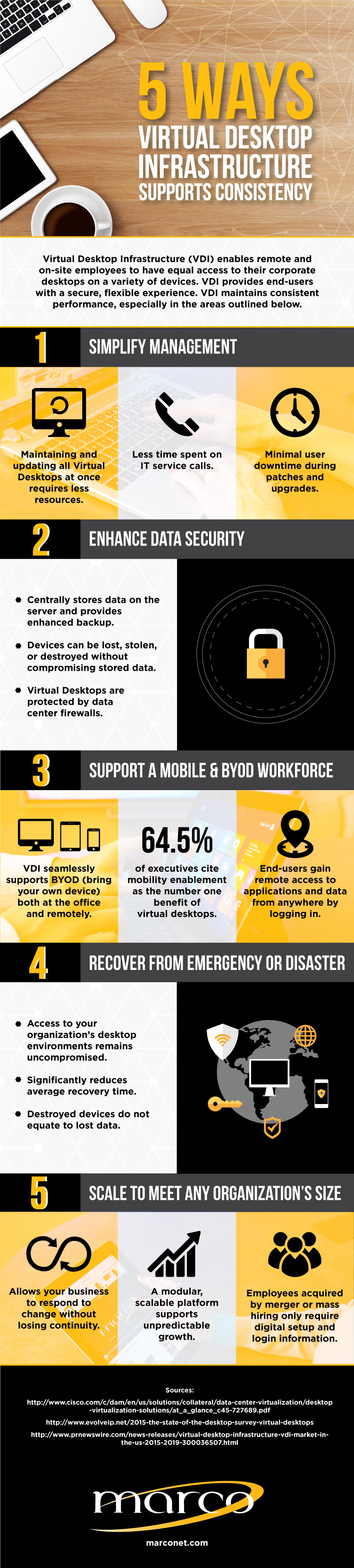
Virtual-Desktop-Infrastructure-Infographic.jpeg

1. Simplifies Management

With Virtual Desktop Infrastructure, nearly all maintenance, updates and patches can be completed remotely. As a result, less IT time is required and users experience minimal downtime. 

2. Enhances Data Security

All data is stored within your organization's data center, meaning it's backed up and protected by data center firewalls. If devices are lost, stolen or destroyed, stored data is not affected.  

3. Supports a Mobile & BYOD Workforce

More and more employees are opting into BYOD (bring your own device) for working both remotely and on-site. With VDI, end-users simply log-in to gain remote access to applications and data. A recent survery found 64.5% of executives cite mobility enablement as the number one benefit VDI provides. 

4. Reduces Emergency Recovery Time

While we hope nothing catastrophic ever happens, having an emergency or disaster recovery plan is good business. If the office is uninhabitable or the computing devices are destroyed, access to your organization's desktop infrastructure is unaffected. 

5. Scales to Meet Any Organization's Size

Increases or decreases in personnel are less likely to interrupt workflow or performance. Because of it's modular, scalable platform, unpredictable growth is supported. With log-in information, newly added employees can immediately access your organization's desktop environment. 

Connect with a Technology Advisor Start the Conversation

Related Posts

NIST Cybersecurity Framework: Full Overview & Guide

Back in 2013, the federal government directed NIST (National Institute of Standards and Technology) to work with industry leaders to build a common framework for cybersecurity risk...

Urgent PaperCut NG/MF Vulnerability: What You Need to Know

If you run PaperCut NG or PaperCut MF, this is the one advisory to stop and read today. In short: PaperCut has confirmed active, real-world exploitation of a vulnerability affectin...

How To Measure Your Cybersecurity Posture Against the NIST Framework

A lot of businesses aren’t sure whether they actually have cybersecurity best practices in place. To be fair, cybersecurity is a moving target, and what was considered sufficient p...

The AI Governance Framework Every Org Needs Before Scaling AI

AI is showing up in the enterprise faster than most governance programs can keep pace with: forecasting models, customer service bots, code generation tools, decision-support syste...

What Is Vishing?
What Is Vishing?

Vishing is short for “voice phishing.” Like other forms of phishing attacks — including email and text-based scams — the goal is to trick someone into handing over credentials, fin...

Cybersecurity Tips for Small Business Owners

Too many small business owners still think they’re “too small” to be targeted by a cybercriminal. Unfortunately, 43% of cyberattacks each year are aimed at small businesses.

5 Common Healthcare Cybersecurity Challenges (and How MDR/SOC Can Help)

In our conversations with healthcare clients, we hear the same five security challenges come up again and again. If you're reading this, you're probably dealing with some version o...

Why Is MFA Important — and Is Your Business Using It Correctly?

Passwords alone haven't been enough to protect business accounts for years. Most IT professionals know this. Most business owners have heard it. And yet credential theft remains on...

What Is Cloud-Native Security?

Most businesses didn't set out to build a cloud-native environment. They started using Microsoft 365, added a cloud-based phone system, migrated a few workloads to Azure or AWS, an...

The Security Strategy AI-Powered Attacks Demand

The threat environment changed. Not gradually. Abruptly. Tools like Anthropic’s Claude Mythos and the latest generation of AI-assisted exploitation capabilities have fundamentally ...